ChatGPT or Claude? If you use AI for work, you have probably already picked one, paid for it, and still quietly wondered if you picked the wrong one.
We know the feeling. They cost the same $20 a month, both claim to be the smarter tool, and the one you choose is the one sitting open on your screen all day. So we stopped wondering and did the obvious thing: we paid for both, kept ChatGPT and Claude open side by side for a month, and put our real work through the pair of them. Articles, client pages, code, research, one client’s 40-page PDF, voice notes in the car, and the hundred small questions a workday throws up.
The short answer will annoy fans in both camps. For writing and coding, Claude is better, and after two weeks it stopped being a debate at our desks. For images, voice, quick research and everything else a day is made of, ChatGPT wins, because it simply does more. Same price, two different tools, and the right pick depends on what your workdays actually look like.
But the features are not what decides this. What decides it is Claude’s usage limits, which arrive much sooner than anyone warns you about. It is the way ChatGPT agrees with you even when you are wrong. It is what the free plans leave out. That is the stuff a month of using both teaches you, and it is all below, round by round.
ChatGPT vs Claude at a Glance
| ChatGPT | Claude | |
|---|---|---|
| Best for | Everyday versatility, images, voice, research | Writing, coding, long documents |
| Flagship models | GPT-6 family (GPT-6 Astra on Pro) | Opus 5.5, Sonnet 5, Haiku 5.5 |
| Free plan | Unlimited chats with GPT-6, limits on extras | Chat, web search, files, memory, Artifacts |
| Main paid plan | Plus, $20/mo | Pro, $17/mo annual or $20 monthly |
| Top individual plan | Pro, from $100/mo | Max, from $100/mo |
| Image generation | Yes, a core strength | No, it can’t create images |
| Voice mode | Yes, very natural | Yes, less polished |
| Context window | Varies by plan and model | Up to 1M tokens, varies by model |
| Biggest weakness | Agrees with you too much, quality dips when busy | Usage limits arrive fast |
How We Tested ChatGPT and Claude
No benchmark charts and no trick questions. Our test was harder than that: a month of real work, with real deadlines, on the tools we were already relying on. We paid attention to where each one saved us time and where each one wasted it.
Most of our work is writing, so that got the hardest test: articles like this one, rewrites of rough drafts, email sequences, editing long documents where the tone has to stay consistent from the first page to the last. Coding came second, small tools we needed built, changes across several files at once, and debugging sessions where the bug turned out to be something dumb we had done ourselves. Then research questions, the kind where you have to go and check the answer afterwards anyway. One client sent us a 40-page PDF, so both tools got questions on that, including questions about page two asked after an hour of talking about page thirty-nine. Plus the daily background noise every tool like this handles now: quick questions, voice chats in the car, image requests.
Two things decided most of our scores. Was the answer right. And how much editing did it need before we could send it to someone. That second one is unglamorous, but it is where your time actually goes.
The Models You’re Actually Comparing
Model names change every few months, so this is the picture as of late 2026, and it is worth pinning down because a lot of comparisons online are reviewing older versions.
ChatGPT runs on the GPT-6 family. The free plan gives unlimited text chats with GPT-6 and puts caps on the extras like image creation, voice and Deep Research. Plus unlocks the stronger reasoning models. Pro adds GPT-6 Astra for reasoning, an always-on agent called Dot, and the largest memory and context OpenAI offers.
Claude’s top model is Opus 5.5, released in September 2026. Below it sit Sonnet 5, which is the one most people should use most of the time, and Haiku 5.5 for quick jobs. You choose your model yourself on Claude, and the choice has a cost attached: Opus is smarter and it also eats your usage allowance noticeably faster.
One number to get right, since most posts still get it wrong. Claude’s own pricing page lists the context window as up to 1 million tokens, depending on the model, and that applies across the plans. The 200K figure in older comparisons is out of date.
The Scorecard: Task by Task
The whole comparison on one table, based on the month we spent with both:
| Task | Winner | Why |
|---|---|---|
| Writing a long article or report | Claude | Holds tone and instructions to the last page |
| Rewriting and editing drafts | Claude | Cuts the flattery, keeps your voice |
| Debugging real code | Claude | Finds the actual cause of a bug |
| Building a small tool or script | Tie | Both deliver; Claude explains better, Codex plans well |
| Generating images | ChatGPT | Claude can’t do it at all |
| Research with current sources | ChatGPT | Faster, cited, deeper research mode |
| Summarising a very long document | Claude | The context window is simply bigger |
| Voice conversation | ChatGPT | The most natural voice in the business |
| Quick everyday questions | ChatGPT | Answers in about half the time |
| Honest advice on a decision | Claude | Pushes back instead of pleasing you |
Six for Claude, three for ChatGPT, one tie. Read your own job into those rows before you treat it as a final score. Someone who makes images all day will look at this table and correctly pick the other tool.
Round 1: Writing
This was the clearest result of the whole month.
Claude’s drafts read like someone wrote them. Sentence lengths change. The tone you asked for on page one is still there on page nine. If you hand it a style guide and a list of things to avoid, it remembers the list, which sounds basic until you have watched other tools forget it by the third paragraph. Most Claude drafts that came back to us needed light editing. Most ChatGPT drafts needed work.
ChatGPT is quicker, and for a short post or a routine email quick is often all you need. But it has habits, and once you see them you see them everywhere. The eager opening line. Everything arranged into three neat points, even when the subject does not have three points. A compliment tucked in before the answer. On long pieces it starts repeating itself, and everything comes out in the same smooth voice, so you spend your time cutting and roughing it back up.
People who use both tend to describe it the same way: ChatGPT’s tell is that it flatters you, Claude’s tell is short, clipped sentences. Both are easy to spot after a while. Claude’s are easier to edit out.
If your job is writing with your name on it, this round decides the comparison on its own.
Round 2: Coding
Simple coding tasks were a draw. Ask either tool to write a small script or fix an obvious error and you get something usable back.
The difference showed up on bigger jobs. When we handed over changes that touched several files, Claude read the surrounding code first and usually found the actual cause of a problem, where ChatGPT more than once fixed the symptom and left the bug sitting there. Claude also explains what it changed in plain language, which matters when the code is yours and you have to maintain it later. Its coding tool, Claude Code, is the one our developers kept open. In one timed comparison of the same job, Claude Code used roughly a quarter of its five-hour allowance while ChatGPT’s Codex used all of its in under ten minutes.
Codex deserves its due, though. On work that was mostly planning, breaking a big task into steps, it matched Claude in our tests and beat it once or twice. And there is a convenience argument for ChatGPT here: code, research and images in a single $20 subscription. If your coding is occasional, that counts.
For someone who codes every day, Claude is the better tool. It is a closer call than the writing round.
Round 3: Images
This round is one sentence long. Claude cannot make images. Not on the free plan, not on Pro, not on Max. It will happily look at an image you upload and tell you what is in it, and it can draw charts using code, but generating a picture is not something it does.
ChatGPT generates images inside the same chat, quickly, and the results are good enough for social posts, rough mockups and article art. This is the main reason we keep meeting people who prefer Claude and still pay for ChatGPT. They need pictures.
Neither of them can analyse a video you upload, in case that is what you were hoping for. On that front it is a tie, and not a useful one.
Round 4: Research, Voice and Everyday Speed
For questions that depend on what is true today, ChatGPT is the tool we open. Its web search is fast, it shows where the answer came from, and Deep Research produces reports that held up when we checked the claims afterwards. It also has the extras that build up around a chat tool over time: scheduled tasks, custom GPTs, projects, an agent that can work on tasks across desktop and mobile.
Speed is part of it. On the same prompts, ChatGPT typically answered in about half the time Claude took. Its voice mode is the best we have used, natural enough that you forget it is a voice mode, and the phone app is better than Claude’s. Claude has voice too, and it works, it just feels like a smaller feature on a tool that cares about other things.
What Claude does better here is own up when it is unsure. It says so, clearly, without dressing it up. When ChatGPT is wrong it tends to be wrong at the same volume as when it is right, and you learn to double-check it on anything you plan to publish. For everyday research and general use, though, this round goes to ChatGPT.
Round 5: Long Documents and Memory
The 40-page client PDF is where Claude pulled away from everything else we tested. With up to a million tokens of context, a document that size is nothing to it, and it was still citing details from the early pages accurately after an hour of questions. Whole books, codebases, long contracts, this is the job Claude was built for, and experienced users who work with documents talk about it for a reason.
Memory is the one part of this round ChatGPT wins. Its memory builds up on its own as you use it, across conversations, without you managing anything, and after a few months the answers start to feel personalised in a way that is hard to give up. Claude has memory as well, free plan included. Ours is a small complaint in the other direction: Claude’s memory is easier to look at. You can open it, read what it has kept, and delete what you do not want kept, instead of trusting that an invisible profile somewhere has you right. If you move from ChatGPT to Claude, there is an import tool for your ChatGPT memory, and people who have used it say it carries over well.
Documents go to Claude. Memory, the set-and-forget kind, goes to ChatGPT.
Pricing: What the Plans Actually Cost
The plans look like twins. Free at the bottom, $20 a month in the middle, $100 and above at the top, on both sides. Spend five minutes with the details and the twins disappear.
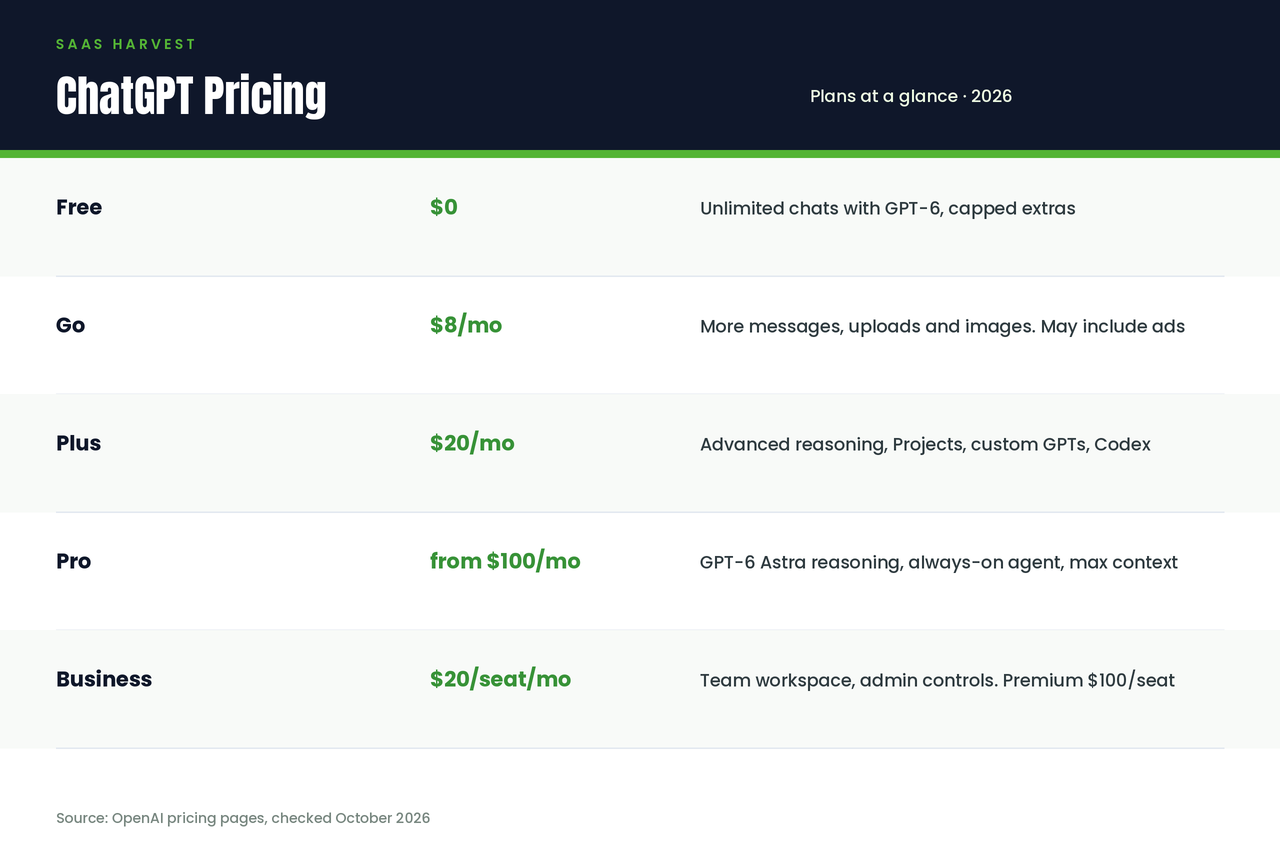
ChatGPT plans
| Plan | Price | What you get |
|---|---|---|
| Free | $0 | Unlimited chats with GPT-6; limited images, voice, Deep Research and memory |
| Go | $8/mo | More messages, uploads and images than Free. Note: this plan may include ads |
| Plus | $20/mo | Advanced reasoning, Projects, scheduled tasks, custom GPTs, Codex, more of everything |
| Pro | From $100/mo | Three usage tiers; GPT-6 Astra reasoning, always-on agent, maximum memory and context |
| Business | $20/seat/mo annual ($25 monthly) | Team workspace, admin controls, no training on your data; Premium seats at $100/$125 with 5x usage and no 5-hour limit |
Claude plans
| Plan | Price | What you get |
|---|---|---|
| Free | $0 | Chat, web search, file creation and code execution, memory, Artifacts, up to 5 Projects |
| Pro | $17/mo annual ($200 upfront) or $20 monthly | More usage, Claude Code, Projects, more models, task scheduling |
| Max | From $100/mo | 5x or 20x Pro usage, higher output limits, priority access, $100 to $200/mo of API credits included |
| Team / Enterprise | Team from about $20/seat annual; Enterprise $20/seat plus usage | Admin controls, SCIM, audit logs; Enterprise bills usage at API rates |
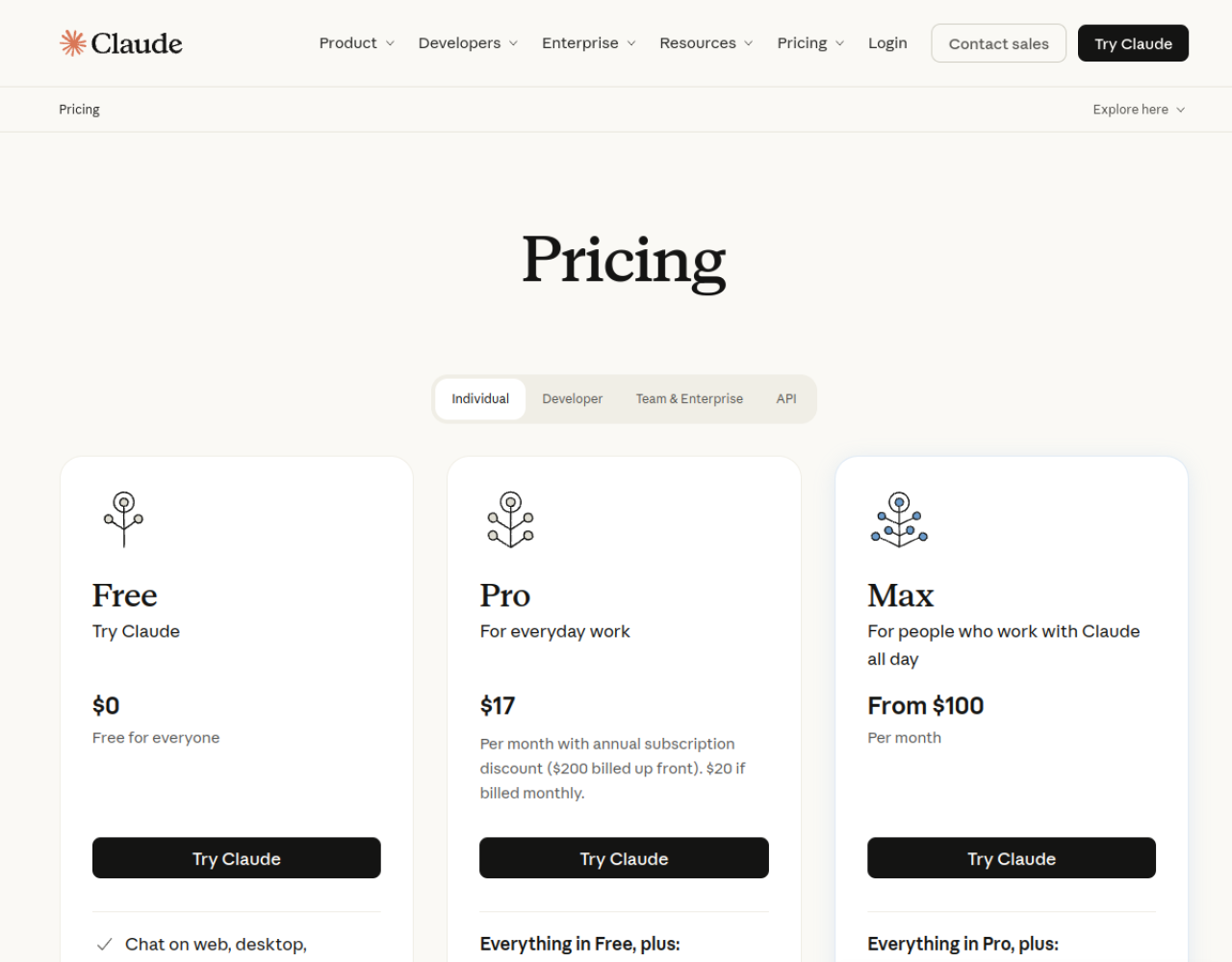
Since both main plans cost $20 a month ($17 for Claude if you pay for the year upfront), the choice at this level is not really about money. It is about what the $20 gets spent on. Claude Pro gives you a smaller allowance of a better writing and coding tool. ChatGPT Plus gives you a bit of everything, wider, shallower. One habit decides how big Claude Pro feels, by the way. Run the flagship Opus model for everything, including trivial questions, and you will hit the limits we describe in the next section. Use Sonnet for normal work and save Opus for the hard jobs, and the same plan lasts the week.
A few other things worth knowing. Claude’s free plan is more generous than it looks: memory, file creation and Projects are in there at $0. ChatGPT’s free plan has unlimited chats, which sounds better, but the extras are capped tightly. The two $100 plans are not the same product wearing the same price. ChatGPT Pro buys you the strongest models and the agent features. Claude Max mostly buys you more usage, five or twenty times Pro’s, and it includes API credits each month, so it works partly like a subscription and partly like a prepaid balance.
For developers there is a wrinkle. On API pricing, OpenAI’s mid-tier model is cheaper per token than Claude’s flagship. On the $20 subscriptions, measured by what the same usage would cost at API rates, Claude Pro works out to several times the value of Plus for coding-heavy work. So Claude is the cheap option as a subscription and the expensive option as an API. Worth knowing before you build a product on either of them.
The Thing Nobody Warns You About: Usage Limits
This is the section we would have wanted to read before paying for Claude.
Claude’s limits are the complaint you hear most from people who like Claude, and Anthropic’s own help pages explain how they work. Your usage runs in a rolling five-hour window. Paid plans add weekly limits on top of that. And there is one pool for everything, so your chats, the questions you ask on your phone and your Claude Code sessions all spend from the same allowance. There is no fixed number of messages. A long chat with big files attached spends the allowance much faster than short questions do.
In practice it goes like this: a heavy morning of coding can use up what you had planned to write with after lunch. People on Pro who work all day in Claude hit the weekly cap inside two or three heavy days, and it happens often enough that it is the first thing ex-users mention. When you hit the cap, you can wait for the window to reset, you can upgrade, or you can turn on usage credits, which bills whatever you use past the cap at normal API rates. That last option turns a flat subscription into a metered one, and the bill at the end of the month can be a surprise.
ChatGPT’s limits at the $20 level are looser, and in a month of daily use it never stopped us mid-task. It has its own irritations. Heavy users complain that allowances feel smaller than they used to, that answers get worse at busy times, as if a lighter model has taken over for a while, and that the plans keep changing, the $200 Pro tier even stopped taking new sign-ups in September 2026. One more thing, if you are counting costs: the Free plan and the $8 Go plan show ads. Claude shows no ads on any plan.
Personality at Work: Flattery vs Pushback
This difference is hard to measure and easy to feel.
ChatGPT agrees with you. You show it an idea and the idea is good. You show it a draft and the draft is strong. We tested this without meaning to: a draft of ours that we knew had a weak middle section came back from ChatGPT praised and lightly polished. Claude sent it back with the weak section named. That sort of thing changes what a tool is for. A writing tool that will not tell you a paragraph is failing is doing half its job.
Claude is more willing to be awkward. It will say a plan has a hole in it. It asks a question back when your instructions leave a gap, instead of guessing and producing something smooth and wrong. When it refuses a request, it explains itself like a person would. The cost of this is that Claude can feel blunt, and some people find ChatGPT’s warmth more pleasant to be around, especially for casual use.
For work, we would rather have the tool that argues. Wrong answers delivered confidently are expensive. A tool that pushes back saves you from some of them.
A Note for Non-English Users and Global Teams
A lot of people reading this do their work in another language, so this is worth a section of its own. Claude’s advantage in writing is not limited to English. In the other major languages we tried, its sentences sounded less like they had been translated from English, which is a fault you learn to recognise in a lot of AI writing. ChatGPT covers more languages confidently, its voice mode works across more of them, and its phone app is the better traveller.
If your team works in two or three languages, do not decide from English reviews. Take one real document in your own language, run it through both, and compare. Ten minutes of that tells you more than this whole section can.
Switching Is Easier Than You Think
If you have read this far and you are leaning towards the tool you do not currently pay for, switching is less painful than it used to be. Your old chats stay behind, that part is true. But the memory the tool has built about you, your style, your projects, the way you like things formatted, that can move. Anthropic has an import tool for ChatGPT memory, and people who have used it say the imported profile is close enough that Claude feels familiar within a day or two. Going the other way is even simpler, because ChatGPT builds its memory just from normal use.
The slow part is not the data. It is the habits: saved projects, custom GPTs you have built up, prompts you have tuned over months. Give it an afternoon. If the tool is central to your work, overlap the two subscriptions for a month and cancel the old one when you stop opening it.
Which One Should You Choose?
Choose Claude if your work is mostly words or code. Writing, editing, research documents, development. The quality difference shows up every day, and at $17 a month on the annual plan it costs less than Plus. Go in knowing about the usage limits, and do your heavy coding in its own five-hour windows so it does not eat the rest of your day.
Choose ChatGPT if your work is a bit of everything. Images, voice, quick research, files, a good phone app. Plus at $20 is the broadest single subscription in this comparison, and the free plan is the one we suggest to people who are not going to pay for any of this.
Choose the free plans if you are a student or you only use AI a few times a week. Claude’s free plan is the better writing tool, ChatGPT’s free plan lets you try more things. There is no rule that says you have to pick one free plan. Use both, with your real work, for a couple of weeks.
Choose both if AI is part of how you make a living. This is where a lot of heavy users end up, from what we see: Claude open for writing and code, ChatGPT for images, voice and research, $40 a month for the pair. It sounds indulgent until you price the alternative, which is doing a job with the wrong tool because the right one is in another subscription you cancelled.
For teams: ChatGPT Business is easier to budget, a fixed price per seat, and its Premium seats have no five-hour limit. Claude’s team and enterprise pricing depends partly on usage, which is fair to light users and expensive for heavy ones. Either way, give three people both tools for a month and watch what they actually open before you buy seats for everyone.
FAQs
Which is better overall, ChatGPT or Claude?
There is no overall winner that survives contact with a real job. Claude is better at writing, coding and long documents. ChatGPT is better at images, voice, research and general day-to-day use. The useful question is which of those lists looks like your week.
Is Claude Pro worth it over ChatGPT Plus?
For writing and coding work, yes. It is cheaper on the annual plan and better at that work. If you use images, voice or heavy web research every day, Plus gives you more for the same $20.
Why does Claude keep telling me I’ve hit my limit?
Because of how the limits are built: rolling five-hour windows, weekly caps on paid plans, and one shared pool that your chats and Claude Code both spend from. Long chats, large files and the Opus models spend it fastest. Working in Sonnet for ordinary tasks and spreading heavy sessions across windows makes a visible difference.
Can Claude create images like ChatGPT?
No. Claude can look at images you upload and can build charts with code, but it cannot generate an image on any plan. This is one of ChatGPT’s plainest advantages.
Which AI has better memory?
ChatGPT’s memory is more automatic and builds up more over time. Claude’s memory is easier to inspect and correct. If you switch to Claude, you can import the memory ChatGPT built about you.
Which is better for students?
Claude’s free plan for essays, reading and long study material. ChatGPT’s free plan for quick questions, images and general help. Many students would be best served by both free plans and no subscription.
Do professionals really pay for both?
Yes, often enough that it is a pattern and not an exception. Claude for writing and coding, ChatGPT for images, voice and research, $40 a month combined. If the output is work you charge for, paying for both is usually cheaper than losing time to the wrong tool.
Which is safer for business data?
Both business plans say your data is not used for training, and both have the admin controls, single sign-on and audit features a company would ask for. The difference to watch is billing: Claude’s enterprise pricing varies with usage, ChatGPT’s per-seat pricing is simpler to forecast.
Final Verdict
Our own subscriptions, after a month of this: we kept both. Claude stays open on our screens all day because most of our work is writing and code, and it is better at both. ChatGPT gets opened for images, for voice, for quick research, and on the phone.
If that is not an option and you have to cancel one, cancel based on your week, not on a features list. If your name goes on documents and code, keep Claude Pro. If your days are mixed and you need a tool that does a bit of everything without stopping you, keep ChatGPT Plus.
Looking for more comparisons like this one? Browse our latest guides, or if you run a SaaS business and want this kind of research applied to your growth, see our SaaS SEO services or get in touch.