Grammarly alternatives are what writers search for the month the Pro bill lands, or the day a feature they relied on turns out to need a paid plan. Grammarly is still a good tool. It catches typos in Gmail, it tidies up a cover letter, and it sits in the browser wherever you write. Millions of people use it every day, and most of them have no reason to leave. Then the price goes up, or the AI prompt allowance runs out mid-month, or a student realises the plagiarism checker they need is locked behind the most expensive tier, and the same tool starts to feel like a subscription that charges for the basics.
My pick is ProWritingAid for most writers leaving Grammarly, because it does the deepest editing of any tool here, it costs $10 a month on annual billing against Grammarly Pro at $12, and it sells a $399 lifetime licence for writers who never want another renewal email. If you want to pay nothing at all, Virtual Writing Tutor is free to start, and it grades essays against the IELTS rubric, which no other free tool here does. The right answer depends on what you write and which limit you keep hitting.
We compared these tools from vendor pricing pages, user reviews and demo videos, checking the editing depth, free plan limits, plagiarism and AI detection rules and platforms from published sources, and we worked out what one writer actually pays for a full year on each one. You will find a side-by-side table, a pricing deep dive, a worked yearly cost example, a switching section, and clear guidance on who should pick each tool.
One thing to know before you start comparing: there is no single best Grammarly alternative, only a best one for your kind of writing. A novelist editing a manuscript needs something very different from a student checking an essay the night before it is due, and a professional writing client emails in three languages needs something different again. The ten tools below cover that whole range.
Quick Picks: The Short Version
ProWritingAid
Best for most writers leaving Grammarly, with the deepest editing reports on this list, a lifetime licence, and strong support for long documents.
Price Free plan, Premium from $10 a month billed annually.
Free plan with 500 words per check and 25 plus writing reports.
Virtual Writing Tutor
Best free start for students and English learners, with essay scoring, vocabulary checks, and feedback in 70 languages at no cost.
Price Free to start, paid membership $36 a year for full use.
Free plan with 3,000 words per check on a free account.
LanguageTool
Best value for multilingual writers, with 30 plus languages, a $69.90 a year Premium plan, and a two-year plan at $4.99 a month.
Price Free plan, Premium from $5.83 a month billed annually.
Free plan with basic checks in 30 plus languages.
Grammarly Alternatives at a Glance
| Tool | Best for | Free plan | Plagiarism checker | Paid from |
|---|---|---|---|---|
| ProWritingAid | Authors and long documents | Yes, 500 words per check | No, sold separately | $10 a month, annual |
| LanguageTool | Multilingual writing | Yes | No | $5.83 a month, annual |
| Hemingway Editor | Clear, readable prose | Yes, web editor | No | $19.99 one-time, desktop |
| QuillBot | Paraphrasing and students | Yes | Yes, on Premium | $9.16 a month, annual |
| Wordtune | Sentence rewriting | Yes, 10 rewrites a day | No | $4.89 a month, annual |
| Ginger | Translation plus grammar | Yes | No | $7.50 a month, annual |
| PaperRater | Essays and plagiarism checks | Yes | Yes, on free | Not purchasable (redirects to Scribbr) |
| Virtual Writing Tutor | Free essay grading | Yes, 10 checks a day | Yes, paraphrase check | Free to start, $36 a year for full use |
| PerfectIt | Professional consistency checks | No, trial only | No | $70 a user a year |
| Microsoft Editor | Word and Outlook users | Yes, basic checks | No | $9.99 a month, via Microsoft 365 |
Prices are US list prices checked against vendor pricing pages.
How We Compared These Grammarly Alternatives
We compared these tools the way a working buyer would shortlist them, from the first draft to the costs that appear by the twelfth month. Editing depth mattered, and so did the quiet costs that appear later: a free plan that caps you at 500 words, a plagiarism checker that only exists on the top tier, a rewrite allowance that runs out on the 12th of the month, and a subscription that costs three times as much when you pay monthly.
Our criteria were simple and practical. First, how good is the edit itself: does the tool catch grammar, spelling, and punctuation, and does it also help with style, clarity, and tone? Second, what does a real writer pay, counting the plan a real buyer would actually buy and the limits that plan really carries? Third, how generous is the free plan: can you do real work on it, or does it only let you test the tool? Fourth, does it cover your language and your platform: does it work in Word, Google Docs, and the browser, and does it check the languages you actually write in? Fifth, what happens when you need more, and which tier unlocks it?
We checked the vendor pricing pages for every price in this article. Where a price depends on your billing term, we give you the annual figure and note the monthly figure beside it.
What Grammarly Costs in 2026
Grammarly runs on three plans, and the plan you buy is really a bundle of AI prompts, rewrite tools, and detection features. The Free plan costs $0 and covers spelling and grammar checks, tone detection, and 100 AI prompts a month. It suits a casual writer who sends emails and writes the odd document, and it is still one of the better free plans for everyday writing. The catch is the AI allowance: 100 prompts a month sounds generous until you use the generate and rewrite features every day, and then it runs out in the second week.
Pro costs $12 a month billed annually, or $144 a year, and it is the plan most regular writers buy. It adds full-sentence rewrites, tone adjustment, fluency suggestions, plagiarism detection, AI-generated text detection, and 2,000 AI prompts a month. Pro also costs $20 a month on quarterly billing and $30 a month billed monthly, so the billing term changes the price more than most buyers expect.
Enterprise is custom priced for larger organisations, and it adds proactive AI, dedicated support, BYOK encryption, data loss prevention, and unlimited style guides and brand tones. The old Business plan no longer exists as a separate tier: it was folded into Pro, which now serves both individuals and teams of up to 149 members, with one style guide and one brand tone on Pro.
Two details decide whether Grammarly Pro is good value for you. First, the monthly penalty: paying $30 a month for a year costs $360, which is $216 more than the $144 annual price, so a writer who pays monthly for convenience pays two and a half times as much. Second, the company behind the product changed: Grammarly’s parent company renamed itself Superhuman in October 2025 after acquiring the Superhuman email client and Coda, and the writing product kept the Grammarly name. Check the live figures on the Grammarly pricing page before you commit, because the plan names have changed before and older guides still quote Premium and Business prices that no longer exist.
Why People Look Beyond Grammarly
Grammarly earned its place. The browser extension works everywhere, the suggestions are fast, and the interface stays out of the way. A writer can install it in two minutes and start catching typos in Gmail, Google Docs, and Word without learning anything new.
The price is the first reason people look around. Pro costs $144 a year on annual billing, and $360 a year on monthly billing, which is a lot for a tool that mainly fixes commas and rewrites sentences. A writer who only writes in German or Spanish pays the same too, even though Grammarly’s deep checks are built for English first. For many writers, the bill does not match the value they actually get.
The second reason is the AI prompt meter. Free gives you 100 prompts a month and Pro gives you 2,000, and both caps are hard stops. A writer who leans on the generate and rewrite features can burn through the allowance and sit waiting for the month to turn over, which feels wrong for a tool you already pay for. Grammarly counts prompts the way a phone plan counts minutes, and writers who draft with AI every day notice the meter more than writers who only fix typos.
The third reason is the shape of the work itself. Grammarly is built for short everyday writing: emails, messages, and documents. A novelist editing a 90,000-word manuscript will find ProWritingAid’s 25 plus reports far more useful, because Grammarly has no manuscript view, no style consistency report, and no chapter-level analysis. A student writing an essay will find PaperRater or Virtual Writing Tutor more useful, because they grade the essay and check for plagiarism without a $144 subscription. A writer working in French, German, or Portuguese will find LanguageTool more useful, because it checks 30 plus languages while Grammarly’s strength stays in English. The ten tools below each solve a different version of this problem. The right one is the one that matches the writing you actually do, at a price you can defend, in the language you actually write.
How to Choose the Right Grammarly Alternative
Writers and authors need depth and length. A novelist or a non-fiction author works on documents of 50,000 words or more, and the tool has to handle the whole manuscript without chopping it into 500-word pieces. ProWritingAid is the pick here, because Premium removes the word cap, runs 25 plus reports on style, pacing, and repetition, and sells a lifetime licence for writers who never want another renewal. PerfectIt is the third pick for authors who work with an editor, because it enforces house style and catches inconsistent spellings across a whole book.
Students need price and plagiarism checks. A student budget rarely stretches to $144 a year, and the two features that matter most are a free plan that does real work and a plagiarism checker that does not need a credit card. Virtual Writing Tutor is the pick here, because it is free, it scores essays against the IELTS rubric, and it checks vocabulary and cohesion, not only grammar. PaperRater is the second pick, because its free plan includes 10 plagiarism checks a month and an automated essay score, which is exactly what a student checks before submitting. QuillBot is the third pick, because Premium adds a plagiarism checker, a summariser, and a citation generator in one subscription.
Professionals need speed and polish. A professional writes emails, proposals, and reports all day, and the tool has to work inside Outlook, Word, and the browser without slowing anything down. Microsoft Editor is the pick here, because it lives inside Word and Outlook already, and the full version comes with a Microsoft 365 subscription many workplaces already pay for. LanguageTool is the second pick, because it runs in the browser, Word, and Google Docs, and its style guide keeps a whole team writing in the same voice.
Multilingual writers need language coverage first. Most grammar checkers are English tools with a few other languages bolted on, and the difference shows in the first paragraph. LanguageTool is the pick here, because it checks 30 plus languages and dialects, and Premium adds 20,000 plus extra checks for English, German, French, Spanish, Dutch, Polish, and Portuguese. If your writing sits inside a bigger design job, with social graphics and presentations alongside the words, our Canva alternatives guide covers the same ground from the design side. Ginger is the second pick, because it translates into 40 plus languages, though its grammar checking itself covers English only, so it suits a writer who translates more than one who drafts in another language.
1. ProWritingAid: Best Overall Grammarly Alternative
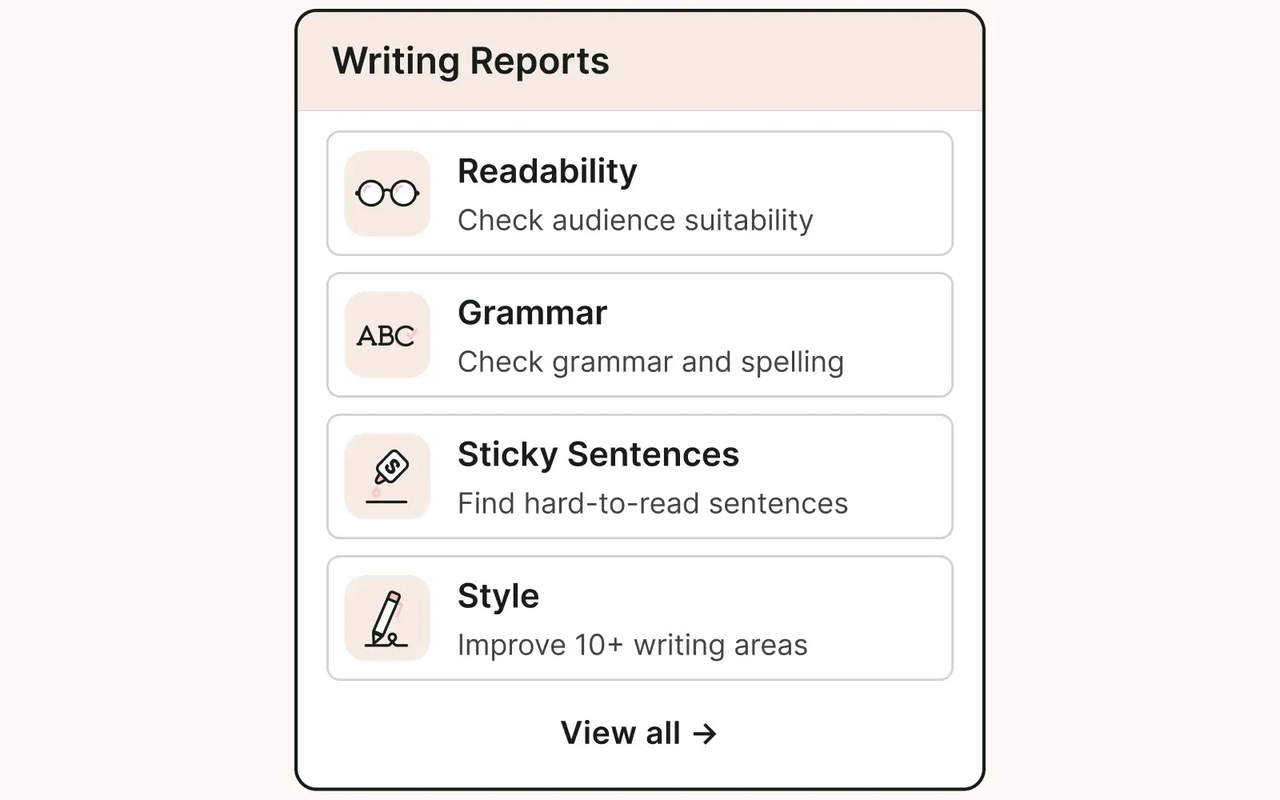
ProWritingAid runs 25 plus reports over a whole document, where Grammarly only underlines one mistake at a time. It is the deepest editor on this list, and the difference shows in the reports. Grammarly underlines a mistake and offers a fix. ProWritingAid runs 25 plus reports over the whole document: readability, sticky sentences, overused words, sentence length variety, pacing, dialogue tags, pronouns, clichés, and consistency. No other tool here looks at your writing from that far back.
The manuscript tools are the other reason ProWritingAid earns its place. It is built for long documents, and it shows. The web editor, the Word add-in, the Google Docs add-in, and the desktop app all handle chapters and full books, so a long manuscript stays in one place from first draft to final proofread. The AI features, called Sparks, rephrase sentences, expand or shorten passages, and critique chapters, and Premium Pro raises the daily AI allowance well above the Premium level. For a writer who finishes books, that depth is worth more than a slightly faster underline.
The trade is the free plan and the learning curve. The free version caps each check at 500 words, allows only two runs of each report per day, and limits rephrases to 10 a day, so it works as a test drive and nothing more. A writer with a 90,000-word manuscript will hit the cap on the first page. The reports also take learning: a new user opens a dashboard full of numbers and coloured bars, and it takes a few sessions to learn which reports matter for their kind of writing.
Pricing is yearly, monthly, or once. The Free plan costs $0 and covers grammar, spelling, and punctuation checks up to 500 words at a time. Premium costs $10 a month billed annually, or $120 a year, and it removes the word cap, unlocks unlimited report runs and rephrases, and adds the style guide and integrations. Premium costs $30 a month if you pay month to month, which is three times the annual rate, so the monthly plan is a poor way to buy it. Premium Pro costs $12 a month billed annually, or $144 a year, and it adds 50 Sparks a day, 30 chapter critiques a day, and the community workshops. Both paid plans also sell as lifetime licences: $399 once for Premium and $699 once for Premium Pro. Check the live figures on the ProWritingAid pricing page before you commit.
Best for: authors, novelists, and non-fiction writers editing long documents who want the deepest reports and a lifetime licence.
What we like about ProWritingAid
- The $399 lifetime Premium licence breaks even against the $120 a year plan in about three and a third years, then costs nothing.
- Premium Pro gives you 50 Sparks a day against 5 on Premium, so heavy AI users get ten times the allowance for $24 more a year.
- Scrivener integration is included, so novelists can edit inside the app where the book actually lives.
What could be better
- Plagiarism check is a paid add-on on all plans, so originality checks cost extra.
- Monthly billing costs $30 against $10 on the annual plan, which is the steepest monthly penalty on this list.
- Yearly, lifetime, and monthly plans all carry a three-day money-back window.
2. LanguageTool: Best Grammarly Alternative for Multilingual Writers
LanguageTool is the multilingual pick on this list, covering more than 30 languages and dialects where most checkers stop at English. It checks more than 30 languages and dialects, and that coverage is the whole point. A writer who drafts a proposal in German, answers a client in French, and writes a report in English can use one tool for all three, with the same interface and the same personal dictionary. LanguageTool is the cheapest of the three at $69.90 a year, less than half the price of Grammarly Pro.
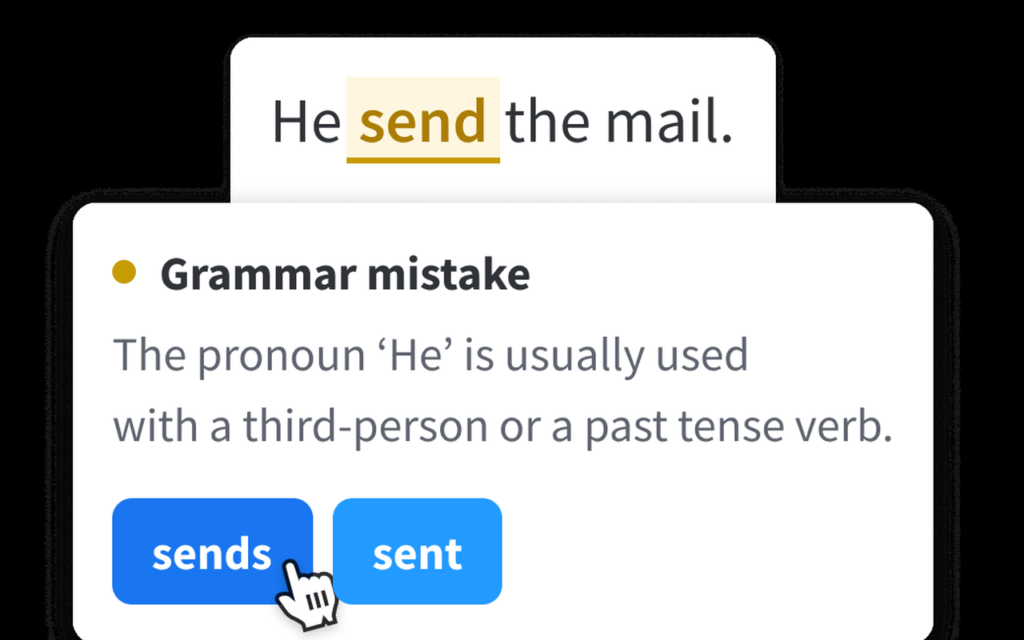
The Premium checks are the other reason LanguageTool earns its place. The free plan covers basic grammar and spelling with a 2,000-character limit per text field, which suits short emails and quick checks. Premium raises that limit to 150,000 characters per field, adds more than 20,000 extra checks for English, German, French, Spanish, Dutch, Polish, and Portuguese, and adds unlimited AI sentence paraphrasing and a personal style guide.
The catch is the free plan and the billing shape. The free plan limits each text field to 2,000 characters, which is about 300 words, so a long email has to be checked in pieces. It also limits AI rephrasing to three a day and Picky Mode to a limited version, so the free plan is a taster, not a workspace. The pricing also changes by region: the US page lists dollars and the European page lists euros, and the euro annual price works out cheaper than the dollar one, so the figure you see depends on where you are.
Pricing is per person, with four billing terms for the same plan. The Free plan costs $0 and covers basic checks in all languages. Premium costs $24.90 a month billed monthly, $49.90 a quarter, $69.90 a year, or $119.80 for two years. The annual plan works out at $5.83 a month, and the two-year plan at $4.99 a month, so paying monthly for a year costs $298.80 against $69.90 on the annual plan, which is more than four times as much. Teams are priced per user per year, starting from $66.40 a user a year for two users, with a shared style guide and a team dictionary. Check the live figures on the LanguageTool pricing page before you commit, because the page shows a limited-time offer and the currency you see depends on your location.
Best for: writers working in more than one language, especially German, French, Spanish, Dutch, Polish, and Portuguese, who want deep checks at a low annual price.
Where it wins
- LanguageTool is owned by Learneo, Inc., the company behind QuillBot, so the two tools share a parent and a similar approach to pricing.
- Eligible students and educators can receive up to 20 percent off Premium, which drops the annual plan below $56 a year.
- Premium includes a personal dictionary and text statistics, so your own terms and your document length stay visible while you edit.
Where it falls short
- The browser extension moved behind the Premium paywall in 2026, so free users lose the way most people actually used the tool.
- The free plan allows only three AI rephrasings a day, so rewriting help is effectively a paid feature.
- There is no plagiarism checker in any plan, so originality checks need another tool entirely.
3. Hemingway Editor: Best Grammarly Alternative for Clear Writing
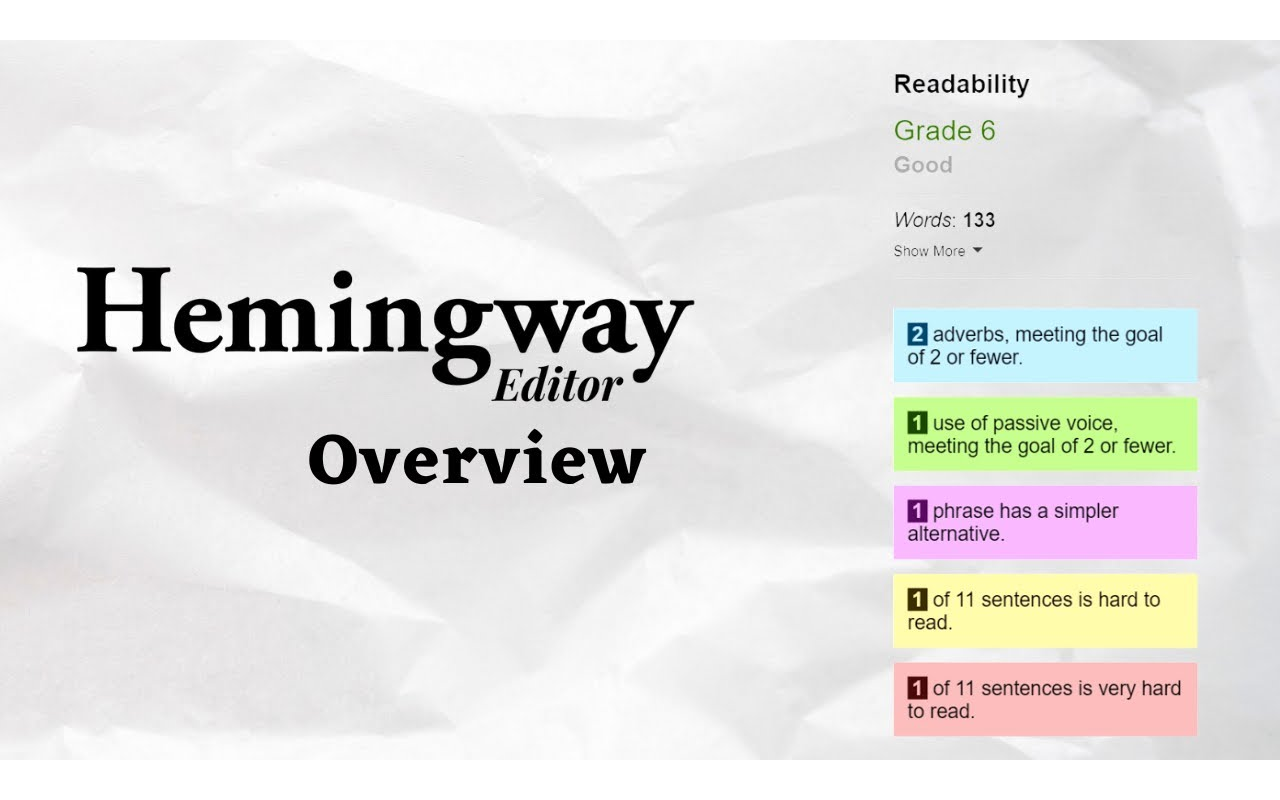
Hemingway Editor is the readability pick on this list, for writers whose problem is not typos but sentences that are too long, too passive, and too hard to read. It does one job, and it does it better than any tool here. Paste in a draft and it highlights the problems in colour: yellow for hard sentences, red for very hard sentences, purple for phrases with a simpler alternative, blue for adverbs, and green for passive voice. It gives the text a readability grade, and it counts words, sentences, and reading time in the sidebar. Grammarly fixes the words. Hemingway fixes the writing.
The free web editor is the other reason Hemingway earns its place. It costs nothing, needs no login, and never expires, which makes it the most generous free tool on this list for the job it does. A student can paste an essay, a blogger can paste a post, and a professional can paste a report, and all three get the same readability score and the same colour highlights. The desktop app, Hemingway Editor 3, costs $19.99 once and works offline on Mac and Windows, with export to Word, PDF, HTML, and Markdown.
The trade is the narrow scope and the product split. Hemingway is a readability editor, not a grammar checker, and the free web version does not fix grammar at all. Buyers mix up the three products: the free web editor, the $19.99 desktop app with no AI features, and Hemingway Editor Plus, which adds AI sentence rewrites, advanced grammar checks, and tone controls. The desktop app does not include the AI features, so a buyer who pays $19.99 expecting rewrites will be disappointed, and that confusion is the most common complaint about the product.
Pricing is free, one-time, or yearly. The web editor costs $0 with no login. Hemingway Editor 3 costs $19.99 once for Mac and Windows. Hemingway Editor Plus Individual 5K costs $100 a year, or $8.33 a month billed annually, for 5,000 AI sentence rewrites a month, and it costs $25 a month if you pay month to month. Individual 10K costs $150 a year, or $12.50 a month billed annually, for 10,000 AI sentence rewrites a month, and $30 a month billed monthly. Team 10K costs the same $12.50 a user a month billed annually. Plus opens with a two-week free trial and asks for no payment details up front. Check the live figures on the Hemingway Editor Plus page before you commit.
Best for: writers who want shorter, clearer sentences and a readability grade, especially bloggers, copywriters, and anyone writing for a general audience.
What we like about Hemingway Editor
- Hemingway was created in 2013 by brothers Adam and Ben Long, and the editor is named after Ernest Hemingway, known for clear and direct prose.
- Plus Enterprise offers 20,000 AI sentences per user a month with single sign-on as an optional add-on, for larger teams.
- The editor aims for a grade 6 to 10 reading level for general audiences, which gives a writer a clear target to edit toward.
What could be better
- The $19.99 desktop app has no AI features at all, so buyers who expect rewrites from it will be let down.
- Plus at $25 a month billed monthly costs three times the $8.33 annual equivalent, so monthly billing is a poor deal.
- There is no plagiarism checker and no spelling checker in the free web editor, so it cannot replace a full grammar tool on its own.
4. QuillBot: Best Grammarly Alternative for Students and Paraphrasing
QuillBot is the rewriting pick on this list, built around paraphrasing first and proofreading second. It started as a paraphraser, and that is still what it does best. Paste in a sentence and it offers the same idea in different words, in nine modes: Standard, Fluency, Formal, Simple, Creative, Expand, Shorten, Academic, and Custom. Grammarly rewrites a sentence when it spots a mistake. QuillBot rewrites a sentence because you asked it to, and it gives you nine versions to choose from.
The bundle is the other reason QuillBot earns its place. One Premium subscription covers the paraphraser, the grammar checker, the summariser, the plagiarism checker, the AI detector, the humaniser, the translator, and the citation generator. A student who writes essays, reads papers, and worries about originality gets three tools for one price, which is why QuillBot is the most popular Grammarly alternative on campus. The newer Flow and Design Studio tools add AI chat, document drafting, and visual design to the same subscription, so the product keeps growing past its paraphrasing roots. If the video side is the part that interests you, our HeyGen alternatives guide compares the avatar presenters head to head, because QuillBot is only one of several ways to turn written words into a video.
The trade is the free plan and the billing record. The free paraphraser caps each pass at 125 words and gives you only two modes, Standard and Fluency, so a long paragraph has to be rewritten in pieces. The free plan also limits the summariser, the humaniser, and the AI detector, so the free tier is a demo of the paraphraser and little more. There is no free trial of Premium, so the free tier is the only way to test it, and the money-back window is only three days. Read the checkout screen carefully, because some users have reported being charged for an annual plan when they believed they had picked a monthly one.
Pricing is free or Premium. The Free plan costs $0 and covers basic paraphrasing in two modes, basic grammar checks, and limited summaries. Premium costs $9.16 a month billed annually, or $109.92 a year, and it unlocks unlimited paraphrasing in all nine modes, advanced grammar suggestions, the plagiarism checker, the full humaniser and AI detector, and summaries up to 6,000 words. QuillBot shows different Premium prices on different visits, so confirm the live price at checkout before you pay; the figure here is the 15 November 2026 read. Verified students get a cheaper plan at $6.25 a month, or $74.96 a year, with a university email. Teams cost $89.95 a seat a year, or $7.50 a seat a month, with a writer management dashboard and usage reports. Check the live figures on the QuillBot Premium page before you commit.
Best for: students and academics who paraphrase, summarise research, and need a plagiarism checker in the same subscription.
Where it wins
- Premium includes 300 AI images a month and AI chat at higher usage, so the subscription covers more than writing.
- The free humaniser allows 125 words per run and 6 uses a day, which is enough to test it on short passages.
- QuillBot reports 35 plus million writers across 180 plus countries, with a 4.7 out of 5 Chrome extension rating, so the scale is real.
Where it falls short
- The free paraphraser caps each pass at 125 words, so a long paragraph has to be rewritten in small pieces.
- There is no free trial of Premium, and the money-back window is only three days.
- The Premium page shows only the annual rate up front, so the monthly price is easy to miss until checkout.
5. Wordtune: Best Grammarly Alternative for Rewriting Sentences
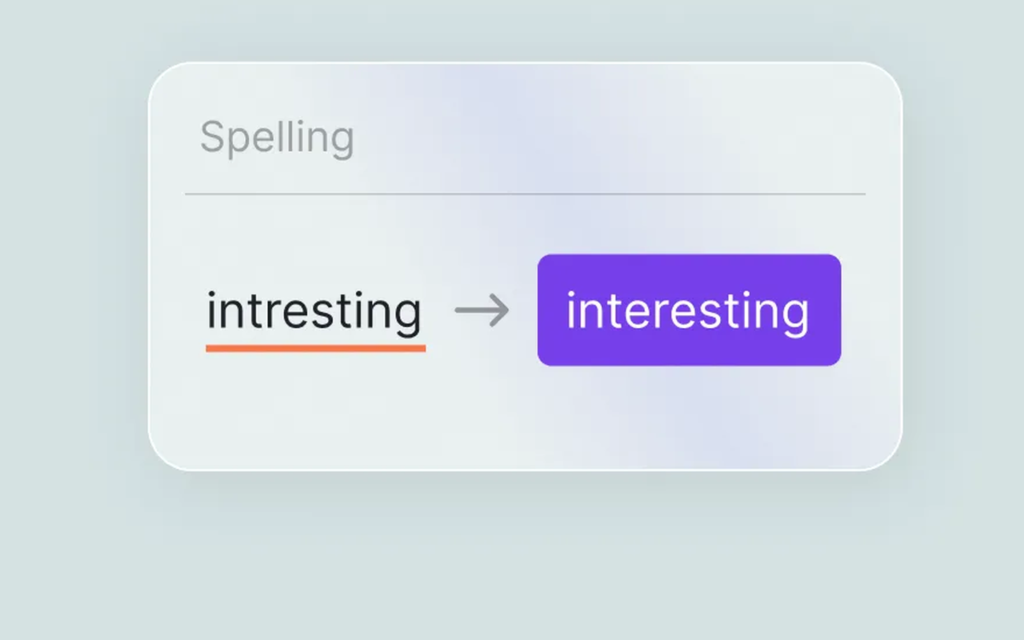
Wordtune is the sentence-rewriting pick on this list, for writers who draft the sentence first and fix the wording second. It is a sentence-level rewriter, and it stays close to that job. Highlight a line in Google Docs, Gmail, or any website where you write, and Wordtune offers several versions of the same sentence: more formal, more casual, shorter, longer, or simply clearer. The Chrome extension is the heart of the product, because it brings the rewrite button into the apps where you already write, instead of asking you to paste text into a separate editor.
The summariser and the Spices are the other reason Wordtune earns its place. The summariser reads long text, documents, websites, and YouTube videos, and pulls out the key points, which suits a writer who researches before drafting. The translation feature rewrites text from another language into English and offers rewrite suggestions at the same time, which suits writers who draft in French or Spanish and publish in English. For pure sentence craft, Wordtune’s suggestions are among the best on this list.
The downside is the narrow scope and the future of the product. Wordtune rewrites sentences, and it does not do much else. There is no plagiarism checker, no AI detector, and no long-document editing, so it cannot replace Grammarly on its own. The bigger worry is the product’s future: AI21 Labs, the company behind Wordtune, discontinued active development of the tool in April 2025, according to a report in Calcalist, and the product has not gained major new features since. The plans page still sells subscriptions, and the tool still works, but a writer who buys a yearly plan should know that the product is in maintenance mode, not active growth.
Pricing is free, Advanced, or Unlimited. The Basic plan costs $0 and covers 10 rewrites and AI suggestions a day, 3 AI summaries a month, and unlimited spelling and grammar checks. Advanced costs $4.89 a month billed annually, or $58.68 a year, for 30 rewrites a day and 15 summaries a month, and it costs $9.79 a month if you pay month to month. Unlimited costs $6.99 a month billed annually, or $83.88 a year, for unlimited rewrites, suggestions, and summaries, and it costs $13.99 a month billed monthly. Both paid plans start with a three-day trial that asks for payment details up front, and the pricing FAQ says paid plans are not refundable, so cancel before the trial ends if it is not for you. Check the live figures on the Wordtune plans page before you commit.
Best for: professionals and non-native English speakers who rewrite sentences all day inside Gmail, Google Docs, and the browser.
What we like about Wordtune
- Wordtune holds a 4.6 out of 5 rating on G2 and 4.4 out of 5 on Capterra, based on user reviews.
- The Chrome extension shortcut is Ctrl plus Shift plus D on Windows and Cmd plus Shift plus D on Mac, so rewrites are one keystroke away.
- Wordtune also works inside Microsoft Word, not only in the browser, so Word users get the rewrite button too.
What could be better
- Paid plans start with a three-day trial that asks for payment details up front, and paid plans are not refundable.
- The iOS app sells its own subscription at $24.99 a month or $119.99 a year, which is far above the web prices.
- Active development was discontinued in April 2025, so new features are unlikely and the product is in maintenance mode.
6. Ginger: Best Grammarly Alternative for Translation and Grammar Together
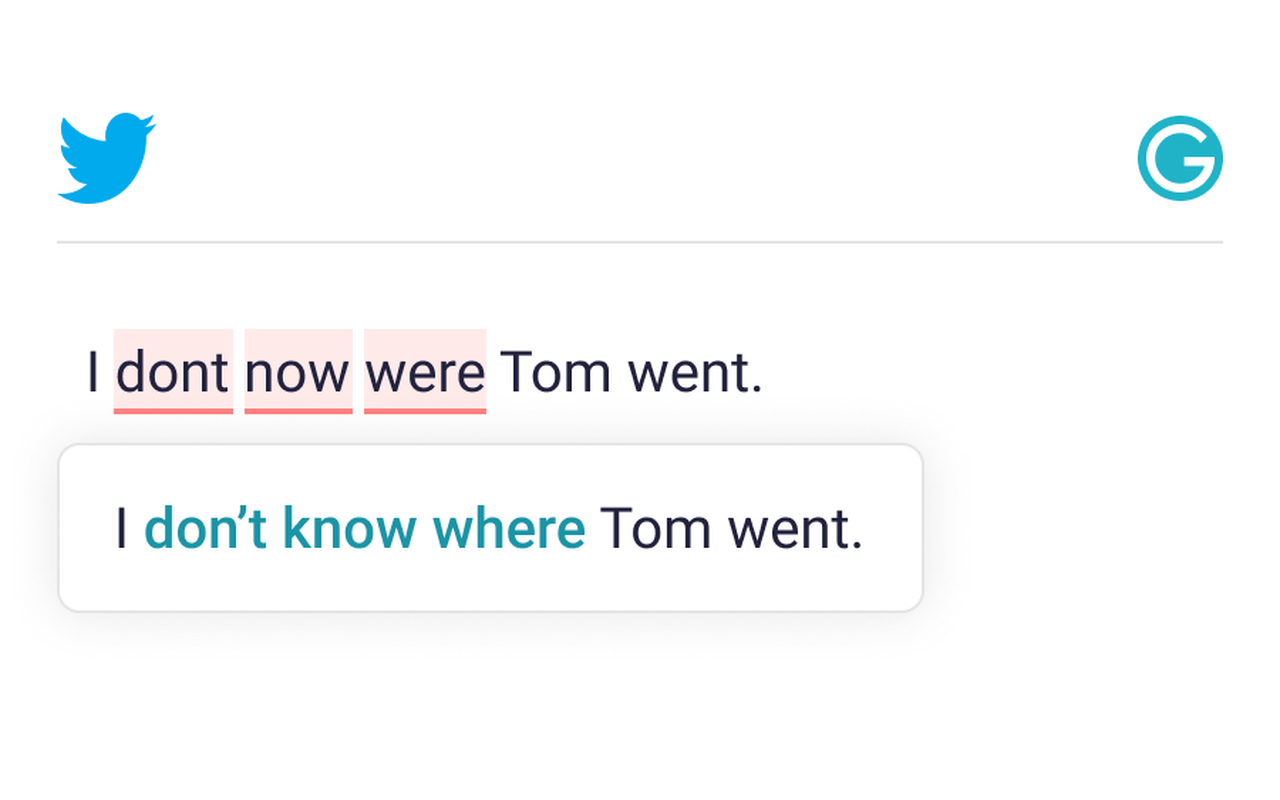
Ginger is the translation-plus-grammar pick on this list, correcting whole sentences in context where most checkers only underline single words. It corrects whole sentences in context, not single words in isolation, which is the feature that sets it apart. Most checkers underline a wrong word and offer a replacement. Ginger reads the sentence, understands what you meant, and rewrites the whole thing so it sounds natural. That sentence-level thinking is why Ginger has stayed popular for more than a decade.
The translation is the other reason Ginger earns its place. It translates into more than 40 languages, and it does so inside the same tool that checks your grammar. A professional who emails a client in Paris, a supplier in Berlin, and a colleague in Madrid can write in English, translate the message, and check the result without opening another app. The apps cover Chrome, Edge, Word, Windows, Mac, iOS, and Android, so the checker follows you from the desktop to the phone.
The trade is the English-only grammar and the dated feel. Ginger’s grammar checking covers English only, so a writer who drafts in Spanish or French gets translation but no grammar help in those languages. That is the opposite of LanguageTool, which checks the grammar of 30 plus languages. The premium prices are also not clearly shown on the official site, which slows down a buying decision and forces a writer to start a checkout before seeing the real figure.
Pricing is free or Premium, with four billing terms. The Free plan costs $0 and covers basic corrections. Premium costs $13 a month billed monthly, $9.99 a month on a quarterly plan, $7.50 a month billed annually, or $6 a month on a two-year plan. The annual plan works out at about $90 a year, and the two-year plan at about $144 for two years. A 50 percent promotion was observed in August 2026, which cut the monthly rate to $6.50 and the annual rate to $3.75 a month, so the price you see may be lower than the list price if a promotion is running. Check the live figures on the Ginger site before you commit.
Best for: non-native English speakers and professionals who translate as often as they write, and who want whole-sentence corrections.
Where it wins
- Ginger is trusted by 10 million users, which makes it one of the most widely used checkers on this list.
- Premium includes a mobile keyboard with corrections built in, so the checker works inside any phone app.
- A Ginger Teams plan is available for shared use, though its price is not listed alongside the personal plans.
Where it falls short
- Grammar checking covers English only, so writers working in other languages get translation but no grammar help.
- Premium prices are not clearly shown on the official site, which makes the buying decision slower than it should be.
- There is no plagiarism checker, no AI detector, and no tone tool, so the feature set is thinner than newer tools.
7. PaperRater: Best Grammarly Alternative for Essays and Plagiarism Checks
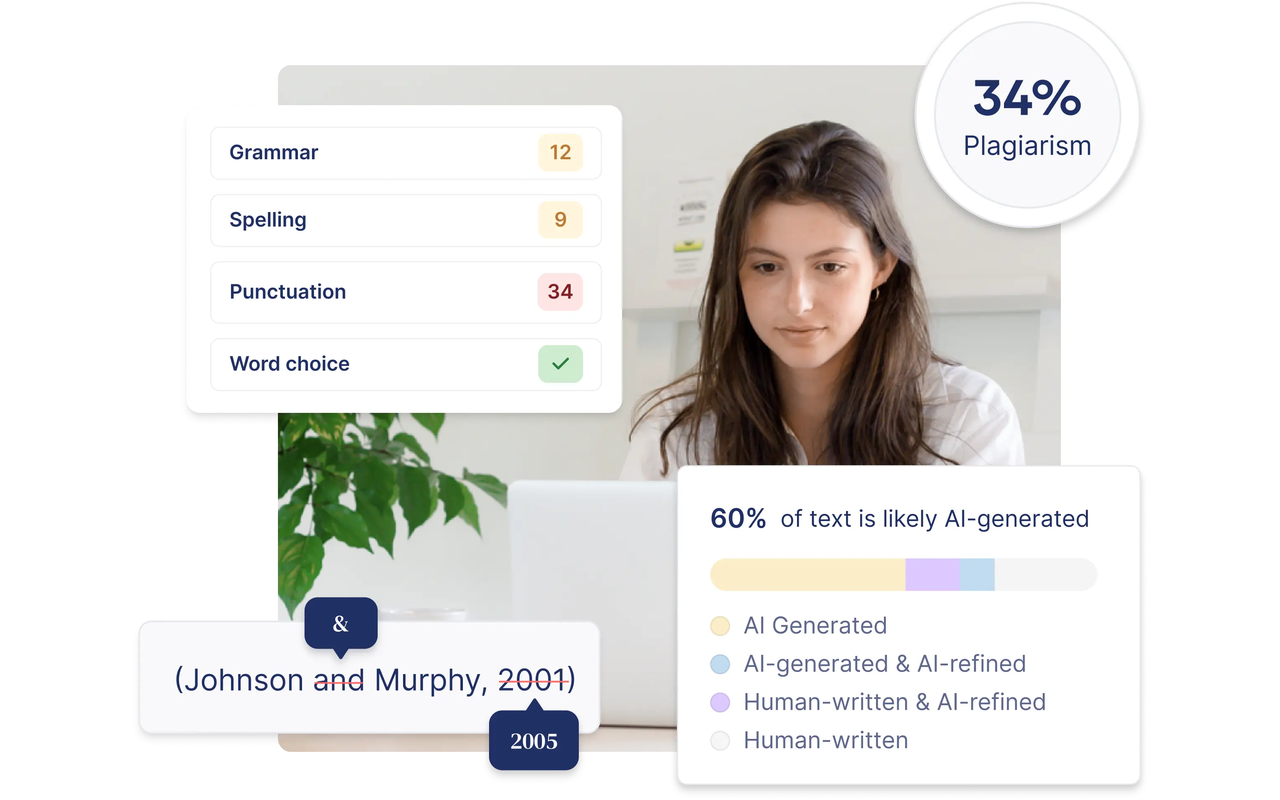
PaperRater is the essay pick on this list, built for the essay itself rather than the email around it. It checks grammar, spelling, and word choice, and it also grades the essay and checks it for plagiarism in the same pass. A student pastes in a paper, picks the education level and the type of submission, and gets back a report with a score, a readability grade, and a list of issues to fix. Grammarly Pro charges $144 a year for a plagiarism check. PaperRater includes 10 plagiarism checks a month on its free plan, which is why students keep coming back to it even though the site looks a decade old.
The free plan is the other reason PaperRater earns its place. It covers submissions of up to 5 pages, 50 submissions a month, and 10 plagiarism checks a month, with no signup needed for a basic check.
The trade is the site itself and the accuracy. PaperRater’s own website has changed hands, and paperrater.com now serves Scribbr content, which means the PaperRater checker you remember may not be the site you land on today. Accuracy is the second worry: independent tests have found that PaperRater catches common errors well but misses subtler issues.
Pricing is free; the old Premium plan is not purchasable. The Basic plan costs $0 and covers 5-page submissions, 50 submissions a month, and 10 plagiarism checks a month. The old Premium plan is not purchasable: paperrater.com now serves Scribbr content, and the PaperRater checker redirects there. Check the live figures on the PaperRater site before you commit.
Best for: students checking essays and papers who want free plagiarism checks and an automated essay score.
What we like about PaperRater
- PaperRater launched in 2009 and was used by schools and universities in more than 100 countries, so the essay scoring has a long history.
- The free checker scans only the first 5,000 characters of each submission, so very long papers need splitting.
- The plagiarism check draws on the indexes of the major search engines, which is how it finds copied text on the open web.
What could be better
- There is no browser extension or desktop app, so checks happen only on the website itself.
8. Virtual Writing Tutor: Best Free Grammarly Alternative
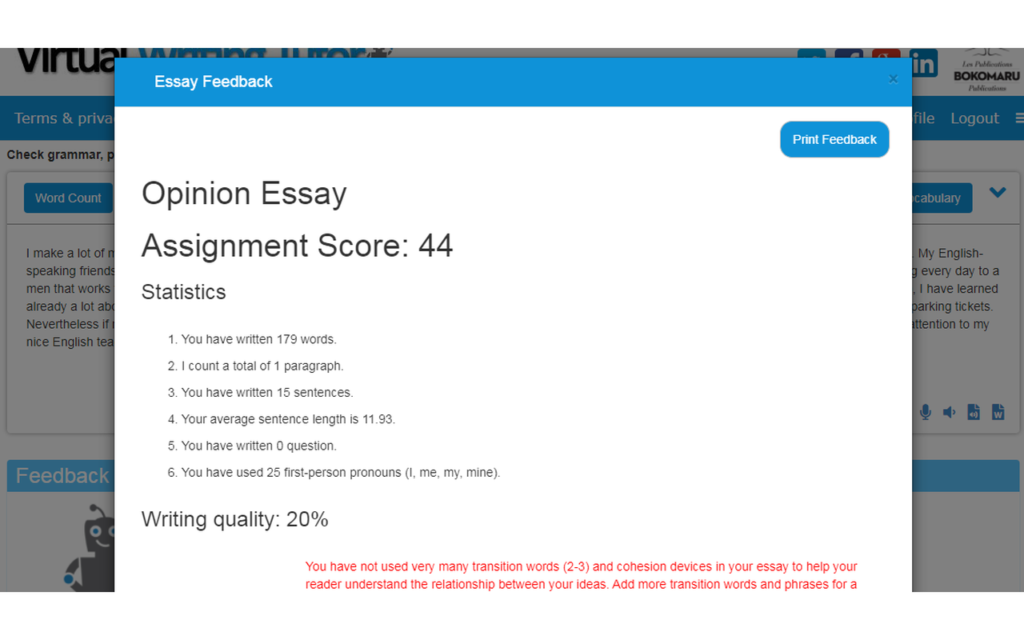
Virtual Writing Tutor is the free essay-grading pick on this list, for students whose budget is zero and whose essay still has to be good. It is free to start, with a paid membership for full use: $36 a year, $16 for three months, $8 a month, or $3 a week, and free members are capped at 10 checks a day. A student signs up for a free account and checks up to 3,000 words at a time, while a visitor without an account can check 500 words. The checker covers grammar, punctuation, spelling, vocabulary, and word choice, and it explains each error with a link to a learning resource, so a student learns why a sentence is wrong instead of only seeing it underlined.
The essay scoring is the other reason Virtual Writing Tutor earns its place. It grades essays against the IELTS rubric and reports on cohesion, tone, argument strength, and vocabulary sophistication, with graphs that show how many advanced words you used and whether your thesis holds through the essay. No other free tool here does this much for students and English learners.
The trade is the interface and the workflow. The site looks dated, and the reports appear on a separate screen from your text, so you read the feedback away from the draft instead of fixing errors in place. There is no browser extension, no Word add-in, and no mobile app, so every check means opening the website and pasting text by hand. The checker is also built for learners, not for professionals: it explains errors like a teacher, which is exactly what a student wants and more than a busy professional has time for.
Pricing is free to start, with a paid membership for the full checker. The free tier covers grammar, punctuation, spelling, vocabulary, and word choice, capped at 10 checks a day for free members, while a visitor without an account can check 500 words. Paid membership costs $36 a year, $16 for three months, $8 a month, or $3 a week. That makes Virtual Writing Tutor the best answer for a student who needs a real checker and has no budget. Check the tool on the Virtual Writing Tutor site, and create the free account first for the 3,000-word limit.
Best for: students, English learners, and teachers who want free essay grading, vocabulary checks, and IELTS-style feedback.
Where it wins
- Feedback can be translated into 70 languages, so a learner can read the correction in their own language.
- The tool estimates your CEFR, IELTS, TOEFL, or CEGEP ESL level in about half a second.
- It also checks double negatives, collocation errors, missing auxiliaries, and tense shifts that basic checkers often miss.
Where it falls short
- The site bundles side tools like a glossary creator and a chatbox builder, which distract from the core checker and show the site’s age.
- There is no offline mode, so every check needs an internet connection.
- Even a free account caps checks at 3,000 words, so a long thesis still has to be checked in pieces.
9. PerfectIt: Best Grammarly Alternative for Professional Consistency
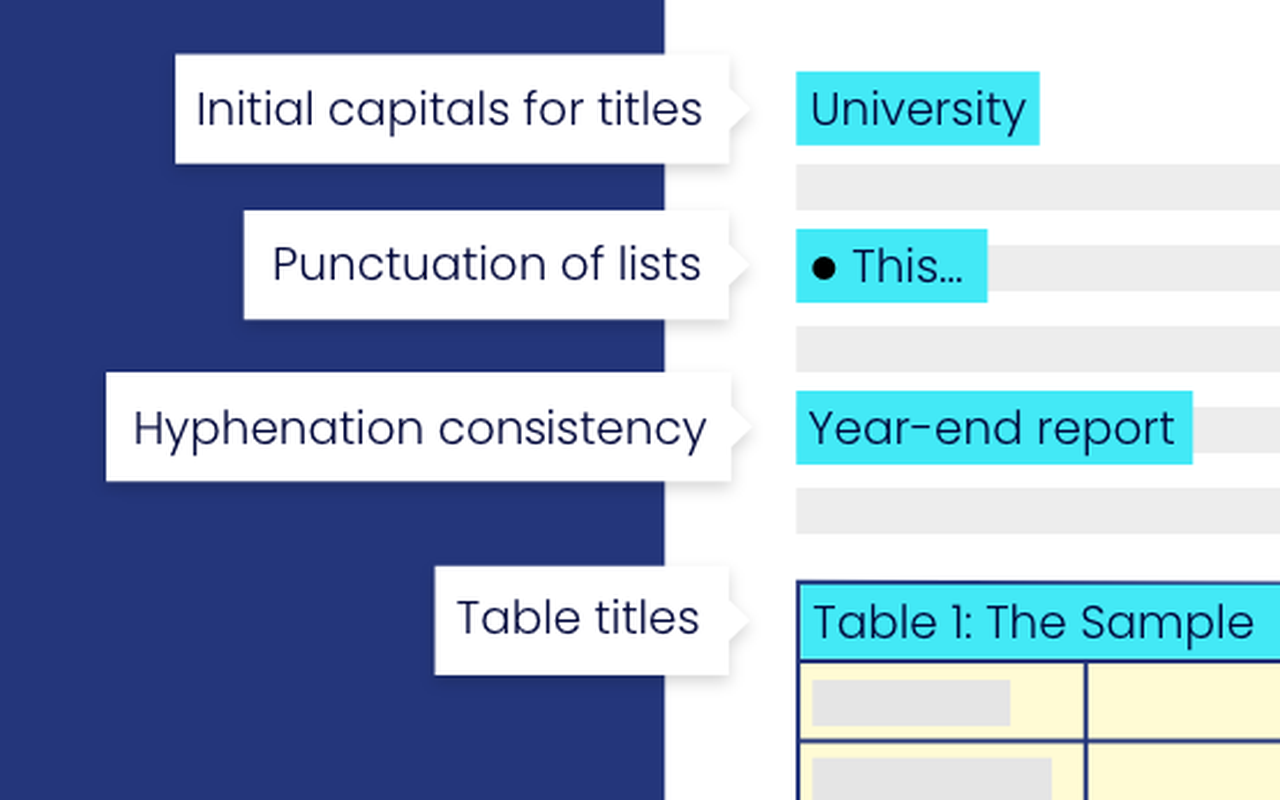
PerfectIt is the consistency pick on this list, catching the errors spellcheckers never catch in a finished document. It is not a grammar checker. It is a consistency checker, and it runs inside Microsoft Word as an add-in. It finds the same term spelled two ways, a hyphen that appears in one chapter and vanishes in the next, a capital letter that changes halfway through, an abbreviation that is never defined, and a table title that breaks the house style. A professional editor working on a contract, a proposal, or a 300-page report will find mistakes here that Grammarly sails past, because Grammarly checks each sentence on its own while PerfectIt checks the whole document against itself.
The house style enforcement is the other reason PerfectIt earns its place. You set the rules once: preferred spellings, hyphenation, capitalisation, number formats, and abbreviation definitions, and PerfectIt applies them across every document. For editors, proofreaders, and teams that publish under a strict style guide, that is the feature that pays for the subscription.
The catch is the narrow job and the price shape. PerfectIt checks consistency, not grammar, so spelling and grammar errors still need another tool, and a writer who buys it expecting a Grammarly replacement will be disappointed. The price is per user per year, which means a team of five pays five times the single-user rate, and there is no free plan, only a trial, so every user pays from day one after the trial ends.
Pricing is per user per year. PerfectIt starts at $70 a user a year, and a free trial is available before you buy. Five users cost $350 a year. Check the live figures on the Intelligent Editing site before you commit, because the price is per user and the team total is the figure that matters.
Best for: professional editors, proofreaders, and teams enforcing a house style across long Word documents.
What we like about PerfectIt
- It saves money on rewrites by catching errors before a document goes to press, when fixes are cheapest.
- It supports Word on both Windows and Mac, so editors on either platform use the same add-in.
- At $70 a user a year, it costs less than half of Grammarly Pro at $144 a year for one editor.
What could be better
- It checks consistency, not grammar, so spelling and grammar errors still need another tool alongside it.
- There is no free plan, only a trial, so every user pays from day one after the trial ends.
- It is a Microsoft Word add-in, now in PowerPoint too for Elite, Team, or Enterprise subscribers, with no browser version and no Google Docs support.
10. Microsoft Editor: Best Grammarly Alternative for Word and Outlook Users
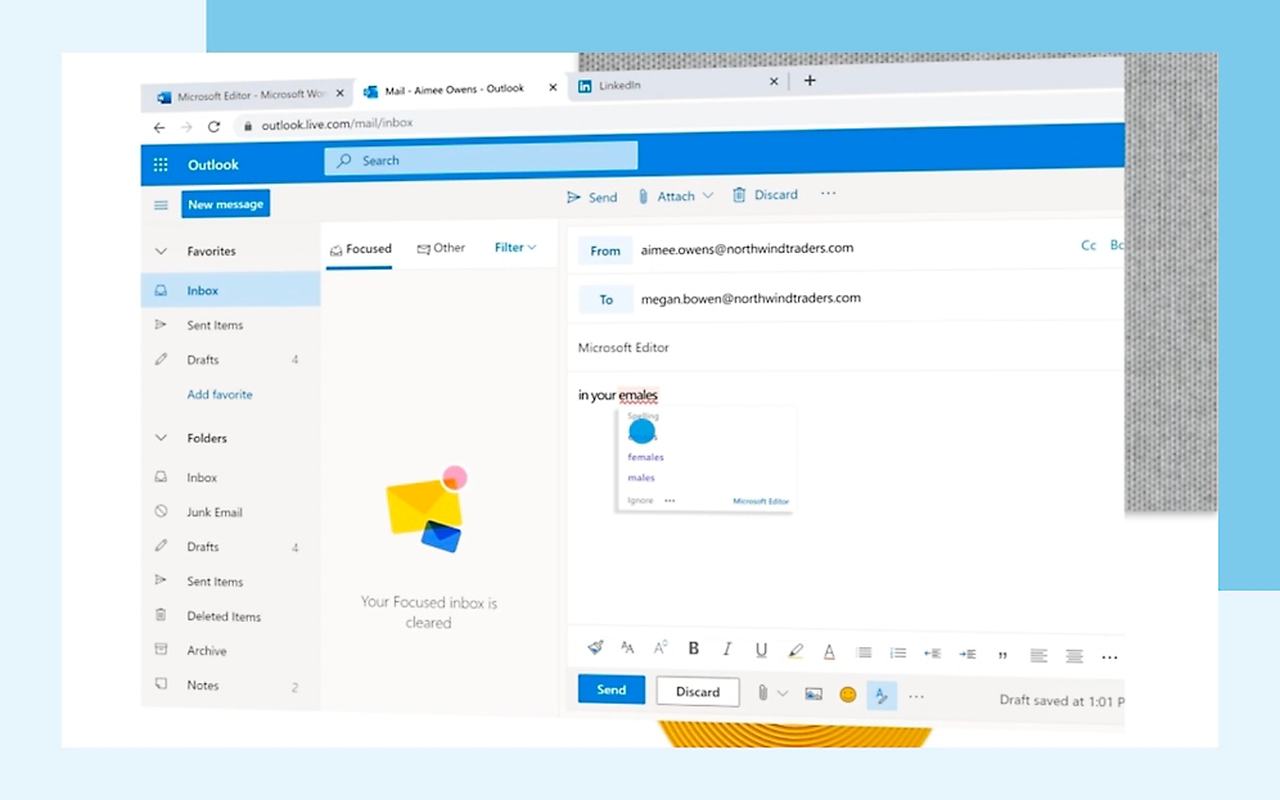
Microsoft Editor is the Word-and-Outlook pick on this list, for writers who already live in those apps and do not want another subscription. It is built into the apps, not bolted on. Open Word or Outlook and Editor checks spelling, grammar, capitalisation, and punctuation as you type, with in-app tips that explain the suggestion. A professional who writes in Word all day gets a checker without installing anything, learning anything, or paying anything extra.
The Microsoft 365 bundle is the other reason Editor earns its place. The full version of Editor comes with a Microsoft 365 subscription, which many workplaces and students already have, and that subscription also buys Word, Excel, PowerPoint, Outlook, OneNote, 1 TB of OneDrive storage, and Copilot AI features. A writer who already pays for Microsoft 365 gets the premium checker for nothing extra, which makes Editor the cheapest full-featured option on this list for anyone in the Microsoft world.
The trade is the paywall placement and the depth. The free version checks only basic spelling and grammar, and the advanced help with clarity, conciseness, and formality needs a paid Microsoft 365 plan. Editor is also shallower than Grammarly or ProWritingAid: it catches mistakes and polishes style, but it has no plagiarism checker, no AI detector, and no rewriting tool, so writers who need those features still need another subscription.
Pricing comes from Microsoft 365, not from Editor itself. The basic version of Editor is free with a Microsoft account. Microsoft 365 Personal costs $9.99 a month or $99.99 a year for one person, with 1 TB of OneDrive storage and the desktop Office apps. Microsoft 365 Family costs $12.99 a month or $129.99 a year for one to six people, with 1 TB of storage per person, up to 6 TB in total. A one-month trial is available, and the limited-time offer and the trial cannot be combined. Check the live figures on the Microsoft Editor page before you commit.
Best for: Word and Outlook users who already pay for Microsoft 365, or who want a capable checker with no new subscription.
Where it wins
- Microsoft 365 Basic costs $19.99 a year with 100 GB of storage, for writers who want the apps without the full Personal price.
- Office Home 2024 costs $179.99 once for one PC or Mac, for writers who prefer a one-time purchase to a subscription.
- Personal works on up to five devices at the same time for one person, so the checker follows you across machines.
Where it falls short
- You cannot buy Editor on its own: the full version needs a Microsoft 365 subscription, with no standalone price.
- The full experience is on desktop devices, including macOS and Windows, so mobile-only writers get the thinner web version.
- Students get Office 365 A1 free with an eligible education email, which is a route many writers miss entirely.
Before you pay for any writing tool, paste in a real document you actually wrote, with your own mistakes in it, and check it twice: once on the free plan and once on the trial. A demo on the vendor site always looks good. Your sentences, your word count, and your deadline are the real test.
Free vs Paid: What the Free Plans Really Give You
The free plan is where most writers start, and the gap between the free plans on this list is wider than the gap between the paid ones. Virtual Writing Tutor gives you the checker free up to 10 checks a day, with a paid membership from $36 a year for heavier use. Hemingway’s free web editor gives you the full readability score and every colour highlight, with no login and no expiry, which is generous for a tool that does one job well. Microsoft Editor’s free version gives you basic spelling and grammar in the browser and in Word for the web, which covers everyday writing for anyone with a Microsoft account.
The other free plans are test drives, and the limits tell you how much testing you get. ProWritingAid caps you at 500 words per check, LanguageTool at 2,000 characters per field, and QuillBot at 125 words per paraphrase, so all three force you to work in small pieces. Wordtune gives you 10 rewrites a day, PaperRater gives you 50 submissions a month, and Ginger covers basic corrections on its free plan.
Two free-plan traps deserve attention. First, the feature you need is often one tier above the free plan. Plagiarism checks need Grammarly Pro or QuillBot Premium, or PaperRater’s free plan, which includes 10 checks a month, and the full rewrite tools need Wordtune Advanced or Hemingway Plus. Second, the free plan can quietly shape your writing: a tool that only checks 500 words at a time teaches you to write in 500-word chunks, and a tool that only fixes spelling teaches you to ignore style. Use the free plan to test the tool, then pay for the plan that matches the writing you actually do, or pick the tool whose free plan already covers it.
Pricing: What You Actually Pay
Pricing is where this comparison is decided for most writers. A tool that costs $4.89 a month looks cheap until you learn that it only rewrites sentences, and a tool that costs $399 once looks dear until you learn that it never charges you again. The monthly figure is only half the story: the billing term, the word cap, and the feature paywall decide the real cost.
Start with the cheapest honest options. Virtual Writing Tutor at $0 is the cheapest plan that gives you essay grading and vocabulary checks, because the free tier costs nothing. Wordtune Advanced at $4.89 a month billed annually is the cheapest plan that gives you regular sentence rewriting. LanguageTool Premium at $69.90 a year is the cheapest plan that gives you deep checks in 30 plus languages. QuillBot Premium at $9.16 a month billed annually is the cheapest plan that gives you paraphrasing, a plagiarism checker, and a summariser in one subscription. ProWritingAid Premium at $10 a month billed annually is the cheapest plan that gives you full manuscript editing with 25 plus reports.
Three pricing traps deserve attention. First, the monthly penalty is brutal on every tool here. Grammarly Pro costs $30 a month against $12 billed annually, ProWritingAid Premium costs $30 against $10, QuillBot Premium costs $9.16 a month billed annually, and LanguageTool Premium costs $24.90 against $5.83, so paying monthly for a year costs between two and four times the annual price on Grammarly, ProWritingAid, and LanguageTool. Second, the feature you need is often one tier above the entry price. Plagiarism detection needs Grammarly Pro or QuillBot Premium, AI rewrites need Hemingway Plus or Wordtune Unlimited, and consistency checks need PerfectIt on top of whatever else you use. Third, the lifetime licence only exists in two places: ProWritingAid at $399 and Hemingway’s desktop app at $19.99, so a writer who hates subscriptions has exactly two ways out.
One final pricing warning applies to every tool here. Vendors change prices, and the figure on the pricing page today may not be the figure next quarter. Grammarly renamed Premium to Pro, Wordtune’s rates moved, and Microsoft raised Personal. Treat any price in this article as a snapshot from 15 November 2026, not a promise.
A Worked Yearly Cost Comparison
Take one solo writer, and put them on the cheapest paid plan that actually fits. Not the cheapest plan on the page, and not the enterprise tier, but the plan a real writer buys in the first year to write every week. Grammarly Pro is included as the baseline you are leaving.
| Tool | Plan used | First-year cost | Renews at (per year) |
|---|---|---|---|
| Virtual Writing Tutor | Paid membership, annual | $36 | $36 |
| Wordtune | Advanced, annual | $58.68 | $58.68 |
| LanguageTool | Premium, annual | $69.90 | $69.90 |
| PerfectIt | Single user, annual | $70 | $70 |
| Ginger | Premium, annual | $90 | $90 |
| Microsoft Editor | Via Microsoft 365 Personal | $99.99 | $99.99 |
| Hemingway Editor | Plus Individual 5K, annual | $100 | $100 |
| QuillBot | Premium, annual | $109.92 | $109.92 |
| ProWritingAid | Premium, annual | $120 | $120 |
| Grammarly | Pro, annual (baseline) | $144 | $144 |
The spread is wider than most writers expect. Wordtune Advanced costs $58.68 a year for the same writer that Grammarly Pro charges $144 a year for, though Wordtune only rewrites sentences while Grammarly checks everything. LanguageTool Premium at $69.90 a year costs about half the baseline, and it gives you a real checker with no monthly penalty if you pay annually. ProWritingAid Premium at $120 a year sits just below Grammarly Pro, while offering far deeper editing, and its $399 lifetime licence breaks even in about three and a third years. PerfectIt at $70 a year is the cheapest paid plan that does a job no other tool here does, though it only checks consistency and needs a grammar tool beside it.
Three rows in this table need a note. Microsoft 365 Personal costs $99.99 a year, which also buys the Office apps and 1 TB of OneDrive storage, so it is the best deal here for anyone who already needs Office. Virtual Writing Tutor costs $36 a year for the paid membership, though it cannot replace a full grammar checker on its own. Run the same simple maths for your own writing load, with the tier you actually need, before you decide.
Switching From Grammarly
Switching writing tools sounds harder than it is, and the fear of losing a personal dictionary keeps more writers on Grammarly than the price ever does. The honest answer is that migration takes an afternoon of setup and a week of running both tools side by side, and it is worth doing properly. Start by listing what you actually use in Grammarly: the browser extension, the Word add-in, the tone detector, the plagiarism checker, and the AI prompts, and decide which of those your new tool must replace and which ones were only ever nice to have. Most writers find that three or four features carry the whole workflow.
Your writing moves easily. Your documents are ordinary files, and they open in any tool, so nothing is trapped inside Grammarly. Your personal dictionary and your style preferences do not export cleanly, so write down the words you added and the rules you set, then add them to the new tool by hand. If you use the plagiarism checker, run your last few documents through the new tool’s checker before you cancel, so you know what it catches and what it misses.
Run both tools in parallel for one to two weeks. Write the next document on the new tool, compare the time it takes with your Grammarly routine, and check the suggestions, the readability, and the export flow on your own writing. Then cancel Grammarly Pro at the end of the billing cycle and keep the free plan for reference, so old documents stay checkable. If you publish what you write on a schedule, our guide to Zapier alternatives pairs well with the switch, because the automation around your writing and posting routine needs the same fresh look as the checker itself.
Who Should Pick Each Grammarly Alternative
Pick ProWritingAid if you write books or long documents and want the deepest editing reports, and you are happy to pay $10 a month billed annually. Pick LanguageTool if you write in more than one language and want 30 plus languages at $5.83 a month billed annually. Pick Hemingway Editor if you want clearer sentences and a readability grade, and you are happy to pay $19.99 once for the desktop app or $100 a year for Plus.
Pick QuillBot if you are a student who paraphrases and needs a plagiarism checker, and you are happy to pay $9.16 a month billed annually. Pick Wordtune if you rewrite sentences all day in the browser, and you are happy to pay $4.89 a month billed annually for Advanced. Pick Ginger if you translate as often as you write, and you are happy to pay $7.50 a month billed annually for Premium.
Pick PaperRater if you check essays and want free plagiarism checks, and you are happy to use the free checker on the site. Pick Virtual Writing Tutor if you want a free essay grader, with paid membership at $36 a year when the free cap runs out, and you are happy to work in the browser. Pick PerfectIt if you edit professionally in Word and need consistency checks, and you are happy to pay $70 a user a year. Pick Microsoft Editor if you already pay for Microsoft 365, and you are happy to pay nothing extra at all.
When Grammarly Is Still the Right Call
Leaving Grammarly is not right for everyone, and this guide would be dishonest if it pretended otherwise. Grammarly is still the easiest writing assistant to install and the fastest to learn, and its browser extension works in more places than any tool here. A writer who checks emails and short documents all day, in English, and never hits the AI prompt cap will notice the difference the day they leave, and not in a good way.
The moment to leave is when the pain is structural, not cosmetic. If the price stings every renewal, or the AI prompt cap runs out mid-month, or your writing is in a language Grammarly treats as second class, or your manuscript needs reports Grammarly does not offer, then the tools above are worth the move. Stay when Grammarly fits and the bill is fair. Leave when your writing has outgrown the tool, not when a review told you to.
Final Thoughts
Grammarly alternatives are not hard to find, and the ten tools above cover every kind of writer who outgrows Grammarly or outprices it. The short answer is ProWritingAid for most writers, Virtual Writing Tutor for the best free start, and LanguageTool for the best value, and any of those three is a safe choice.
Shortlist two tools from this guide, use each one for two real weeks with real writing, and keep the one that makes your week easier. Check the tier that carries the feature you need, run the yearly maths from the table above for your own writing load, and confirm the price on the live pricing page before you pay. Then switch properly: rebuild your dictionary, test the plagiarism checker, and cancel Grammarly Pro at the end of the cycle.
FAQs
What is the best Grammarly alternative in 2026?
ProWritingAid is the best overall Grammarly alternative for most writers, because it offers the deepest editing reports, handles long documents, and costs $10 a month billed annually against Grammarly Pro at $12. LanguageTool is the best value at $69.90 a year, and Virtual Writing Tutor is the best free start, because the free tier costs nothing.
Is there a free alternative to Grammarly?
Yes. Virtual Writing Tutor is free to start with a paid membership for full use, and Hemingway’s web editor is free with no login. LanguageTool, ProWritingAid, QuillBot, Wordtune, Ginger, PaperRater, and Microsoft Editor all offer free plans too, though each one caps words, characters, or features. Virtual Writing Tutor is the only tool here whose free tier grades essays against the IELTS rubric.
Which Grammarly alternative has a free plagiarism checker?
PaperRater includes 10 plagiarism checks a month on its free plan, and Virtual Writing Tutor includes a paraphrase checker for free. QuillBot’s plagiarism checker needs Premium at $9.16 a month billed annually, and Grammarly’s own plagiarism checker needs Pro at $12 a month billed annually.
Why is Grammarly Pro $12 a month now?
Grammarly Pro costs $12 a month when billed annually, or $144 a year, and that rate has held for some time. The confusion comes from the billing term: the same plan costs $20 a month on quarterly billing and $30 a month billed monthly, so a writer who pays monthly spends $360 a year. Grammarly also renamed the old Premium plan to Pro and folded the old Business plan into it, so older guides quote plan names that no longer exist.
Can I use a Grammarly alternative in Microsoft Word?
Yes. Microsoft Editor is built into Word and Outlook, ProWritingAid and LanguageTool both offer Word add-ins, PerfectIt runs inside Word as an add-in, and Ginger offers a Word add-in too. QuillBot and Wordtune work through browser extensions that cover Word for the web and Google Docs.
Which Grammarly alternative is best for students?
Virtual Writing Tutor is the best pick for students on a zero budget, because it is free and it grades essays against the IELTS rubric. PaperRater is the best pick when a student needs free plagiarism checks, with 10 a month on the free plan. QuillBot is the best pick when a student needs paraphrasing, summarising, and a plagiarism checker together, with a verified student plan at $6.25 a month.
Which Grammarly alternative is best for writing in other languages?
LanguageTool is the best pick for multilingual writing, because it checks more than 30 languages and Premium adds 20,000 plus extra checks for seven major languages. Ginger is the best pick when translation matters most, with translation into 40 plus languages, though its grammar checking covers English only. Microsoft Editor is the best pick for writers who switch between languages inside Word, with basic guidance in more than 20 languages.
Can I move my writing from Grammarly to another tool?
Yes, mostly. Your documents are ordinary files and they open anywhere, so nothing is trapped inside Grammarly. Your personal dictionary and style preferences do not export cleanly, so write down the words you added and add them to the new tool by hand.
Pick ProWritingAid for most writers, Virtual Writing Tutor for the best free start, LanguageTool for the best value
Most writers leaving Grammarly should start with ProWritingAid, because the editing reports are the deepest on this list, Premium costs $10 a month billed annually, and the $399 lifetime licence ends renewals for good. Writers who want to pay nothing should pick Virtual Writing Tutor, and writers working in more than one language should pick LanguageTool Premium at $69.90 a year. Students should pick QuillBot or PaperRater for plagiarism checks, and Word users should check Microsoft Editor first, because it may already be included in a subscription they pay for.
This kind of research, applied to your growth
If you run a SaaS business, SaaS Harvest can do this kind of digging in your market and turn it into search traffic that signs up.