

HeyGen alternatives are the first thing most creators search for when the credit meter starts biting. HeyGen is still a strong tool. Its avatars look good, its voice cloning is convincing, and a finished video can look like it came from a studio. But the free plan only makes 3 videos a month, each one minute long, and every one of them carries a HeyGen watermark. The first paid plan costs $29 a month, and it buys 600 credits, which turn into about 12.5 minutes of its best avatar model, and if you want 4K export you have to step up to Pro at $49 a month or more. That is a lot of money for a creator who makes a few short videos a week.
My direct opinion is that most people leaving HeyGen should land on Synthesia, because it is the most complete swap: a free plan with real minutes, more than 125 stock avatars on the first paid tier, and the training and business features HeyGen charges extra for. If the budget is the real problem, D-ID is the honest answer, because its Lite plan costs $5.90 a month and its free trial costs nothing for 14 days. If you make short social clips on your phone, Captions is the one to look at first, because its Max plan costs $24.99 a month and it edits like a human editor would. The right answer depends on what you make, and this guide covers ten tools so you can find the one that fits your videos, your budget, and your patience for learning a new editor.
We compared these tools the way a buyer would: we checked the vendor pricing pages for every price in this article, we looked at the avatars, the voices, the languages, and the export quality, and we worked out what a typical creator actually pays for a full year on each one. You will find a side-by-side table, a pricing deep dive, a worked yearly cost example, a switching section, and clear guidance on who should pick each tool.
One thing to know before you start comparing: there is no single best HeyGen alternative, only a best one for your kind of video. A trainer who makes a course needs something very different from a marketer who makes ads, and a solo creator who films on a phone needs something different again. The ten tools below cover that whole range.
Quick Picks: The Short Version
Synthesia
Best for most people leaving HeyGen, with a free plan, the widest avatar library here, and training features built in.
Price Free plan, paid from $19 per month.
Free plan with 10 minutes of video a month, watermarked, no card needed to start.
D-ID
Best free start for anyone who wants talking photos and agents, with the cheapest paid plan on this list.
Price Free 14-day trial, paid from $5.90 per month.
Free trial with 3 minutes of video, no card needed to start.
Captions
Best value for short-form creators, with an AI editor, an AI twin, and caption styles for $24.99 a month on Max.
Price Free plan, paid from $9.99 per month, AI features from $24.99.
Free plan with a small lifetime credit allowance, no card needed to start.
HeyGen Alternatives at a Glance
| Tool | Best for | Free plan | Paid from (per month) | Standout strength |
|---|---|---|---|---|
| Synthesia | Most people leaving HeyGen | Yes, 10 min a month | $19 Starter | 125+ avatars and training tools |
| Colossyan | Training courses and SCORM | Yes, 20 min a month | $59 Professional | Course builder with quizzes |
| D-ID | Cheapest paid start | 14-day trial | $5.90 Lite | Talking photos and AI agents |
| Hedra | Expressive talking characters | Yes, small allowance | $20 Basic | Character-3 lip sync up to 10 min |
| VEED | Editing plus avatars | Yes, watermarked | $12.25 Creator | Full editor with subtitles and AI |
| Elai | Slides to video | Yes, 1 minute | $29 Creator | PPT and article import |
| Tavus | Live talking faces in apps | Yes, 20 min a month | $59 Starter | Real-time conversational video |
| Hour One | Polished presenters | Free trial | $30 Lite | 100+ realistic presenters |
| Captions | Short-form phone video | Yes, small allowance | $9.99 Basic | AI Edit and AI Twin on Max |
| Virbo | Cheap avatar volume | Free trial | $9.08 Basic (billed annually) | Cheap avatar volume on every device |
Prices are US list prices checked against vendor pricing pages. D-ID and Hour One figures carry the hedges in their section notes, because D-ID’s pricing page renders its prices with JavaScript and Hour One’s pricing page did not load in our check.
How We Compared These HeyGen Alternatives
We compared these tools from their vendor pricing pages, documentation, demos and user reviews. Setup speed mattered, and so did the quiet costs that appear later: a credit meter that eats a whole month of allowance on one long video, and a feature that only exists on the tier above the one you bought.
Our criteria were simple and practical. First, how good are the avatars: do they look like people in the demos, do their mouths match the words, and do they hold up in a close-up? Second, what does a real month cost, counting the plan a real creator would actually buy and the minutes that plan really buys? Third, how good are the voices and languages: can you clone your own voice, and can the same video speak in more than one language? Fourth, how easy is the editor: can a non-technical person turn a script into a finished video in an afternoon? Fifth, what happens to your work: can you export in the quality you need, and can you use the video commercially?
We checked the vendor pricing pages for every price in this article. Where a price depends on your billing term or your credit tier, we give you the monthly figure and note the annual figure beside it. If a figure was uncertain, we left it out or told you to check the live page.
Why People Look Beyond HeyGen
HeyGen earned its place. It turned avatar video into something a solo creator could do well, and marketers and trainers who need a presenter on screen often love it for that. The paid plans are where the trouble starts. Creator at $29 a month buys 600 credits, which make about 12.5 minutes of top-quality video a month at the newest model rates, and a creator who makes two videos a week will hit the ceiling fast. Pro starts at $49 a month and scales to $4,300 a month for the biggest credit tier.
The credit system is the second reason people look around. HeyGen charges credits for everything: avatar video, translation, voice cloning, and image generation, and each feature burns credits at its own rate, so the monthly allowance is hard to predict until you have used it for a month. A tool that charges by the finished minute is easier to budget, and several tools on this list do exactly that. HeyGen also keeps its best export quality behind the Pro tier, so 4K costs $49 a month at least, and team features like a shared workspace, brand kit, and single sign-on only arrive on Business at $149 a month plus $20 per seat.
The third reason is the job itself. HeyGen is built for presenter videos, and it does that job well. But a creator who wants to edit a whole video, add captions, cut silences, and publish to social media will find HeyGen thin, because it is an avatar studio, not an editor. A developer who wants a talking face inside their own app will find Tavus the better fit for live conversation, and a trainer who needs SCORM exports will find Synthesia and Colossyan better equipped. The ten tools below each solve a different version of this problem. The right one is the one that matches the videos you actually make, at a price you can defend, with an editor you will actually open. Start with the Quick Picks, then read the two or three sections that match your work.
What HeyGen Costs in 2026
HeyGen runs on credits, and the plan you buy is really a monthly credit allowance. The Free plan costs $0 and makes up to 3 videos a month, each up to 1 minute long, with a HeyGen watermark, 500+ stock avatars, one custom video avatar, one voice clone, and 30+ languages. No credit card is needed. It is not a plan you can run a channel on.
Creator costs $29 a month, or $24 a month billed annually, and it is the plan most solo creators buy. It includes 600 credits a month, 1080p export, no HeyGen branding, videos up to 30 minutes long, 175+ languages and dialects, 700+ stock avatars, expanded voice cloning usage, and a custom video avatar. A second custom video avatar costs $5 a month, and each extra avatar costs $10 a month. It also includes 24/7 support.
Pro starts at $49 a month, or from $41 a month billed annually, and it is a ladder: every tier carries the same features and only the credit allowance changes, from 1,000 credits up to 100,000 at $4,300 a month. Pro adds 4K export, faster processing, cinematic avatars, and access to newer models like Seedance and Veo. Business costs $149 a month, or $119 a month billed annually, plus $20 per extra seat, and it is the first plan with a shared team workspace, brand kit, single sign-on, SCORM export, and 5 custom video avatars. It includes 1,500 credits shared by the team and videos up to 60 minutes long. Enterprise is custom priced, with no maximum video length.
Two details decide whether HeyGen is good value for you. First, the per-minute cost: at 48 credits a minute for Avatar V, Creator’s 600 credits make about 12.5 minutes of top-quality video a month, while older models stretch much further. Second, the upgrade path: Creator and Pro users cannot buy extra credit packs, so when the credits run out the only fix is a bigger tier, while Business users can buy top-ups. If your volume is steady and your videos are short, Creator is fair value. If your volume swings, a tool that sells minutes instead of credits will be easier to live with. Check the live figures on the HeyGen pricing page before you commit, because the credit rates change with the models.
1. Synthesia: Best Overall HeyGen Alternative
Synthesia is the most direct HeyGen replacement in this list, and that is why it leads it. It is the category leader for avatar video, and the product shows it: more than 125 stock avatars on the first paid tier, 180+ on Pro, and a studio that is built for business video from the ground up. The workflow is simple: paste a script, pick an avatar, choose a template, and generate. The avatars look polished and business-ready, and the voices cover 140+ languages, so a team that localizes training into five languages can do it in one place.
The training features are the other reason Synthesia wins on range. Interactive video with quizzes, branching, and calls to action all live on the Pro plan, and SCORM export lives on Enterprise, so a learning team can publish straight into its learning platform. The API is included on Pro, and one-click translation turns a finished video into another language without rebuilding it. A newer addition is Syren, an AI video agent that builds a video from a description, which works most like HeyGen’s Video Agent.
The catch is the meter and the seats. Synthesia now runs on credits, and every plan except Enterprise includes a free allowance of 10 minutes of video or dubbing a month, with paid credits on top. Starter adds about 12 extra minutes a month, and Pro adds about 60, so a creator who makes long videos will feel the ceiling quickly. A five-person team needs five subscriptions or the Enterprise quote.
Pricing is easy to read and the free plan is genuinely useful. Basic costs $0 and includes 500 credits a month, 10 minutes of video or dubbing, 9 avatars, and a watermark, with no downloads. Starter costs $19 a month, with the first month at $9, and it adds 1,250 credits a month, downloads, logo removal, AI dubbing, and 3 personal avatars. Pro costs $89 a month, with the first month at $49, and it adds 6,000 credits a month, 5 personal avatars, branded video pages, interactive video, voice cloning, and API access. Enterprise is custom priced with unlimited minutes, 240+ avatars, and a dedicated manager. Annual billing lowers the monthly rate, with Starter around $14 a month and Pro around $59 a month on annual terms. For a head-to-head on AI tools in general, read our ChatGPT vs Claude comparison. Check the live figures on the Synthesia pricing page before you commit, because the plan structure changed in late 2026 and older guides quote retired tiers.

What we like about Synthesia
- Pro includes 360 minutes of API video a year, so automated video generation is part of the plan, not an add-on.
- Every paid plan carries a single editor seat, which keeps the price honest for solo buyers and small teams.
- A Studio Express-1 avatar costs $1,000 a year as an add-on, and it takes up to 10 days to produce.
What could be better
- Unused minutes expire at the end of each cycle, with no rollover on monthly plans.
- The free 10 minutes cover video and dubbing together, so a creator who dubs as well as generates will use them twice as fast.
- A one-minute Syren video uses 1,000 to 2,000 credits, so the AI agent burns the allowance fast.
2. Colossyan: Best HeyGen Alternative for Training Courses
Colossyan is the tool HeyGen users pick when the video is a course, not a clip. It is built for training and enablement teams, and that focus shows in every part of the product: a course outline editor, interactive videos with quizzes and branching, auto-translation that localizes the avatar, the text, and the voice together, and SCORM export that drops the finished course into a learning platform. A team that turns a slide deck into a twenty-lesson course will save days here, because the whole pipeline lives in one place.
The avatar library is the pleasant surprise. The free Starter plan includes the full 300+ avatar library and 20 minutes of video a month with the NEO model, which is generous for a free tier. The newer NEO2 model is more realistic, and it is metered separately from NEO, which is the detail to watch when you compare plans.
The downside is the minute cap and the price step. Professional at $59 a month is the first plan that removes the watermark and adds SCORM, and it caps NEO video at 30 minutes a month plus 10 minutes of NEO2. The free plan also carries a watermark, and the commercial license only becomes clear on paid plans, so treat free output as a test, not a publishable course.
Pricing is simple once you understand the two models. Starter costs $0 and includes 20 minutes a month with NEO, 15 custom avatars and 3 voices, 10 interactive videos a month, 15 auto-translations a month, and unlimited viewers. Professional costs $59 a month billed annually and includes 30 minutes a month with NEO plus 10 minutes with NEO2, watermark removal, 5 SCORM exports a month, AI image generation, 20 custom avatars and 5 voices. Enterprise is custom priced with unlimited minutes on both models, unlimited SCORM, unlimited custom avatars, single sign-on, data residency, and a dedicated manager. Check the live figures on the Colossyan pricing page before you commit, because the plan names changed in 2026 and older guides still quote the retired Starter and Business tiers.

What we like about Colossyan
- Professional allows 3 editor seats, and each extra editor costs $30 a month on annual billing.
- Annual plans receive all minutes for the year upfront, so a team can front-load a course build.
- Accounts can be paused for up to 2 months free, which suits teams with seasonal training.
What could be better
- NEO2, the most realistic model, is capped at 10 minutes a month even on Professional.
- Minutes do not roll over at the end of a monthly billing period.
- Studio custom avatars filmed on a green screen cost $1,000 a year as an add-on.
3. D-ID: Best Cheap HeyGen Alternative
D-ID is the tool HeyGen users pick when the budget is the whole decision. Its Lite plan costs $5.90 a month, which is the cheapest paid plan on this list by a wide margin, and its free trial costs nothing for 14 days. D-ID started with talking photos: upload a single still image, add a script or an audio clip, and the photo speaks with synced lip movement. That simple idea still works well for faceless channels and social clips, and the platform has grown around it into full presenters, conversational agents, and video translation.
The agents are the other reason D-ID earns its place. An agent is a talking avatar that can hold a conversation, answer questions, and act as a front desk for a website or a training module, and D-ID sells that as a core product, not an afterthought. Developers can build talking photos into an app through the API without paying for an enterprise tier first. Video Translate turns a finished video into another language with the same face.
Where it falls short is the watermark and the license. The free trial and the Lite plan both watermark every video, and both carry a personal-use license, so nothing you make on them can be used for commercial work. The first plan with a commercial license is Pro at $29 a month, which is the real entry price for anyone who publishes for a business, but Pro still adds an AI watermark to videos, so fully watermark-free video starts at Advanced at $196 a month ($108 billed annually). The minute allowances are also small, and only Advanced buys 100 minutes a month, so a creator who publishes daily will outgrow the cheap tiers fast.
Pricing is credit-based, with minutes as the visible unit. The Trial costs $0 for 14 days and includes 3 minutes across videos, agents, video translation, and the API, with a full-screen watermark. Lite costs $5.90 a month, or $4.70 a month billed annually, and includes 10 minutes a month, photo and 2 video avatars, and fast processing. Pro costs $29 a month, or $16 a month billed annually, and includes 15 minutes a month, 3 personal avatars, premium voices, 1 voice clone, and the commercial license. Advanced costs $196 a month, or $108 a month billed annually, and includes 100 minutes a month, 5 personal avatars, 3 voice clones, and a custom logo. Enterprise is custom priced. One honest note: the D-ID pricing page renders its prices with JavaScript, so the figures here come from multiple October 2026 reads of the same page that agree with each other. Check the live figures on the D-ID pricing page before you commit.

What we like about D-ID
- Paid plans include unlimited videos in the first month, under fair-use limits, so a new buyer can test at full volume.
- API access is included from the free trial upward, which is rare at this price.
- Advanced includes 10 Agentic Videos a month, with 5 on Pro and 3 on Lite.
What could be better
- The trial and Lite plans watermark every video and carry a personal-use license only, so paying $5.90 does not buy clean video.
- The refund policy is restrictive, with users reporting difficulty getting refunds even within days of purchase.
- Multiple users report the price shown at checkout differing from the price on the pricing page, so confirm the total before paying.
4. Hedra: Best HeyGen Alternative for Expressive Characters
Hedra is the tool HeyGen users pick when the face itself is the content. Its Character-3 model turns a single portrait and an audio track into a talking or singing character, with lip sync, blinks, eye shifts, and small head movements that follow the delivery. The clip runs as long as your audio, up to 10 minutes, and it renders at up to 1080p. That makes Hedra the pick for storytelling channels, animated personalities, faceless YouTube videos, and ads where the character carries the whole message.
The range is the other reason Hedra earns its place. Character-3 works with realistic human portraits and with illustrated or fictional characters, so a cartoon mascot and a photoreal presenter use the same workflow. Hedra also opens its platform to 28+ video, image, and audio models, including third-party models like Veo, Kling, and Seedance, so one subscription covers more than talking heads.
The weak spot is the meter and the direction of the company. Hedra bills per second of finished video, not per video, so a long take costs more than a short one. The paid plans start at $20 a month, so there is no free tier to lean on for a real test. Hedra has also shifted toward infrastructure in late 2026: its pricing page now leads with GPU compute and Model Factory engagements, and the consumer plans are harder to find, which is a fair reason to check the current plans inside the app before you commit.
Pricing is credit-based, and the live Play plans are: Basic at $20 a month with 2,000 credits and commercial use. Pro at $50 a month with 7,200 credits. Ultra from $100 a month with 18,000 credits. Teams at $75 a month with 14,400 credits. Enterprise is custom priced. Credits buy video by the second, so a long take costs more than a short one. Check the live figures on the Hedra Play pricing page before you commit.

What we like about Hedra
- Character-3 renders at up to 1080p in 7 aspect ratios, including 16:9 and 9:16, so one generation fits every platform.
- Add-on credit packs carry over month to month, even though plan credits expire.
- A Teams tier at $75 a month covers business buyers without an enterprise sales call.
What could be better
- Plan credits expire at the end of each billing cycle and do not roll over.
- There is no free plan, so a real test costs money from the first video.
- Hedra’s own marketing page still cites a stale “paid plans start at $10 a month” figure that contradicts the live $20 floor.
5. VEED: Best HeyGen Alternative for Editing Plus Avatars
VEED is the tool HeyGen users pick when they want one place for the whole video, presenter included. VEED started as a browser-based editor: trim, captions, background removal, translations, and stock media all live in the same timeline, with AI avatars, voice cloning, and text-to-video on top. A creator who makes a talking-head video and then needs it captioned, translated, and cut for three platforms will finish the whole job in VEED.
The subtitles are the quiet strength. Caption styles are the part social creators notice first, because a captioned clip keeps viewers who watch with the sound off. The editor also handles the practical details well: 4K export on Pro and a brand kit, so a small marketing team can keep the brand consistent.
The catch is the price model and the avatar depth. VEED charges per seat, so a team of three pays three times the plan price, and the bill grows with every editor you invite. The avatars are also a feature inside an editor, not the core product, so a creator who only wants the most realistic presenter will find Synthesia or HeyGen stronger on the face itself. The free plan watermarks every export and caps exports at 10 minutes, so it is a test, not a production plan.
Pricing is per seat per month, on annual billing. Free costs $0 and includes 720p exports with a watermark, a 10-minute export limit, and basic editing tools. Creator costs $12.25 a month billed annually, or $25 a month on monthly billing, and adds 1080p export, no watermark, unlimited uploads, and 5 GB of storage. Pro costs $22.08 a month billed annually, or $45 a month on monthly billing, and adds 4K export, a brand kit, AI avatars, voice cloning, video translation, premium stock assets, and 50 GB of storage. Enterprise is custom priced. Check the live figures on the VEED pricing page before you commit.

What we like about VEED
- Creator includes 5 GB of storage and Pro includes 50 GB, so project files fit on the plan.
- All paid plans include unlimited subtitle generation, with a fair-use limit of 50 hours a month.
- Pro includes a brand kit, so a small team keeps one brand across videos.
What could be better
- Monthly billing costs about double the annual rate, so paying month to month is the expensive way to buy VEED.
- VEED’s avatar library is smaller and less realistic than the avatar-first tools, so presenter quality lags Synthesia and HeyGen.
- Creator’s 5 GB of storage fills fast on long projects, so heavy users step up to Pro.
6. Elai: Best HeyGen Alternative for Slides to Video
Elai is the tool HeyGen users pick when the starting point is a slide deck, not a blank page. It turns text, slides, articles, and URLs into presenter-led video: paste a script or upload a PowerPoint, pick one of 80+ avatars, and Elai builds the video around the slides. A trainer with a hundred-slide onboarding deck will feel the difference at once, because the deck becomes the video.
The pricing is the other reason Elai earns its place. Creator at $29 a month matches HeyGen’s Creator dollar for dollar, and it buys 15 finished minutes a month, which is a number you can plan around, because Elai meters by the rendered minute, not by credits. The Team plan at $125 a month buys 50 minutes, with 4K export, premium voices, and a selfie avatar and a voice clone on annual billing.
The downside is the free plan and the scale. The free plan is barely enough to test one slide, so a real evaluation needs the Creator plan. The avatar count is also smaller than the leaders, which matters if you need a wide cast of presenters, and the language count sits at 75+, which is fine for most teams and thin for a global training program. Elai is now part of Panopto, which is good news for stability and a fair reason to expect the product to keep moving toward learning teams.
Pricing is by the rendered minute. Free costs $0 and includes 1 minute of video, 1 seat, and access to the 80+ avatar library and 75+ languages, with a watermark. Creator costs $29 a month, or $23 a month billed annually, and includes 15 minutes a month, 1 seat, Full HD export, and the full avatar, voice, and language library. Team costs $125 a month, or $100 a month billed annually, and includes 50 minutes a month, 3 editors plus 3 guests, 4K export, custom images and fonts, premium voices, and 1 selfie avatar and 1 voice clone on annual billing. Enterprise is custom priced with unlimited minutes and seats. Check the live figures on the Elai pricing page before you commit, because the plan names moved from Basic and Advanced to Creator and Team in 2026.

What we like about Elai
- Overage costs a flat $2 per extra minute on Creator and Team, so a busy month is a small top-up.
- Team includes 3 editors plus 3 guests, so a small training team fits on one plan.
- A Studio Avatar add-on costs $500 a year and a Selfie Avatar $199 a year, with voice cloning at $200 a year.
What could be better
- The free plan gives a single minute of video in total, which is barely enough to test one slide.
- The avatar library is smaller than the leaders, at 80+ stock avatars against Synthesia’s 125+ and HeyGen’s 700+.
- Custom avatars are annual add-ons, so a digital twin costs extra on top of the plan.
7. Tavus: Best HeyGen Alternative for Live Talking Faces
Tavus is the tool HeyGen users pick when the video has to talk back. HeyGen makes videos you watch. Tavus makes replicas you have a conversation with: a digital twin that sees, hears, and responds in real time, with less than a second of latency between statements. A sales trainer can practice a hard conversation, a support team can put a face on its help desk, and a developer can build a video agent into their own product through the API. Tavus is a developer platform first, and that shapes everything about it.
The replica is the core product. A custom replica needs about 1 minute of training video, and it comes back as a face that speaks with your voice and your mannerisms, in 30+ languages. Stock replicas are available for teams that want to start without filming anyone, and the free plan includes 25 conversation minutes a month. The newer Griffin model reads speech, facial expressions, tone, and pauses while it talks.
Where it falls short is the audience and the pricing page. Tavus is built for developers and product teams, not for a creator who wants a quick presenter video, and the learning curve shows it: the dashboard, the API, and the conversation minutes are a different world from a script-to-video editor. The pricing page also splits into two product lines, PALs for no-code builders and Developer plans, which is a real problem for a buyer who just wants one price list.
Pricing is metered in live conversation minutes. Basic costs $0 and includes 25 conversation minutes a month, stock replicas, and 1 concurrent session. Starter costs $59 a month and includes 100 minutes, 3 custom replica trainings a month, and 3 concurrent streams. Growth costs $397 a month and includes 1,250 minutes, 7 custom replica trainings a month, and 10 concurrent streams. Enterprise is custom priced. The pricing page also lists a separate PALs line for no-code builders, so make sure you are reading the Developer plans when you compare. Check the live figures on the Tavus pricing page before you commit.

What we like about Tavus
- Extra custom replicas cost $65 on Starter and $40 on Growth, so scaling the cast is a known price.
- The free plan includes whitelabeled API access, so a prototype can start without a monthly fee.
- The separate PALs app runs from $20 a month on Plus and $50 a month on Max for no-code builders.
What could be better
- Every call carries a 30-second minimum charge, so short tests still burn minutes.
- The free plan’s 25 minutes run out fast in live conversation, so a real test needs a paid plan.
- There is no script-to-video editor, so a creator who wants a quick presenter video will find the dashboard unfamiliar.
8. Hour One: Best HeyGen Alternative for Polished Presenters
Hour One is the tool HeyGen users pick when the presenter has to look like a news anchor. Its library holds 100+ photorealistic virtual presenters, filmed in studio quality, and the videos they make look like broadcast segments: clean lighting, steady framing, and natural gestures. A corporate communications team, a news desk, and an e-learning team will all feel at home here, because Hour One is built for professional video, not social clips.
The workflow is the other reason Hour One earns its place. A script wizard helps write and revise the script, templates cover training, marketing, HR, and news, and the editor lets you add images, screen recordings, and B-roll. The platform charges per second of published video, so a 35-second clip costs 35 seconds of allowance. Custom avatar creation lets you clone a real person from a short sample video, so a company spokesperson can present every update without a studio booking.
The catch is the price step and the minute cap. Lite at $30 a month buys 10 minutes of video, which is thin for a team that publishes weekly, and the next step is Business at $112 a month, which is a steep jump for a small team. Minutes do not roll over from month to month, so a quiet month wastes the allowance.
Pricing is by published minutes. The free account costs $0 and includes 3 minutes of publishing time. Lite costs $30 a month and includes 10 minutes of video a month, with full presenter video creation. Business costs $112 a month and adds more minutes, more presenters, and team seats. Enterprise is custom priced with a dedicated manager. One honest note: the Hour One pricing page did not render dollar figures in our text check on 11 November 2026, so the figures here come from June 2026 reads that agree on $30 and $112 a month. Check the live figures on the Hour One pricing page before you commit.

What we like about Hour One
- Free accounts carry no expiration date, so a test account stays live.
- Plans can be frozen for up to 2 months, which suits teams with seasonal video work.
- Hour One supports 140+ languages, so one script can become a multilingual video set.
What could be better
- Lite buys only 10 minutes a month, and the next step is Business at $112 a month.
- Minutes do not roll over from month to month on monthly billing.
- The free account needs a business email, so personal-email creators cannot test it the same way.
9. Captions: Best HeyGen Alternative for Short-Form Phone Video
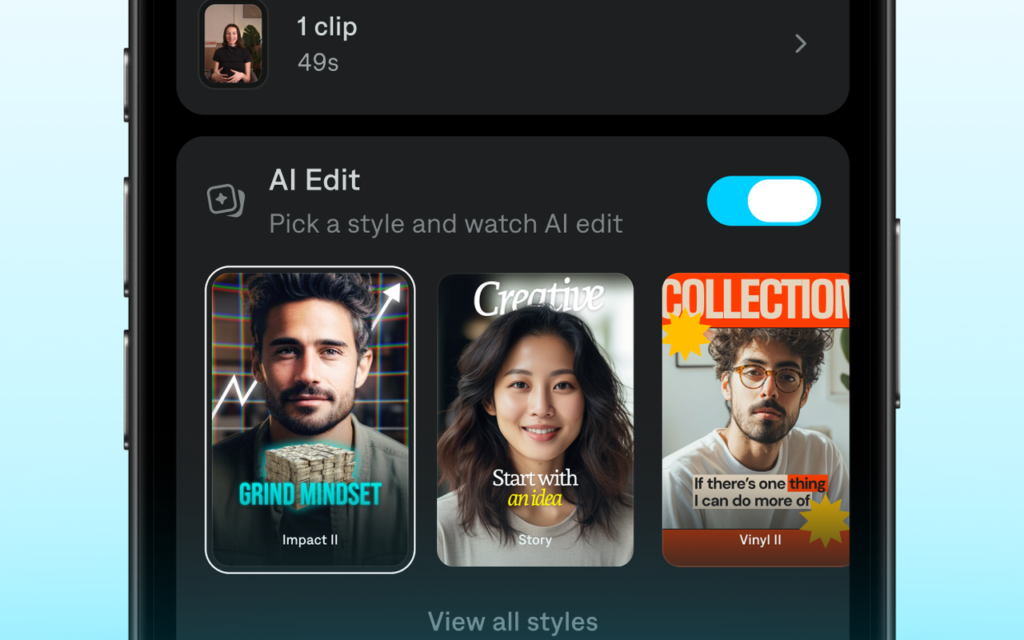
Captions is the tool HeyGen users pick when the video is made on a phone and published the same day. It started as a captioning app, and it has grown into an AI editing studio: a teleprompter, a camera with trim and zoom, captions in 100+ styles and 100+ languages, and AI Edit, which applies a whole editing style to your footage. The newer AI Twin feature turns you into a custom AI actor, and text-to-video builds a clip from a script without filming at all.
The editing is the reason Captions wins for short form. Eye Contact fixes wandering eyes, Denoise cleans up bad audio, and the chat-based editor lets you describe the change you want. A creator who makes a talking-head video every day will save real time here, because the whole pipeline, from filming to captions to export, lives in one app.
The downside is the platform and the paywall. Captions is built for the iPhone first, and the prices it lists are iOS prices, so web and Android pricing can differ. The AI features that matter for a HeyGen switch, the AI Twin, AI actors, text-to-video, and AI Edit, are locked to the Max plan at $24.99 a month, so the entry tier is a captioning tool, not an avatar tool.
Pricing is credit-based, on iOS prices. Free costs $0 and includes 60 to 200 lifetime credits, basic editing, captions, trim, and transitions, with no AI Twin or actors. Basic costs $9.99 a month and includes 200 credits a month and the core AI editing tools. Max costs $24.99 a month and includes 500 credits a month, AI Edit styles, AI Twin and custom AI actors, the chat-based editor, and custom B-roll, music, and image generation. Frontier starts at $69.99 a month and includes 1,400 credits, with 2x and 4x tiers at $139.99 and $279.99 a month for heavier AI usage. Check the live figures on the Captions pricing page before you commit, because the page says its listed prices reflect iOS plans only, and web checkout can show different rates.
What we like about Captions
- Credits roll over up to 3 times the monthly allowance, so a quiet month banks credit for a busy one.
- Basic costs $64.99 a year in the App Store, which is about $5.42 a month for caption work.
- Max includes 2 seats, so a creator and an editor can share one plan.
What could be better
- AI Twin, AI actors, text-to-video, and AI Edit need Max at $24.99 a month, not Basic.
- The free plan is a one-time lifetime credit allowance, not a monthly refill.
- The desktop experience is thinner than the phone app, so heavy editing still happens on a phone.
Before you pay for any avatar tool, make one test video with your own script and your own face or voice, and watch it on your phone. A demo video on the vendor site always looks good. Your script, your lighting, and your voice are the real test.
10. Wondershare Virbo: Best HeyGen Alternative for Cheap Avatar Volume
Wondershare Virbo is the tool HeyGen users pick when they want a lot of avatar video for little money. Basic Membership costs $109 a year and buys 600 credits a month, and Premium Membership costs $289 a year, or $29.90 a month, and buys 1,700 credits a month. A weekly plan costs $9.90 a week and buys 500 credits a week. Virbo runs on Windows, Mac, iOS, Android, and the web, which is the widest device coverage on this list.
The templates are the other reason Virbo earns its place. A creator who makes product videos, real estate listings, and social ads will find a starting point for each one, and the talking photo feature turns a single image into a presenter, which is handy for listings and announcements. Commercial use of generated videos is allowed for subscribers.
The biggest problem on this list needs stating plainly. There is no free plan, only a 3-day free trial, so a real test needs a paid plan from the start. The two membership tiers are the whole range, and a creator who outgrows Premium’s 1,700 credits a month has only the custom Enterprise plan above it. That narrow range is the reason Virbo sits last here despite the low prices.
Pricing is credit-based. Basic Membership costs $109 a year and includes 600 credits a month. Premium Membership costs $289 a year, or $29.90 a month, and includes 1,700 credits a month. A weekly plan costs $9.90 a week and includes 500 credits a week. Enterprise is custom priced. There is a 3-day free trial, and the trial credit amount is not stated on the pricing page. Check the live figures on the Virbo pricing page before you commit.
What we like about Virbo
- Basic Membership at $109 a year is the cheapest yearly route on this list, at about $9 a month.
- A weekly plan at $9.90 a week fits a short project that does not need a full month.
- Premium’s 1,700 credits a month are nearly three times Basic’s 600, so the step up buys real volume.
What could be better
- There is no free plan, only a 3-day free trial, so a real test needs a paid plan.
- Unused credits expire at the end of the validity period, with no rollover.
- The two membership tiers are the whole range, so a creator who outgrows Premium has only the custom Enterprise plan above it.
Pricing: What You Actually Pay
Pricing is where this comparison is decided for most buyers. A tool that costs $5.90 a month looks cheap until you learn that it watermarks every video and forbids commercial use, and a tool that costs $89 a month looks dear until you learn that it replaces a video editor, a captioning tool, and a translation service.
Start with the cheapest honest options. Synthesia Starter at $19 a month ($14 billed annually) is the cheapest plan that gives you clean, commercial video with no watermark. D-ID Pro at $29 a month carries a commercial license but still adds an AI watermark, so the cheapest watermark-free D-ID plan is Advanced at $196 a month ($108 billed annually). Lite at $5.90 a month keeps the watermark and the personal-use license. Synthesia Starter also undercuts HeyGen Creator at $29 a month by $10. Captions Max at $24.99 a month is the cheapest plan that gives you an AI twin and an AI editor in one app. Elai Creator at $29 a month matches HeyGen Creator dollar for dollar, and it buys 15 finished minutes, which is a number you can plan around.
Three pricing traps deserve attention. First, the meter is the price, not the plan. Every tool here meters by credits or minutes, so the plan price tells you nothing until you know what a minute costs on that plan. A 10-minute training video takes about 45% of Synthesia Starter’s month, two-thirds of the allowance on Elai Creator, and about 80% of the credits on HeyGen Creator at the newest model rates. Second, the free plan is a test, not a plan. Every free plan here watermarks, caps minutes, or blocks commercial use, and D-ID and Virbo do not even offer a lasting free plan. Third, the feature you need is often one tier above the entry price. 4K export needs HeyGen Pro or Elai Team, SCORM needs Colossyan Professional or Synthesia Enterprise, and an AI twin needs Captions Max, so read the plan comparison table before you budget, not after you buy.
Work out your minutes before you pick a plan. Count the finished minutes you publish in a normal month, add a third for retakes and translations, and buy the plan that covers that number. A plan that is $10 cheaper and 20 minutes short costs more than the dearer plan.
One final pricing warning applies to every tool here. Vendors change prices, and the figure on the pricing page today may not be the figure next quarter. HeyGen itself moved its credit rates as new avatar models arrived, Synthesia rebuilt its plans in October 2026, Colossyan renamed its tiers, and Tavus restructured in July 2026, so older guides quote retired tiers and retired prices. Treat any price in this article as a snapshot from 11 November 2026, not a promise.
A Worked Yearly Cost Comparison
Take a solo creator who publishes about 15 finished minutes of avatar video a month, and put them on the plan each tool would actually sell them. Not the cheapest plan on the page, and not the enterprise tier, but the plan a real creator buys in their first year. HeyGen Creator is included as the baseline you are leaving.
| Tool | Plan used | First-year cost | Renews at (per year) |
|---|---|---|---|
| D-ID | Pro, annual | $192 | $192 |
| Synthesia | Starter, annual | $168 | $168 |
| Virbo | Basic, annual | $109 | $109 |
| Captions | Max, monthly | $300 | $300 |
| VEED | Creator, annual | $147 | $147 |
| Elai | Creator, annual | $276 | $276 |
| HeyGen | Creator, annual (baseline) | $288 | $288 |
| Hedra | Pro, monthly | $600 | $600 |
| Hour One | Lite, monthly | $360 | $360 |
| Colossyan | Professional, annual | $708 | $708 |
| Tavus | Starter, monthly | $708 | $708 |
The spread is wider than most creators expect. Virbo Basic at $109 a year costs less than half of HeyGen Creator at $288 a year. Synthesia Starter at $168 a year undercuts HeyGen Creator by a clear margin and gives you clean, commercial video. D-ID Pro at $192 a year is cheaper than HeyGen too, but its videos still carry an AI watermark. VEED Creator at $147 a year and Elai Creator at $276 a year sit just below HeyGen, while Captions Max at $300 a year costs $12 more, which is fair for an editor and an AI twin in one app. Hedra Pro costs $600 a year, Hour One Lite costs $360 a year, and Colossyan Professional and Tavus Starter both cost $708 a year, which fits, because both are team and developer tools, not solo creator plans.
The yearly column is the one to show your manager, but remember what the entry plan leaves out. A creator who needs 4K on HeyGen steps up to Pro at $588 a year, and a team that needs Tavus for live conversation is buying minutes, not videos. Run the same simple maths for your own volume, with the tier you actually need, before you decide.
Switching From HeyGen: How to Move Without Losing Work
Switching avatar tools sounds harder than it is, and the fear of losing work keeps more creators on HeyGen than the price ever does. The honest answer is that migration takes an afternoon of planning and a week of running both tools side by side, and it is worth doing properly. Start by listing every video you have made on HeyGen, with its script, its avatar, and its purpose, and decide which videos move and which ones are finished and can be archived. Most creators find that a third of their videos are old offers or outdated intros.
Export comes next. Download your finished HeyGen videos and keep the original scripts separately, because the scripts are the part you will reuse, and no avatar tool imports another tool’s avatar. Your custom avatar does not move either: a digital twin trained on HeyGen has to be retrained on the new tool, so budget a day for filming and training, and test the new twin with a short script before you commit to a long video. Voice clones move the same way, which is to say they do not move, so record a fresh voice sample on the new platform.
Run both tools in parallel for one to two weeks. Build the next two videos on the new tool, compare them side by side with your HeyGen output, and check the lip sync, the voice, and the export quality on a phone. Then cancel HeyGen at the end of the billing cycle and keep the account open for reference for a month. If you work with design assets for thumbnails and social posts, our guide to Canva alternatives pairs well with the switch, because the graphics around your videos need the same fresh look as the videos themselves.
How to Choose the Right HeyGen Alternative
Choose by the video, not by the feature list. A feature list will tell you that every tool on this page has avatars, voices, and languages, and that is true and useless. What matters is which tool makes your most common video easier. If your most common video is a training lesson, pick Synthesia or Colossyan. If it is a social clip, pick Captions or VEED. If it is a talking character, pick Hedra. If it is a live conversation, pick Tavus. If it is a slide deck turned into a course, pick Elai.
Then check three practical things before you pay. First, the free plan or the trial: use it for two real weeks with a real script, not a demo. Second, the meter: work out your finished minutes for a normal month, add a third for retakes, and buy the plan that covers that number. Third, the exit: check that you can export your finished videos in the quality you need, and that the commercial license covers how you publish.
Finally, involve the people who will make the videos. An avatar tool is only as good as the person who opens it, and a tool your team resents is a tool with stale videos and missed publishing dates. Let two people try the top two contenders for a week, then ask them which one they would keep. Their answer is worth more than any review, including this one.
Who Should Pick Each HeyGen Alternative
Pick Synthesia if you want the closest HeyGen replacement with more training power, and you are happy to pay $19 a month for Starter or $89 a month for Pro. Pick Colossyan if you build courses and you are happy to pay $59 a month for Professional. Pick D-ID if you want the cheapest paid start and talking photos, and you are happy to pay $5.90 a month for Lite.
Pick Hedra if your videos are character-driven and you are happy to pay $50 a month for Pro. Pick VEED if you want an editor and avatars in one place and you are happy to pay $12.25 a month for Creator. Pick Elai if your videos start as slide decks and you are happy to pay $29 a month for Creator. Pick Tavus if you build live video conversation into a product and you are happy to pay $59 a month for Starter.
Pick Hour One if your videos need a polished, broadcast-style presenter and you are happy to pay $30 a month for Lite. Pick Captions if you film short videos on your phone and you are happy to pay $24.99 a month for Max. Pick Virbo if you want cheap avatar volume and you are happy to pay $29.90 a month for Premium.
When HeyGen Is Still the Right Call
Leaving HeyGen is not right for every creator, and this guide would be dishonest if it pretended otherwise. HeyGen is still one of the best avatar tools for a solo creator who makes presenter videos, and its Avatar V model is genuinely strong.
HeyGen is also the right call when your videos already run on it and the pain is small. If the complaint is one missing feature, check whether Pro at $49 a month fixes it before you move a whole library to a new platform. Migration costs time, retraining, and goodwill, and a creator who moves for a small saving often finds the new tool has its own gaps.
The moment to leave is when the pain is structural, not cosmetic. If the credit meter runs out every month, or your work needs an editor HeyGen will not give you, or your videos need to talk back to the viewer, then the tools above are worth the move. Stay when HeyGen fits and the bill is fair. Leave when your videos have outgrown the tool, not when a review told you to.
Final Thoughts
HeyGen alternatives are not hard to find, and the ten tools above cover every kind of creator who outgrows HeyGen or outprices it. The short answer is Synthesia for most people, D-ID for the best free start, and Captions for the best value, and any of those three is a safe choice.
Shortlist two tools from this guide, use each one for two real weeks with a real script, and let the people who will make the videos vote. Check the tier that carries the feature you need, run the yearly maths from the table above, and confirm the price on the live pricing page before you pay. Then switch properly: archive the dead videos, retrain your avatar on the new tool, and cancel HeyGen at the end of the cycle.
FAQs
What is the best HeyGen alternative in 2026?
Synthesia is the best overall HeyGen alternative for most people, because it keeps the presenter video workflow, adds a free plan with 10 minutes a month, and costs $19 a month on Starter. D-ID is the best free start, Captions is the best value for short-form creators, and Colossyan is the best pick for training courses with SCORM export.
Is there a free alternative to HeyGen?
Yes. Synthesia, Colossyan, VEED, Elai, Tavus, and Captions all have free plans, and D-ID has a free 14-day trial. Synthesia has the most useful free plan, with 10 minutes a month and 9 avatars, while HeyGen’s own free plan makes 3 watermarked videos a month of up to 1 minute each. Hour One has a free trial, and Virbo has a free trial with limited credits.
Which HeyGen alternative is cheapest?
Synthesia Starter is the cheapest plan that gives you clean, commercial video, at $19 a month, or $14 a month billed annually. D-ID Lite costs $5.90 a month, but it watermarks every video and carries a personal-use license, so it is not a real alternative for business use. D-ID Pro at $29 a month has a commercial license but still adds an AI watermark, and the cheapest watermark-free D-ID plan is Advanced at $196 a month ($108 billed annually). Synthesia Starter at $19 a month is cheaper than HeyGen Creator at $29 a month, and Virbo Premium at $29.90 a month is about the same price as HeyGen Creator.
Can I use my HeyGen avatar on another tool?
No. A custom avatar trained on HeyGen does not move to another platform, and the same applies to voice clones. You need to film a fresh training video and record a fresh voice sample on the new tool, which takes about a day including processing. Your scripts and your finished video files do move, so save both before you cancel.
Is Synthesia better than HeyGen?
It depends on what you value. Synthesia is stronger on training, with interactive video, quizzes, and SCORM export, and its Starter plan at $19 a month costs less than HeyGen Creator at $29 a month. HeyGen is stronger on avatar realism at the top end, with its Avatar V model, and its credit rollover is more generous. For a solo creator making short videos, HeyGen is often the better fit. For a training team, Synthesia wins.
Which HeyGen alternative is best for training videos?
Colossyan is the best pick for training videos, because it is built for courses, with a course outline editor, quizzes, branching, and SCORM export at $59 a month on Professional. Synthesia is the other strong pick, with interactive video on Pro and SCORM on Enterprise, and Elai is the best pick when your training starts as a slide deck.
Which HeyGen alternative is best for social media videos?
Captions is the best pick for social media, because it is built for phone filming, with a teleprompter, AI Edit, an AI Twin, and caption styles for $24.99 a month on Max. VEED is the best pick when you also need a full editor, with subtitles and translations in the same timeline, and Hedra is the best pick when the video is a talking character.
Does HeyGen still have a free plan?
Yes. HeyGen offers a free plan with up to 3 videos a month, each up to 1 minute long, with a HeyGen watermark, 500+ stock avatars, one custom video avatar, and 30+ languages, with no credit card required. Creator costs $29 a month after that, Pro starts at $49 a month, and Business costs $149 a month. If you need a free plan that makes more than 3 short videos a month, Synthesia’s free plan gives you 10 minutes a month, and Colossyan’s gives you 20 minutes a month with the NEO model.
Pick Synthesia for most people, D-ID for the best free start, Captions for the best value
Most people leaving HeyGen should start with Synthesia, because it keeps the presenter video workflow and adds the training features HeyGen charges extra for, with a free plan and paid plans from $19 a month. Creators who want the cheapest clean commercial video should pick Synthesia Starter at $19 a month ($14 billed annually), and short-form creators who film on a phone should pick Captions Max at $24.99 a month. Trainers who build courses should pick Colossyan, and developers who need live conversation should pick Tavus.
This kind of research, applied to your growth
If you run a SaaS business, SaaS Harvest can do this kind of digging in your market and turn it into search traffic that signs up.
