

Shopify vs WooCommerce is the ecommerce decision that shapes everything after it: what you pay each month, how fast you can launch, how much control you keep, and how painful it is to change your mind later. My direct opinion is that most first-time store owners should start with Shopify, because it removes the technical work that kills new stores before they get their first steady sales. But if control matters more to you than convenience, and you are comfortable with WordPress, WooCommerce can be the better long-term home. Which one sounds more like you: a store you can open this weekend, or a store you can rebuild exactly the way you want?
The reason this comparison never gets old is that the two platforms solve the same problem in opposite ways. Shopify gives you a finished, hosted store. You sign up, pick a theme, add products, connect payments, and you are selling. WooCommerce gives you a free plugin that turns WordPress into a store, and you assemble the rest yourself: hosting, a theme, payment processing, security, and updates. One trades freedom for simplicity. The other trades simplicity for freedom. Neither trade is wrong. The mistake is picking the wrong trade for your skills, your budget, and your patience.
In this comparison, we compared the two platforms from vendor pricing pages, plan documents, user reviews and demo videos: we checked setup, selling, design, payments, search, speed, and ownership on paper, and we worked out what a small store actually pays in year one from the published figures. You will find a side-by-side table, a clear pricing breakdown, a migration section for people who change platforms later, and clear guidance on who should pick each option. By the end, you should be able to choose with confidence, and you should also know what that choice will cost you in time as well as money.
Quick Picks: The Short Version
Shopify
Best for most new and growing stores that want a fast launch, reliable checkout, and support when something goes wrong.
Price From $39 per month, or $29 per month billed yearly on Basic.
3-day free trial, then $1 per month for 3 months on most plans at the time of writing.
WooCommerce
Best for WordPress users who want full ownership of code, data, and design, and who do not mind managing hosting and updates.
Price Core plugin free. You pay for hosting, a domain, and any paid extensions you choose.
No monthly platform subscription and no revenue share from WooCommerce itself.
WooCommerce on Lean Hosting
Best value when your sales are still low, your product list is modest, and you can keep hosting and extension costs lean.
Price Hosting from the lower end of the $25 to $350 per month range WooCommerce budgets for most stores, plus a domain at roughly $10 to $30 per year.
Start lean, add paid extensions only when a feature earns its cost.
Shopify vs WooCommerce at a Glance
| Area | Shopify | WooCommerce |
|---|---|---|
| Model | Hosted, subscription platform | Free WordPress plugin, self-hosted |
| Starting cost | $39 per month monthly, $29 per month billed yearly on Basic | Free plugin, plus hosting and domain |
| Ease of setup | Very fast, guided setup, no hosting to arrange | Slower, you arrange hosting, WordPress, theme, and payments |
| Design and themes | Curated theme store, visual editor, limited code access on lower plans | Thousands of WordPress themes, full code access |
| Apps and extensions | Large app store, many paid apps, monthly costs add up | Huge WordPress plugin ecosystem, mix of free and paid extensions |
| Payments and fees | Shopify Payments or third-party gateways, gateway fees apply on some plans | Processor rates only, no platform transaction fee from WooCommerce |
| SEO | Strong built-in basics, some URL and structure limits | Deep control through WordPress and SEO plugins |
| Scalability | Scales smoothly, higher plans unlock lower fees and more features | Scales with hosting, caching, and maintenance quality |
| Support | Official support channels included with subscription | Docs and community, plus support from your host and extension makers |
How We Compared Shopify and WooCommerce
We compared these platforms as a store owner would experience them, starting with the first hour and ending with the first year. That means setup speed mattered, and so did the quiet costs that only appear later: app subscriptions, payment fees, hosting upgrades, and the time spent fixing things. A platform that looks cheap on day one can become expensive by month six, and a platform that looks technical on day one can become cheap and flexible once it is running well. We kept both timelines in view.
Our criteria were simple and practical. First, how quickly can a non-technical owner launch a store that looks good and takes payments safely? Second, what does year one really cost for a small store, including the fees most comparison pages bury in footnotes? Third, how well does each platform handle everyday selling: products, checkout, shipping, discounts, and customer accounts? Fourth, how much control do you keep over search visibility, speed, data, and design? Fifth, what happens when you outgrow your first setup, or when you want to move? A good platform should help you grow, and it should not punish you for changing direction.
We checked the vendor pricing pages for every price in this article, and we did not rely on second-hand pricing roundups. Prices are US list prices checked against vendor pricing pages. Where a price depends on your choices, for example hosting or extensions, we give you the range and a worked example, so you can adjust the maths for your own store. If a figure was uncertain, we left it out or told you to check the live page. That matters in ecommerce, because a $10 monthly difference, repeated over a year and combined with payment fees, can change which platform is actually cheaper for you.
One more point on method. We compared the two platforms from vendor pricing pages, plan documents, user reviews and demo videos, not from marketing pages alone. Marketing pages show the best version of a product. Store owners live with the ordinary version: the theme that needs tweaking, the app that needs a paid plan, the checkout that needs testing on a phone, the plugin update that needs care. This article stays close to that ordinary experience, because that is where most buying regret comes from. If you want a wider look at hosted options before you decide, our guide to Shopify alternatives is a useful next read, especially if Shopify feels close but not quite right.
Shopify in Focus
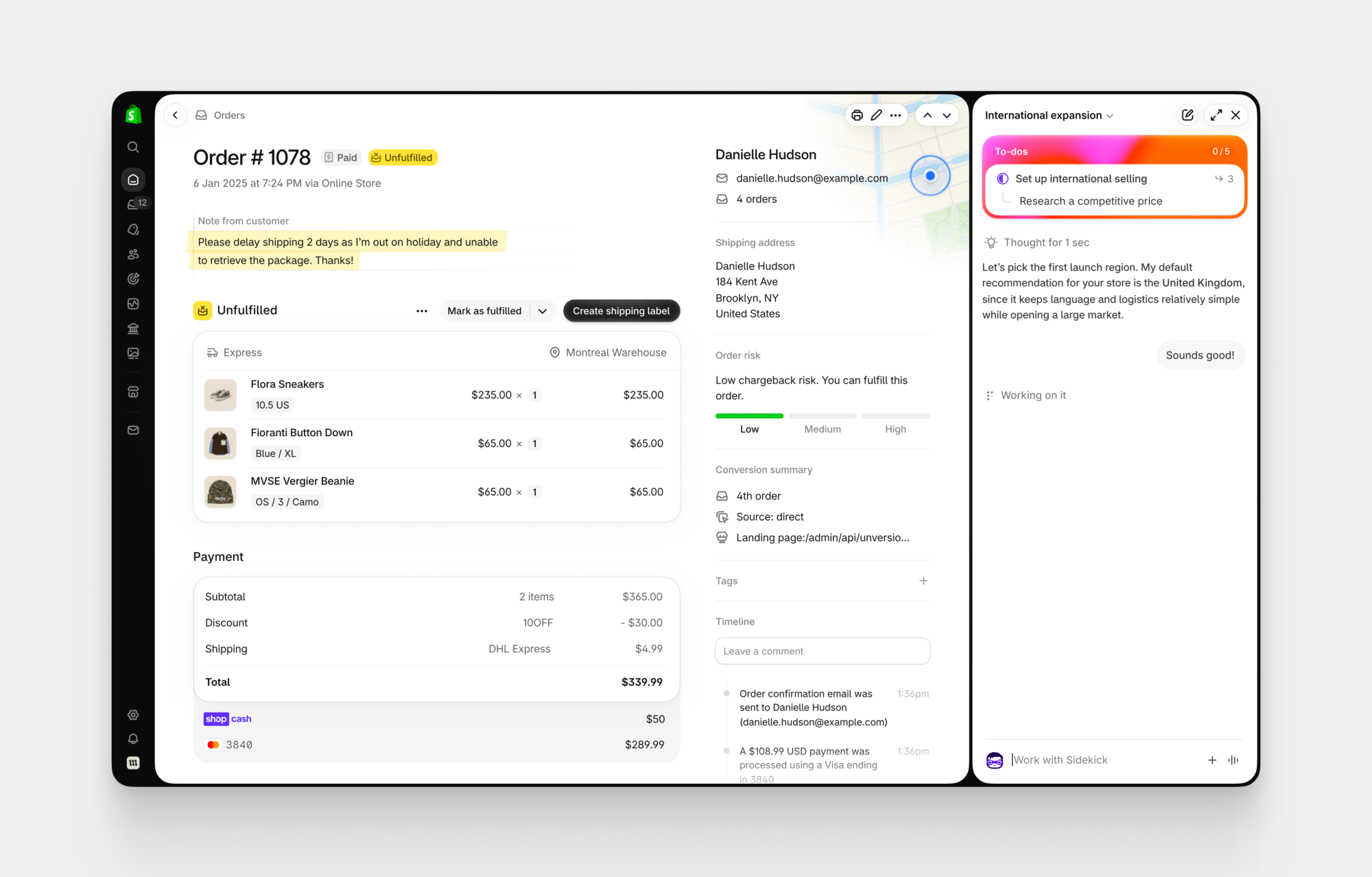
Shopify is a hosted ecommerce platform, which means Shopify runs the servers, the security updates, the software upgrades, and the core infrastructure behind your store.
You pay a monthly subscription, and in return you get a working store with hosting included, a checkout that is tested at huge scale, and a support team to contact when you are stuck. For a new owner, that trade is hard to beat. You can focus on products, photos, pricing, and marketing, while the platform handles the parts of running a store that most beginners never wanted to learn.
The day-to-day experience is deliberately guided. You add products through a clean admin area, you choose a theme and edit it visually, you set shipping zones and tax settings with prompts, and you connect a payment provider in a few steps. The editor is friendly, the defaults are sensible, and the store looks professional quickly. That speed is a real business advantage. A store that launches in a week can start learning what customers want, while a store that takes two months to perfect may still be guessing. Shopify rewards momentum, and momentum is often what a new business needs most.
Shopify also shines when you start selling in more places. You can sell through your online store, social channels, and in person with the same product catalogue, and you can manage orders in one place. Discounts, gift cards, customer accounts, and order management are built in, so you are not hunting for a plugin for every basic selling task. The limits appear later, and they are mostly about control and cost: you work inside Shopify rules, you pay extra for some features through apps, and moving away takes planning. For many stores, those limits never become a problem. For stores with very specific needs, they matter a lot, and that is where WooCommerce starts to look attractive.
What we like about Shopify
- Staff accounts work differently by plan: Basic includes only the store owner login, with no additional staff accounts; Grow adds 5 additional staff accounts; Advanced adds 15; Plus has unlimited staff accounts, so a small team can work in the store without sharing one login.
- More than 200 themes are listed in the official theme store, including free options, which gives new stores a polished starting point without hiring a designer.
- Abandoned checkout recovery is included even on the Basic plan, so you can follow up with shoppers who left items in their cart.
What could be better
- Full checkout customisation is restricted on lower plans, with the deepest checkout control reserved for higher plans and Plus.
- Shopify URL structure keeps fixed prefixes for products and collections that you cannot remove, which limits how clean some URLs can look.
- Leaving Shopify means rebuilding your theme and reworking some integrations, because the hosted setup does not transfer as a complete package.
WooCommerce in Focus

WooCommerce is a free plugin for WordPress, and that one fact explains both its power and its workload. WordPress already powers a huge share of the web, so WooCommerce inherits a mature content system, a vast theme and plugin ecosystem, and complete access to your site files and database. You can change almost anything: the checkout flow, the product page layout, the emails customers receive, the way shipping is calculated, and the design down to the smallest detail. If you can describe the store you want, there is usually a way to build it with WooCommerce.
The catch is that you are the store operator in a fuller sense. You choose a host, you install WordPress, you install WooCommerce, you pick a theme, you connect payments, and you keep everything updated. A good host will handle some of that work for you, and managed WordPress hosting can close much of the gap with Shopify, but it adds cost. A cheap host can save money and cost you speed and reliability instead. WooCommerce rewards owners who enjoy that control, or who already run WordPress and know its rhythms. It can frustrate owners who just want to sell and move on.
Where WooCommerce truly earns its keep is content and customisation. If your store also needs a blog, landing pages, membership content, or a complex catalogue with detailed product information, WordPress gives you tools that a hosted platform cannot match without workarounds. You own your content and your store in the same place, you can use the SEO plugins WordPress is known for, and you are not paying a platform fee on every sale. That combination makes WooCommerce a strong choice for content-led stores, niche catalogues, and businesses that already have WordPress skills in house. You can read more about hosted builders in our Wix vs Squarespace comparison if you want to see how simpler builders differ from both options here.
What we like about WooCommerce
- No product or staff user cap is imposed by the platform itself, so growth in catalogue size or team size is limited by your hosting and workflow, not by a plan tier.
- More than 800 official extensions are listed in the WooCommerce marketplace, covering payments, shipping, subscriptions, bookings, and many niche selling needs.
- Full access to your database and code lets you customise checkout fields, order data, and product logic in ways a hosted platform would block.
What could be better
- Security patching and backups fall to you unless your host covers them, so a neglected store can become a risk over time.
- A single theme or extension update can conflict with another part of the site, which means updates need careful testing before they go live.
- There is no single official phone support line in the same way a hosted subscription provides, so help comes from docs, forums, your host, and extension makers.
Pricing Deep Dive: What You Actually Pay
Shopify pricing is easy to read and easy to underestimate. Basic costs $39 per month when paid monthly, or $29 per month when billed yearly. Grow costs $105 per month, and Advanced costs $399 per month. At the time of writing, new stores also get a 3-day free trial, then $1 per month for 3 months on most plans. That intro offer lowers the first months, but it does not change the long-term price, so judge Shopify on the regular monthly figure, not the $1 months. Shopify Plus is the enterprise tier, from about $2,300 per month, and it is only relevant once a store is operating at serious scale.
Payment fees are where Shopify costs need careful reading. With Shopify Payments, online card rates are 2.9 percent plus 30 cents on Basic, 2.7 percent plus 30 cents on Grow, and 2.5 percent plus 30 cents on Advanced. If you use a third-party gateway instead, Shopify adds its own fee on top of what that gateway charges: 2 percent on Basic, 1 percent on Grow, and 0.6 percent on Advanced. That extra fee is a strong reason many Shopify stores use Shopify Payments when it is available in their country. It is also a reason to check the live Shopify pricing page before you commit, because rates and plan details can change, and your country or currency can affect what you actually pay.
WooCommerce pricing works in the opposite direction: the plugin is free, and everything around it costs money. WooCommerce itself charges no monthly subscription and takes no revenue share. The WooCommerce pricing page budgets hosting at $25 to $350 per month for most stores, and extensions at $29 to $299 per year per extension. Payment processing is charged at processor rates, with Stripe and WooPayments at about 2.9 percent plus 30 cents for US cards. A domain costs roughly $10 to $30 per year. Those ranges are wide on purpose, because a small store on lean hosting looks nothing like a busy store on managed hosting with five paid extensions. Your choices decide your bill.
Here is a worked year-one example for a small store, using only the figures above and plain assumptions you can adjust. Assume the store sells 100 orders per month, with an average order value of $50, which gives $5,000 in monthly sales and $60,000 in year-one sales. Assume the owner starts on monthly billing, uses the standard card processor on each platform, and keeps paid extras modest. On Shopify Basic at $39 per month, the subscription costs $468 for the year. Card fees at 2.9 percent plus 30 cents, on 1,200 orders, come to $1,740 in percentage fees plus $360 in per-order fees, a total of $2,100. Add a domain at $20 for the year, and the year-one platform and payment total is about $2,588, before any paid apps or theme purchases.
For WooCommerce on lean hosting, assume hosting at $25 per month, which is the low end of the range above, plus a $100 per year domain and $100 per year for two small extensions at $50 each. That is $300 plus $200, or $500 for the year, before card fees. Card fees on $60,000 of sales at 2.9% plus 30 cents per order come to $2,100, so the WooCommerce lean total is $2,600 before any other costs. The number is low because hosting is low and the plugin is free, and it is also fragile, because every paid extra is counted in full, and any one of them can move the total.
Change the assumptions and the winner changes. If WooCommerce hosting rises to $75 per month, the WooCommerce total in this example rises by $600, and Shopify Basic becomes cheaper. If the Shopify store adds three paid apps at $15 per month each, Shopify rises by $540 for the year, and WooCommerce pulls ahead again. If sales double, card fees rise equally on both platforms at the same rate, so the gap stays driven by subscriptions, apps, hosting, and extensions, not by sales volume alone. The lesson is practical: write down your expected order count, your average order value, your app list, and your hosting choice, then run the same simple maths for your store. A platform that wins on a marketing page can lose on your spreadsheet, and the reverse is also true.
Before you pay for a full year of anything, run the store for one full month on monthly billing and list every paid app and extension you actually used. Cancel the ones you opened twice or less, then switch to yearly billing only for the tools that survived that test.
One final pricing warning applies to both platforms. Free plans and free plugins are not free stores. Themes, apps, extensions, email tools, and design help all carry costs, and those costs tend to grow as a store grows. Shopify makes those costs visible as monthly app charges. WooCommerce spreads them across hosting renewals, extension renewals, and occasional developer help. Budget a small monthly amount for tools on either platform, review it every quarter, and treat any tool that does not earn its fee as a candidate for cancellation. That habit saves more money over two years than picking the cheapest starting plan.
Ease of Use: Setup, Themes, and Day-to-Day Running
Shopify setup feels like following a checklist that already knows the answers. You create an account, answer a few questions about what you sell, pick a theme, add a product, set a price, connect payments, and publish. The admin area uses plain language, the settings are grouped sensibly, and help text appears where you need it. A complete beginner can have a presentable store in a day, and a focused owner can have a selling store in a weekend. That speed is not a gimmick. It comes from Shopify removing decisions that beginners find confusing, like choosing a server, installing software, or configuring caching.
WooCommerce setup asks more of you at the start, and it rewards you later with more choices. You need a domain and hosting, a WordPress install, the WooCommerce plugin, a theme that works well with WooCommerce, and payment and shipping settings that you configure yourself. Managed WordPress hosts simplify several steps, and many offer one-click WooCommerce installs, but you still need to understand what you installed and how the pieces fit together. An owner who already uses WordPress will move through this quickly. An owner who has never used WordPress should allow extra time, or budget for help, because the learning curve is real even if the software itself is free.
Themes show the same contrast. Shopify themes are curated, consistent, and easy to edit visually. You can change colours, fonts, sections, and page layouts without touching code, and the result usually looks clean on phones as well as desktops. The trade-off is that deep customisation often needs code knowledge or a developer, and some changes that are simple in WordPress require an app or a workaround in Shopify. WooCommerce themes are far more varied, because the whole WordPress theme market is open to you. You can find a theme for almost any niche, and you can edit templates directly if you know how. The trade-off is quality variation: a badly coded theme can slow your store or conflict with a plugin, so theme choice needs more care.
Day-to-day running follows the same pattern. Shopify centralises orders, customers, discounts, and inventory in one admin area, and it handles updates in the background. You log in and sell. WooCommerce gives you the same daily tools, plus WordPress content tools, but you also carry update and maintenance routines. That routine is not heavy for a small store: update plugins regularly, check the site after updates, keep backups, and monitor speed. It is, however, a routine that Shopify owners never have to think about. Ask yourself honestly how you feel about that routine. If it sounds like a chore you will avoid, Shopify will serve you better. If it sounds like control you want, WooCommerce will feel like home.
For teams, the difference is similar. Shopify gives you a single system with clear roles and a support channel when the team is stuck. WooCommerce gives you WordPress user roles plus plugin controls, which can be more flexible and also more fragmented. A small team with one owner and one helper will be fine on either platform. A larger team with specific permissions, approval steps, or content workflows will appreciate WordPress flexibility, provided someone owns the technical side. Ease of use, in the end, is about more than the first week. It is about the hundredth week, when the store is busy, the team is tired, and a simple task still needs to be simple.
Selling Features: Products, Checkout, Shipping, and Payments
Both platforms handle the core selling job well: products with variants, prices, sale prices, inventory tracking, discounts, customer accounts, and order management. The differences show up in the details and in what is included without an extra purchase. Shopify includes a polished checkout, discount codes, gift cards, and multi-channel selling as part of the core platform. You can sell on your store, on social channels, and in person, and you can see those orders together. That integration is valuable for a store that sells at markets, on Instagram, or through a pop-up shop as well as online.
WooCommerce matches that core job through the plugin and its extension ecosystem. You can sell physical products, digital downloads, subscriptions, bookings, and memberships, often with a dedicated extension for each model. That breadth is a genuine advantage for unusual businesses. A store selling courses with membership access, a rental business with booking calendars, or a subscription box with complex billing cycles will often find a WooCommerce extension that fits, where a hosted platform might need a workaround or a higher plan. The cost is complexity: each extension adds settings, renewal costs, and update checks, so a store with ten extensions needs more care than a store with two.
Checkout is the moment that decides revenue, and both platforms treat it seriously. Shopify checkout is fast, familiar to millions of shoppers, and optimised for phones. Customers recognise it, trust it, and complete it quickly. WooCommerce checkout is fully customisable, which is powerful for stores with specific fields, shipping rules, or upsell flows, but it also means the store owner owns checkout quality. A slow theme, a heavy plugin, or a poorly tested payment setup can hurt conversion in ways a hosted checkout would prevent. Test your checkout on a real phone, with a real test order, before you launch on either platform, and repeat that test after any major change.
Shipping and payments follow the same hosted versus self-hosted logic. Shopify offers built-in shipping tools, discounted carrier rates in some regions, and Shopify Payments for a smooth setup, plus third-party gateways with the extra fees described earlier. WooCommerce lets you choose any payment processor and shipping extension you like, with no platform fee on top, and you can build shipping rules that match complex business needs. That freedom is excellent for stores with unusual shipping logic. It also means you compare processors, test shipping calculations, and fix edge cases yourself. If your shipping is simple, Shopify simplicity wins. If your shipping is unusual, WooCommerce flexibility wins.
One practical selling point deserves emphasis: customer data and marketing tools. Both platforms connect to email marketing tools, analytics, and advertising platforms. Shopify has a strong app ecosystem for marketing automation, reviews, and loyalty. WooCommerce has the WordPress plugin ecosystem for the same jobs, plus full control over forms, landing pages, and content that supports those campaigns. As your store grows, pairing it with a proper customer system matters, and our guide to the best CRM software for small business can help you choose a tool that keeps customer history in one place instead of scattered across apps. The platform you pick should make that connection easy, not fight it.
SEO, Speed, and Ownership: What You Keep
Search visibility starts with basics that both platforms handle: editable titles, descriptions, product URLs, image alt text, sitemaps, and mobile-friendly pages. Shopify covers those basics well, and its hosted infrastructure gives most stores solid speed without extra work. WooCommerce, through WordPress, gives you deeper control: you can use mature SEO plugins, edit content structure freely, build detailed category and blog content, and shape internal linking exactly as you want. For a content-heavy store that plans to win search traffic with guides, comparisons, and product education, that depth is a real advantage.
Speed deserves a separate look, because shoppers leave slow stores. Shopify speed is generally consistent, because Shopify controls hosting, caching, and the checkout environment. A heavy theme or too many apps can still slow a Shopify store, but the baseline is strong. WooCommerce speed depends on your choices: hosting quality, theme code, image sizes, caching, and plugin count. A well-built WooCommerce store on good hosting can be very fast. A WooCommerce store on cheap shared hosting with a heavy theme and twenty plugins can be slow, and fixing it requires technical work. Speed, in WooCommerce, is a responsibility. In Shopify, speed is mostly a default.
Ownership is where the platforms truly diverge, and it is the section many buyers skip until it is too late. With WooCommerce, you own your site files, your database, your content, and your customer data in a portable form. You can move hosts, change themes, hire any WordPress developer, and keep your store running on your terms. Your main lock-in is practical, not contractual: moving a large, customised store still takes work, but no single company can close your store or change your plan terms overnight. With Shopify, you rent a complete service. You own your products, customers, and content in the sense that you can export much of it, but your store design, your hosted setup, and many app integrations live inside Shopify rules. That is a fair trade for convenience, and millions of stores accept it happily, but you should accept it with open eyes.
Think about ownership in terms of risk as well as freedom. A hosted platform can change pricing, change features, or close accounts that break its terms. Those events are rare for ordinary stores, but they are possible, and they remind you that a hosted store is a tenancy, not a freehold. A self-hosted store can suffer hosting outages, security issues, or update problems, and those risks fall on you. Neither model is risk-free. The question is which risk you prefer to manage: platform dependence, or technical responsibility. Your answer to that question often predicts which platform you will still be happy with in three years.
For search and ownership together, WooCommerce has one more quiet advantage: content and commerce live in the same system. A blog post can link naturally to a product, a buying guide can rank and convert, and a category page can carry the editorial depth that search engines reward. Shopify also has blogging, and it works well for many stores, but WordPress blogging is deeper and more flexible. If your growth plan depends on search traffic and helpful content, weigh that advantage heavily. If your growth plan depends on paid ads, social selling, and fast launches, Shopify speed and checkout may matter more than content depth.
Who Should Pick Shopify?
Pick Shopify if you want to sell soon, with as little technical work as possible, and you value reliable support over total control. This fits first-time store owners, creators selling merch, small brands testing a product idea, and busy founders who need to focus on products and marketing. It also fits stores selling through multiple channels, stores that need a dependable checkout on phones, and teams that want one admin area without managing servers. If the idea of updating plugins, choosing a host, and troubleshooting a theme conflict makes you sigh, Shopify is probably your platform.
Shopify also fits growing stores that want predictable scaling. As sales rise, you can move from Basic to Grow to Advanced, gain lower card rates and more features, and keep the same admin workflow your team already knows. You will pay more as you grow, through subscriptions and apps, but you will rarely hit a technical wall that stops selling. The stores that regret Shopify are usually stores with very specific customisation needs, stores that resent platform fees on third-party gateways, or stores that want to own every line of code. If none of those descriptions fit you, Shopify simplicity is a strength, not a compromise.
Who Should Pick WooCommerce?
Pick WooCommerce if you already use WordPress, you enjoy control, and you want to own your store outright. This fits content-led businesses, niche stores with complex products, developers and agencies building client stores, and owners who already manage WordPress sites without fear. It also fits stores with tight early budgets that can keep hosting lean, stores that need unusual checkout or shipping logic, and businesses that plan to build a large library of search content alongside their catalogue. If you like the idea of choosing every piece of your store, WooCommerce will reward that interest.
WooCommerce also fits owners who think long term about costs and independence. No monthly platform subscription means your fixed costs stay tied to hosting and extensions you choose, and no platform fee means you keep more control over payment choices. The trade is time and responsibility: you, or someone you pay, must keep the store updated, backed up, and fast. If you have that person, whether it is you or a developer or a managed host, WooCommerce can be cheaper and more flexible for years. If you do not have that person, and you do not want to become that person, the freedom of WooCommerce can turn into a burden.
Switching Later: Moving Between Shopify and WooCommerce
Many store owners ask whether they can switch later, and the honest answer is yes, with effort and planning. Moving from Shopify to WooCommerce usually means exporting products, customers, and orders, rebuilding your theme in WordPress, reconnecting payments and shipping, and setting up redirects so old product URLs point to new ones. Moving from WooCommerce to Shopify means exporting the same data, choosing a Shopify theme, rebuilding custom features with apps or code, and again setting up redirects. Neither move is a one-click job, and both moves carry a risk of lost search rankings if redirects are missed.
That risk is manageable if you plan for it. Keep a full export of products, customers, and orders before you move. Map every important old URL to a new URL, especially best-selling products and pages that rank in search. Test the new checkout with real test orders, check shipping and tax settings, and run both stores in parallel for a short period if you can. Tell repeat customers about any account changes, because customer passwords usually do not transfer cleanly between systems. A careful migration takes days, not minutes, but it is a normal business project, and thousands of stores complete it every year.
Migration also teaches a useful lesson about your first choice. Because switching takes work, it pays to choose well now, but it does not pay to freeze with indecision. A store that launches on Shopify, learns what customers want, and later moves to WooCommerce with real sales data is in a stronger position than a store that spends six months debating platforms and never launches. Likewise, a store that starts on WooCommerce, builds content and a catalogue, and later moves to Shopify for simplicity is making a business decision, not admitting a mistake. Platforms serve stages of a business. Your first platform does not have to be your last platform, and a good migration plan protects you either way.
If you are already leaning one way but worried about lock-in, take one practical step before you launch: keep your product data clean. Use clear product titles, complete descriptions, consistent categories, and good photos that you own. Clean data migrates well. Messy data, with missing descriptions and duplicate products, makes every future move harder. That habit costs nothing now and saves hours later, whichever platform you choose today, and whichever platform you choose next.
Final Thoughts
Shopify vs WooCommerce comes down to a simple choice between convenience and control, and both sides of that choice are respectable. Shopify gives you speed, reliability, and support, at the cost of monthly fees and platform rules. WooCommerce gives you freedom, ownership, and content depth, at the cost of setup time and ongoing maintenance. Most new stores will do better with Shopify, because launching fast and learning fast matters more than perfect control in year one. Most WordPress-savvy owners, content-led stores, and highly custom businesses will do better with WooCommerce, because control and ownership pay off over years.
Our recommendation is practical. If you want a store live this week, choose Shopify Basic, use Shopify Payments, and keep your app count low. You will know your cost in advance, and you will have support when something breaks. If you want ownership and control and you already use WordPress, choose WooCommerce, pay for good hosting, and keep the plugin list short. Both choices can work, and the difference is not which platform is better in general, but which trade you prefer: convenience and a higher fixed cost, or control and more work. Choose the trade, then count the cost in full, and the platform will follow.
FAQs
Is Shopify or WooCommerce cheaper for a small store?
It depends on your hosting and app choices. In our worked example, with 100 orders per month at $50 per order, Shopify Basic and lean WooCommerce hosting came out almost equal in year one, at about $2,588 and $2,578. Shopify becomes cheaper if WooCommerce hosting rises or many extensions are added. WooCommerce becomes cheaper if hosting stays lean and paid extras stay low. Run the maths with your own order count and tool list before you decide.
Do I need technical skills to use WooCommerce?
You need basic WordPress comfort, or a willingness to learn it. Installing WooCommerce, choosing a theme, connecting payments, and keeping plugins updated are all learnable tasks, and managed hosting helps a lot. If you have never used WordPress and you want the fastest possible launch, Shopify will feel easier. If you already run a WordPress site, WooCommerce will feel like a natural extension of skills you already have.
Is Shopify better for beginners?
Yes, for most beginners. Shopify removes hosting, security updates, and core software maintenance from your workload, and it guides setup step by step. A beginner can launch a professional-looking store quickly and get help from official support when stuck. WooCommerce can also work for beginners, especially with managed hosting, but it asks more questions at setup and expects more ongoing care.
Can I move my store from Shopify to WooCommerce, or the other way?
Yes. You can export products, customers, and orders, rebuild your theme on the new platform, reconnect payments and shipping, and set up redirects from old URLs to new ones. Migration takes planning and testing, and customer passwords usually do not transfer cleanly, so tell repeat customers what to expect. With clean product data and careful redirects, most stores migrate without losing their core catalogue or customer list.
Does WooCommerce charge a fee on every sale?
No. WooCommerce itself charges no monthly subscription and takes no revenue share. You still pay your payment processor, at about 2.9 percent plus 30 cents for US cards with Stripe or WooPayments, plus hosting, domain, and any paid extensions you choose. Those are separate costs from WooCommerce, and they are the costs to budget for.
Which platform is better for SEO?
Both can rank well, and content quality matters more than platform choice alone. Shopify covers SEO basics reliably and offers solid speed by default. WooCommerce, through WordPress, offers deeper control over content structure, SEO plugins, and internal linking, which suits content-heavy stores. If search traffic is central to your growth plan, WooCommerce control is an advantage. If you want strong basics without technical work, Shopify is enough for most stores.
Can I sell subscriptions or digital products on both platforms?
Yes. Shopify handles subscriptions and digital products through built-in features and apps, with a smooth checkout for repeat billing. WooCommerce handles them through dedicated extensions, including options for subscriptions, memberships, bookings, and digital downloads. For unusual subscription or booking logic, WooCommerce extensions often offer more flexibility. For standard subscriptions, both platforms work well.
What happens if I outgrow my first plan?
On Shopify, you move to a higher plan for lower card rates and more features, or to Plus at enterprise scale, while keeping the same admin system. On WooCommerce, you upgrade hosting, add caching, or add extensions as traffic and orders grow, while keeping the same WordPress store. Both paths scale, but Shopify scaling is mostly a plan change, while WooCommerce scaling is a hosting and optimisation project. Choose the scaling style that matches your team.
Start with Shopify unless WordPress control is your priority
For most new stores, Shopify wins on launch speed, checkout reliability, and support, and its year-one cost is competitive once hosting and extensions are counted in full. WooCommerce wins for WordPress users, content-led stores, and owners who want full ownership and deep customisation. Pick the trade that fits your skills and your growth plan, then launch and learn from real sales.
This kind of research, applied to your growth
If you run a SaaS business, SaaS Harvest can do this kind of digging in your market and turn it into search traffic that signs up.
