

The best crm software for small business is the one your team actually opens every morning. A CRM should hold every lead, customer, conversation, and deal in one place, so follow-ups stop living in notebooks, inboxes, and memory. If you have ever lost a deal because nobody remembered to call back, or found three different phone numbers for the same customer in three different spreadsheets, you already know why a CRM pays for itself. The short answer is simple. Start free with HubSpot if budget is tight, pick Zoho if you want the most features per dollar, pick Pipedrive if selling is the whole job, and pick Close if your team lives on the phone.
We researched and compared the tools below the way a buyer should: we checked current vendor pricing pages, compared free plans against their limits, reviewed how each tool handles contacts, pipelines, automation, and reporting in vendor documentation and published user reviews, and looked at where each one breaks down in real use. Small business CRM is a crowded label, and vendors stretch it. Some tools on this list are full sales platforms. Others are simple contact and pipeline tools that do one job well. Both kinds belong here, because a solo founder and a ten-person sales team do not need the same system.
Quick Picks: The Short Version
HubSpot CRM
A genuinely usable free CRM with marketing and sales in one database
Price Free, Starter from $20/seat/mo
Free plan available, no credit card to start
Zoho CRM
Deep features and automation at a small business price
Price Free, Standard from $14/user/mo
Free plan available, paid from $14/user/mo
Pipedrive
The clearest visual pipeline for teams that sell every day
Price From $14/user/mo
No free plan, 14-day trial
Best CRM Software for Small Business at a Glance
| Tool | Best for | Free plan | Paid from |
|---|---|---|---|
| HubSpot CRM | Free start, all-in-one growth | Yes | $20/seat/mo |
| Salesforce Starter Suite | Small teams planning to scale | Yes, capped entry | $25/user/mo |
| Zoho CRM | Value and customization | Yes | $14/user/mo |
| Pipedrive | Visual sales pipelines | No, trial only | $14/user/mo |
| Freshsales | Phone-first small sales teams | Yes | $9/user/mo |
| Monday Sales CRM | Visual workflows and customization | No, trial only | $12/seat/mo |
| Close | Outbound and call-heavy teams | No, trial only | $9/user/mo |
| Capsule CRM | Simple, tidy contact management | Yes | $18/user/mo |
| Insightly | Sales plus project delivery | No, trial only | $29/user/mo |
| Keap | Automation, email, and payments in one | No, trial only | $249/mo annual |
Prices are US list prices checked against vendor pricing pages. Confirm the checkout price before you buy, because free plans carry caps, paid tiers reprice often, and several tools on this list charge extra for calling, SMS, or add-on modules.
What Makes a Good Small Business CRM?
Start with contacts and deals. A good CRM keeps one record per person and per company, with every email, call, note, and deal attached to it. When a rep picks up the phone, the full history should be right there. If the team has to search three places to answer a simple question about a customer, the CRM is adding work, not removing it.
Then check the pipeline. Deals should move through stages you define, with a clear next step on each one. Automation comes next: follow-up reminders, lead assignment, and email sequences that run without manual chasing. Reporting matters too, but keep it honest. A small team needs to see deals by stage, deals by rep, and deals closing this month. Anything fancier can wait until the team grows.
How We Chose These 10 Tools
We started from the tools that show up again and again when small businesses compare CRMs, then filtered hard. A tool made the list only if a small team can run it without hiring an admin, if pricing is published or clearly explained, and if it covers contacts, deals, and follow-up properly. We checked each vendor pricing stance, noted where a free plan exists and where it does not, and flagged where the realistic team tier costs more than the headline entry price.
1. HubSpot CRM: Best Overall for Small Business
HubSpot CRM is the default recommendation for a reason. The free CRM is a working product, not a demo: contact and company records, deal pipelines, forms, live chat, meeting scheduling, and email marketing all run on one shared database. A two-person founding team can run on it for months without paying anything, and marketing engagement and sales history live on the same contact record, so nobody asks a lead the same question twice.
The upgrade path is where buyers need to pay attention. Starter adds more seats and removes limits, and it suits a small team that has outgrown the free tier. Professional is a much bigger step, and it is where real automation, custom reporting, and sequences live. That jump catches teams by surprise, so budget from the tier you will need in six months, not the tier you start on. For a team whose main problem is lead generation, the marketing tools built into HubSpot are worth more than a cheaper sales-only CRM.
The ecosystem is the other advantage. More than a thousand integrations cover email, calendars, accounting, and support tools, and HubSpot Academy offers free training that actually teaches a small team to use the system well. If you want one database for marketing, sales, and service, and you want to start free, this is the pick.
Best for:small teams that want a free start and one shared database for marketing, sales, and service.
Official site: HubSpot
What we like about HubSpot CRM
- One shared contact record across marketing, sales, and service
- Genuinely usable free tier with pipelines, forms, and scheduling
- Large integration library and free training for small teams
What could be better
- Free plan covers 2 users and 1,000 contacts, so a third hire forces a paid tier
- Sales Hub Professional adds a one-time $1,500 onboarding fee on top of the seat price
- Starter removes HubSpot branding from forms and emails, which free users have to live with
Price: free plan at $0, Starter from $20 per seat per month, Professional from $90 per seat per month on annual billing.

2. Salesforce Starter Suite: Best for Small Teams Planning to Scale
Salesforce Starter Suite gives a small team the core of the world’s most widely used CRM without the enterprise project. Lead, account, contact, and opportunity management sit alongside built-in sales flows, lead routing, email sync, and basic marketing, all in one package. For a team that expects to grow into a larger Salesforce setup later, starting here keeps the data model clean from day one, so a future upgrade does not mean a painful migration.
The honest trade is complexity and price direction. Starter is the only paid tier Salesforce also sells month to month, which suits a team testing the waters. Every tier above it needs an annual commitment, and the step up from Starter is steep. Salesforce is also not a tool you switch on over a weekend. Setup, data import, and training take real time, and many small teams end up paying for help. Buy Starter when you have a clear reason to be on Salesforce, such as a planned scale-up or a team that already knows the platform. Do not buy it just because the brand feels safe.
Where Starter shines is structure. Pipelines, reports, and dashboards behave consistently, and the AppExchange marketplace covers almost any integration a small business will need. If your five-person team plans to be a twenty-person team on the same system, that consistency is worth the learning curve.
Best for:small teams that want Salesforce from the start and plan to grow into higher tiers.
Official site: Salesforce
What we like about Salesforce Starter Suite
- Core CRM plus marketing basics in one small-team package
- Month-to-month billing available on the Starter tier
- Clean upgrade path into the wider Salesforce platform
What could be better
- Free Suite covers 2 user licenses, so it is a capped entry point, not a team plan
- Pro Suite jumps to $100 per user per month, a fourfold step from Starter
- Agentforce add-on costs $125 per user per month, so AI is a separate budget line
Price:Free Suite at $0, Starter Suite from $25 per user per month, billed monthly or annually.

3. Zoho CRM: Best Value for Small Business
Zoho CRM is the best value pick on this list for teams willing to spend a little time on setup. Standard covers contacts, deals, pipelines, workflows, and forecasting at a price every other tool on this list struggles to match. Professional adds automation depth, including blueprints that walk a deal through your sales process step by step, plus inventory and CPQ tools for teams that quote products. Enterprise adds territory management, portals, and deeper customization for teams running several groups at once.
The Zoho ecosystem is the quiet advantage. If you already use Zoho Books for accounting, Zoho Campaigns for email, or Zoho Desk for support, the CRM connects to them without middleware. That saves a small business both money and integration headaches. The trade is the learning curve. Zoho packs a lot of settings into every screen, and a new user can feel lost for the first week. Spend a day configuring pipelines, fields, and workflows before inviting the team in, and the payoff is a system shaped exactly around how you sell.
Support is the other thing to check. Zoho support quality varies by tier, and complex setups sometimes need paid help. For a patient team that wants deep features at a low seat price, Zoho wins. For a team that needs plug-and-play simplicity on day one, Pipedrive or Capsule will feel easier.
Best for:budget-conscious teams that want deep customization and automation at a low seat price.
Official site: Zoho CRM
What we like about Zoho CRM
- Strong features per dollar, from workflows to forecasting
- Deep ecosystem with accounting, email, and support apps
- Flexible customization for teams with a defined sales process
What could be better
- Free plan covers 3 users and 5,000 records, so growing lists outgrow it fast
- Zia AI sits on Enterprise at $40 per user per month, not on the cheaper tiers
- Team users get limited access at a lower seat cost, which complicates seat planning
Price:free plan at $0, Standard from $14 per user per month, Professional from $23, Enterprise from $40, all on annual billing.

4. Pipedrive: Best for Sales-Driven Teams
Pipedrive is built around one idea: the pipeline is the product. Deals sit on a visual board, reps drag them through stages, and activities, reminders, and email stay attached to each deal. A new rep can be productive within an hour, because there is almost nothing to learn beyond the stages of your own sales process. For a team that sells every day, that clarity is worth more than a hundred extra features nobody opens.
The tier to budget from is Growth, not Lite. Lite covers the pipeline and basic reports, but full email sync, sequences, and the automation builder arrive higher up. Premium adds forecasting, custom reports, and lead scoring for teams that manage by numbers.
The mobile app deserves a mention. Reps who work from phones get a usable pipeline, activity list, and call log, which matters for field sales and trades teams. Email tracking shows opens and clicks, so a rep knows when a proposal was actually read before making the follow-up call.
Best for:sales teams that live in the pipeline and want the clearest deal view at this price.
Official site: Pipedrive
What we like about Pipedrive
- Clearest visual pipeline on this list, easy for new reps to learn
- Strong email tracking, sequences, and automation on higher tiers
- Good mobile app for reps who sell away from a desk
What could be better
- Lite plan limits you to 3 pipelines, so multi-product teams need a higher tier
- LeadBooster add-on costs $32.50 per company per month on top of the plan
- API calls cap at 1,000 per day on Lite, which limits heavy integrations
Price: Lite from $14 per user per month, Growth from $39, Premium from $49, all on annual billing.

5. Freshsales: Best for Phone-First Small Sales Teams
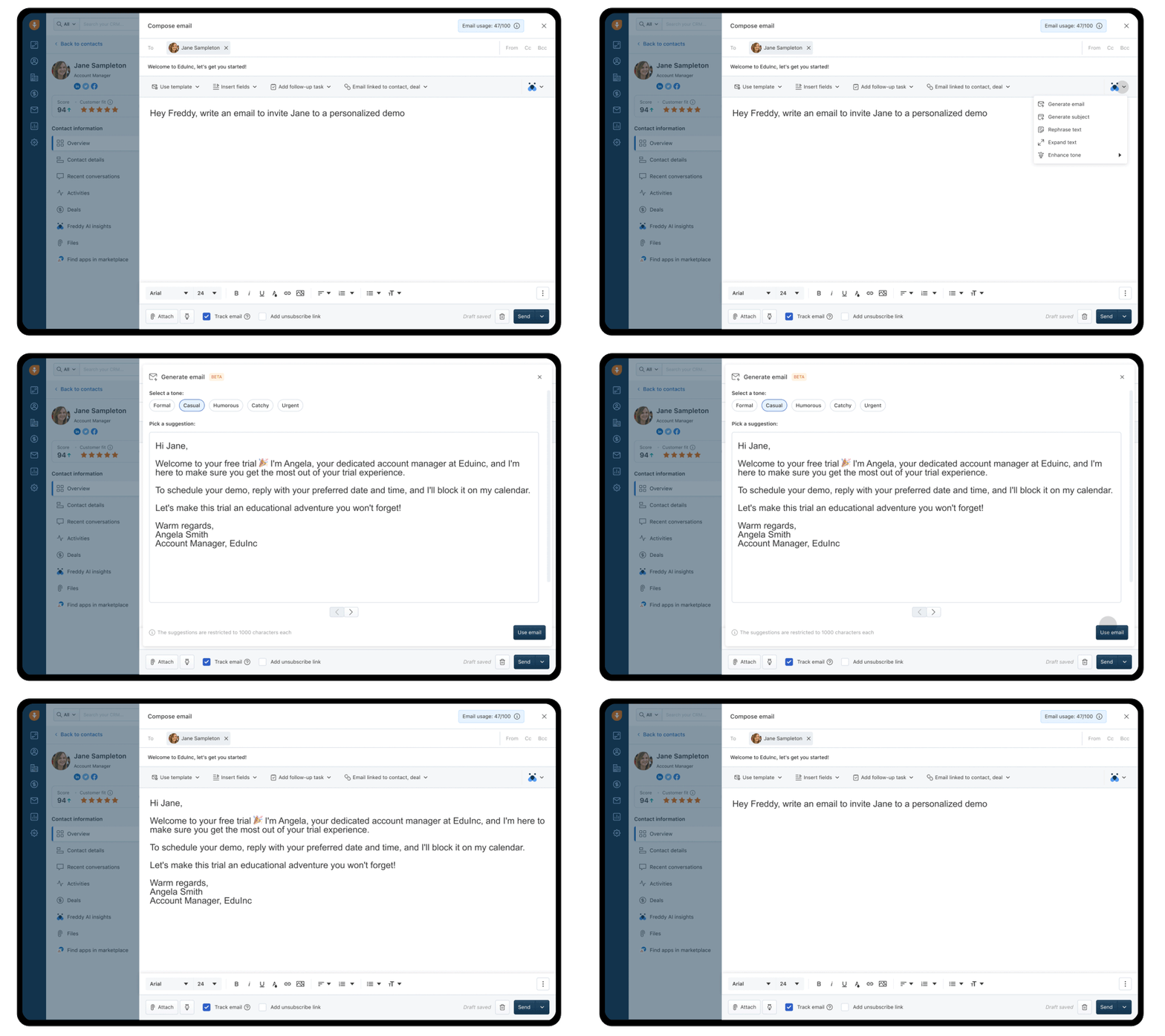
Freshsales is the pick for a small team that sells by phone. Calling, email, and chat live inside the CRM, so a rep dials, logs, and follows up without switching tools. The interface is clean, setup takes a few hours, and Freddy AI scores leads and surfaces deal insights so reps spend time on the conversations most likely to close. For a team making dozens of calls a day, built-in telephony is the feature that justifies the whole subscription.
The tier to budget from is Pro, not Growth. Growth covers the pipeline, contact management, and basic workflows at a very low price, but sequences, multiple pipelines, and custom reports arrive on Pro. That jump is steep, so evaluate Freshsales as a Pro-priced tool if sequences and reporting matter to you. The integration library is smaller than HubSpot or Salesforce, and reporting depth trails the bigger platforms, so teams that run on complex dashboards should test reporting during the trial before committing.
For startups and small outbound teams, Freshsales hits a sweet spot: cheaper than Pipedrive Professional, simpler than Zoho, and more call-friendly than either. Test the phone properly during the trial, with real calls and recordings, because that is the reason to choose it over a pipeline-only tool.
Best for:small teams that call prospects daily and want phone, email, and chat in one CRM.
Official site: Freshsales
What we like about Freshsales
- Built-in phone, email, and chat, so reps work from one screen
- Clean interface that a small team learns in a day
- Freddy AI lead scoring helps reps prioritize the right deals
What could be better
- 21-day free trial is the only hands-on test before paying
- Phone minutes cost $0.02 to $0.05 per minute on top of the seat price
- Freddy AI sessions cost $49 per 100 sessions beyond the included allowance
Price:free plan for up to 3 users, Growth from $9 per user per month, Pro from $39, Enterprise from $59, all on annual billing.
6. Monday Sales CRM: Best for Visual Workflows and Customization
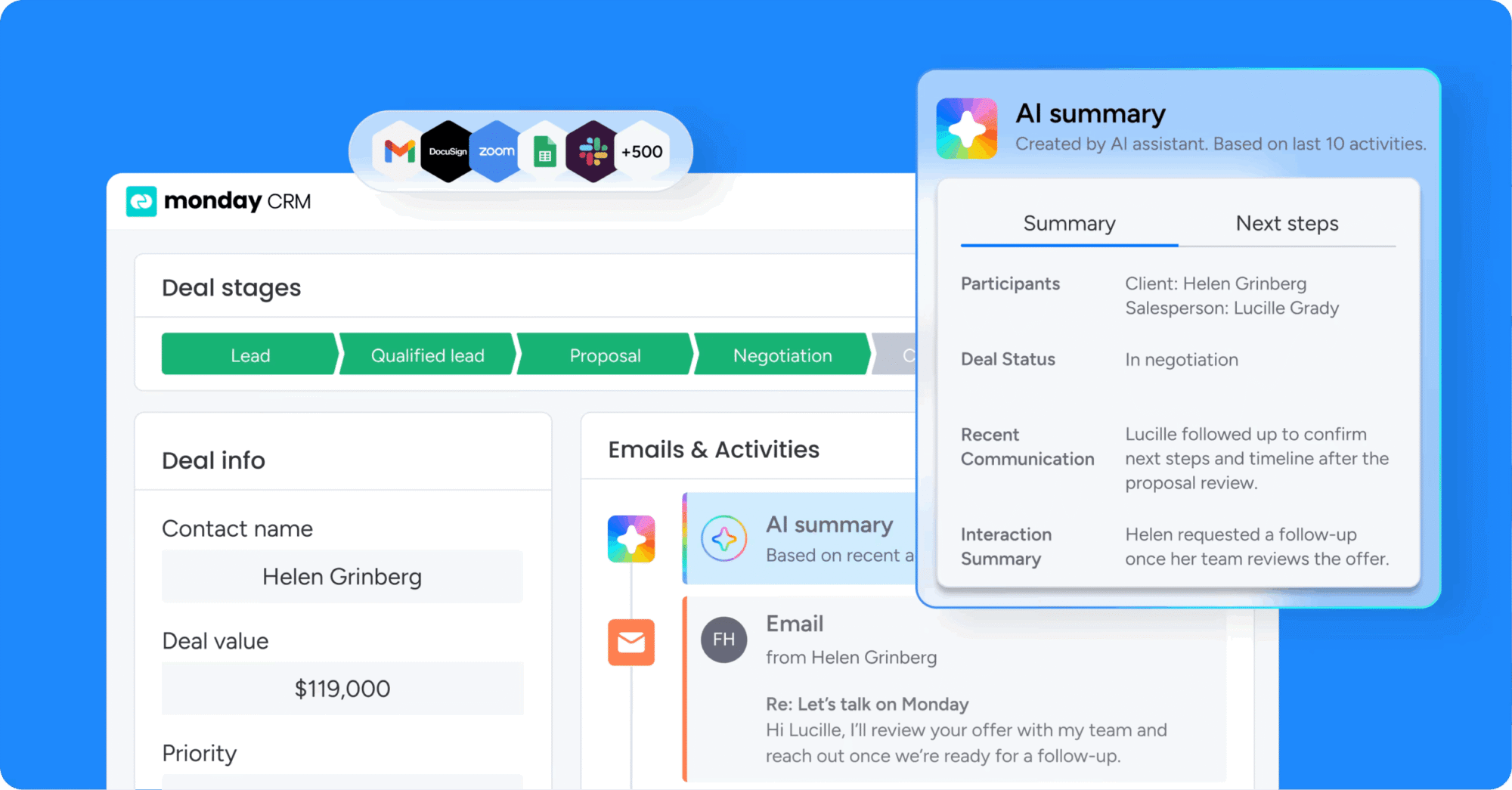
Monday Sales CRM turns the pipeline into a colorful board that a team can reshape without help from IT. Columns, stages, automations, and views all adjust by dragging and dropping, so a team that sells services, runs projects, and manages clients can bend the same board to each job. Email integration, activity timelines, and AI summaries keep every deal conversation in one place, and dashboards combine several boards into one view for managers.
The tier to budget from is Standard, not Basic. Basic covers pipelines and contacts, but automations and integrations arrive on Standard, and quotes, invoices, forecasting, and sequences arrive on Pro. A team that picks Monday for automation and then lands on Basic will feel stuck fast. Check the seat maths at checkout too, because pricing is per seat and small teams should confirm exactly how many seats their plan covers before paying.
Monday suits teams that already think in boards, or teams that run sales alongside delivery work on the same platform. A pure sales team that only needs a pipeline will find Pipedrive simpler. A team that wants one workspace for deals, projects, and client work will get more from Monday.
Best for:teams that want a visual, customizable workspace for sales plus project work.
Official site: Monday Sales CRM
What we like about Monday Sales CRM
- Highly visual boards that a team can reshape without IT help
- Strong automations and dashboards on Standard and above
- Quotes and invoices on Pro keep billing close to the deal
What could be better
- 3-seat minimum on every paid plan, so solo buyers pay for seats they do not use
- Seats sell in buckets of 3, 5, 10, 15, so a 7-person team pays for 10
- Standard caps automations at 250 per month, which heavy users outgrow
Price:Basic from $12 per seat per month, Standard from $17, Pro from $28, all on annual billing. Enterprise by quote.
7. Close: Best for Outbound and Call-Heavy Teams
Close is built for teams that sell by calling. The dialer, email, and SMS live inside the CRM, so a rep works a list, calls, texts, emails, and logs everything without leaving one screen. The power dialer on Growth and the predictive dialer on Scale let a small outbound team move through call lists far faster than a general CRM with a phone add-on. Workflows automate follow-up sequences, and the Chloe AI agent can qualify new leads and book meetings within minutes of a lead arriving.
The tier to budget from is Growth, not Solo. Solo suits a single founder working alone, and Essentials suits a small team working leads by hand, but automated workflows and the power dialer arrive on Growth. Calling minutes, SMS, and phone number rental bill as usage on top of the seat price, so a high-volume team should budget a usage envelope and watch it monthly. Close has no built-in lead database, so teams bring their own lists through import or forms.
For an outbound floor, Close is the strongest tool on this list. For a team that rarely calls, the dialer strength is wasted money, and Pipedrive or HubSpot will cover the pipeline for less.
Best for:outbound, inside sales, and call-heavy teams that need a dialer inside the CRM.
Official site: Close
What we like about Close
- Built-in calling, SMS, and email in one rep screen
- Power dialer and workflows speed up outbound list work
- Chloe AI agent qualifies leads and books meetings fast
What could be better
- Solo plan caps at 10,000 leads and 1 user, so teams start on Essentials or higher
- Call recordings kept 90 days on Growth, with unlimited retention only on Scale
- Phone support is a $750 per month add-on, not part of standard plans
Price:Solo from $9 per user per month, Essentials from $35, Growth from $99, Scale from $139, all on annual billing. No free plan, 14-day trial.

8. Capsule CRM: Best for Simple, Tidy Contact Management
Capsule is the CRM for teams that want simplicity above all else. Contacts, opportunities, tasks, and projects sit in a clean interface that a new user understands the same day, with no consultant and no training course. Pipelines use a drag-and-drop board, opportunities link to contacts and follow-up tasks automatically, and project boards carry the work forward after a deal closes, which suits service businesses that sell and then deliver.
The tier to budget from is Growth, not Starter. Starter raises the contact limit and adds email templates, but multiple pipelines, workflow automations, and advanced reporting arrive on Growth. That is the tier where Capsule becomes a full CRM for a growing team. Capsule does not try to be a marketing platform, so teams that need email campaigns will add a separate tool for that job. For a team that wants a tidy system for contacts and deals, that focus is a strength, not a gap.
Support quality is a genuine selling point here, with Capsule rated highly by its users for help and onboarding. A small team that values a calm, reliable tool over a feature race will settle into Capsule quickly and stay there.
Best for:small teams that want the simplest good CRM, with projects for post-sale delivery.
Official site: Capsule CRM
What we like about Capsule CRM
- Clean, calm interface a new user learns the same day
- Project boards carry delivery work after the deal closes
- Strong support ratings from small business users
What could be better
- Free plan caps at 250 contacts and 2 users, a genuinely small list
- Transpond email marketing starts free up to 1,000 contacts, then scales separately
- Growth unlocks 5 pipelines, so Starter buyers get one pipeline only
Price:free plan at $0, Starter from $18 per user per month, Growth from $36, Advanced from $54, all on annual billing.

9. Insightly: Best for Sales Plus Project Delivery
Insightly wins on one workflow no other tool on this list does as well: a closed deal converts directly into a project. For agencies, consultants, and service businesses, that handoff is where work usually falls apart, with details lost between the sales rep and the delivery team. Insightly keeps the same record from first call to finished project, with tasks, milestones, and files attached along the way.
The tier to budget from is Professional, not Plus. Plus covers contacts, pipelines, and basic project tools, but workflow automation and the AI Copilot arrive on Professional. Marketing, service, and the integration platform are separate modules priced per account, so a team that wants the full platform should price the bundle before comparing Insightly against a single-price CRM. Email sending limits also matter for outbound teams, so check the daily cap on your tier before building sequences.
Setup is fast, and the interface stays approachable for a small team. For a service business where delivery matters as much as selling, Insightly is the most complete small business pick here. For a pure sales team, Pipedrive or Close will feel sharper.
Best for:service businesses and agencies that need deals to flow into delivery projects.
Official site: Insightly
What we like about Insightly
- Opportunity-to-project conversion keeps sales and delivery on one record
- Fast setup with a genuinely usable interface for small teams
- Generous record limits even on the entry tier
What could be better
- AppConnect starts at $249 per account per month plus a $3,000 setup fee
- Plus caps mass email at 2,500 per day, tight for serious outbound
- AI Copilot gives 75 queries on Professional, with no Copilot on Plus at all
Price:Plus from $29 per user per month, Professional from $49, Enterprise from $99, all on annual billing. No free plan, 14-day trial.

10. Keap: Best for All-in-One Automation, Email, and Payments
Keap is the all-in-one pick for small businesses that want CRM, email marketing, automation, landing pages, and payments in a single system. A coach, consultant, or local service business can capture a lead on a landing page, run an automated email sequence, book the appointment, send the invoice, and take payment without stitching five tools together. The automation builder is the strongest of its kind at this level, with templates that cover the common small business journeys from first contact to repeat purchase.
The price is the honest catch. Keap starts far above the other tools on this list, and pricing scales with contacts and users, so a growing list raises the bill. Onboarding is guided and hands-on, which helps a non-technical owner get live fast, but it adds a setup cost to the first year. Keap makes sense once a business already knows it needs serious automation and already has the list and the revenue to support it. A team still finding its list size will get better value from HubSpot free or Zoho Standard until the automation need is proven.
Where Keap earns its price is time saved. Businesses that run the same follow-up, nurture, and payment journeys every week can automate most of that work once and let it run. If your business lives on repeat clients, reminders, and rebooking, that automation pays back quickly.
Best for:service businesses that want CRM, marketing automation, and payments in one system.
Official site: Keap
What we like about Keap
- One system for CRM, email, automation, landing pages, and payments
- Strong automation builder with templates for common small business journeys
- Guided onboarding helps non-technical owners get live fast
What could be better
- Mandatory implementation fee starts at $500 on top of the subscription
- Extra users cost $39 per month each beyond the included users
- SMS beyond 500 included messages costs $0.015 per text
Price:one all-inclusive plan from $249 per month on annual billing ($299 month to month) for 1,500 contacts and 2 users, scaling with contacts. No free plan, 14-day trial.

Pick by Team Shape, Not by Feature List
A solo founder needs something different from a ten-person sales team, and the wrong pick wastes both money and patience. Solo founders and two-person teams should start free: HubSpot, Zoho, Freshsales, or Capsule all cover contacts, deals, and follow-up at no cost, and the right one is the interface you enjoy opening. Do not pay for a CRM until the free plan blocks something you actually do every week.
Small sales teams of three to ten reps should shortlist Pipedrive, Freshsales, and Close, and pick by how they sell. Pipeline sellers pick Pipedrive. Phone sellers pick Freshsales or Close, with Close winning for pure outbound volume. Service businesses that deliver projects after the sale should shortlist Insightly, Capsule, and Monday, because the deal-to-project handoff matters more to them than dialer speed. Teams planning fast growth should weigh Salesforce Starter and HubSpot, because both scale into much larger systems without a migration.
CRM vs Other Business Software
Buyers often confuse a CRM with the other systems a small business runs, and the confusion costs money. A CRM tracks customers: leads, deals, conversations, and revenue. An accounting tool tracks money: invoices, expenses, and tax. A project tool tracks work: tasks, deadlines, and delivery. Some tools on this list blur those lines, and that is fine, as long as you know which job you are buying for. If the job is customer support rather than sales, compare Zendesk alternatives before you buy a CRM for it.
The other confusion is customers versus employees. A CRM organizes the people who buy from you. A human resources system organizes the people who work for you, with records, payroll, time off, and performance in one place. If you are comparing the two, or you need both sides of the business covered, read our HCM software guide to see how employee systems differ from the customer systems on this page.
File storage is another system that sits beside a CRM, so if deal files, contracts, and proposals need a home of their own, see our guide to the best Dropbox alternatives.
Free vs Paid: Where Free Actually Stops
Free CRM plans are real, but every one of them has a wall, and the wall is usually seats, contacts, or automation. HubSpot, Zoho, Freshsales, and Capsule all offer free tiers that cover a tiny team well. The moment a third or fourth person joins, or the contact list grows past the free cap, the paid tier starts. That is normal, and it is still a good deal, because the free months let you prove the system works before spending anything.
Migration: Moving In Without Losing Deals
Moving into a CRM fails when teams import everything at once and clean nothing. Start by exporting contacts, companies, deals, and notes from the old system or spreadsheet. Remove duplicates, fix obviously wrong phone numbers and emails, and agree on one owner for each record. Import a small test batch first, check that deals land in the right stages, and only then import the rest.
Timing matters too. Migrate during a quiet week, not during a launch or a month-end close. Keep the old spreadsheet read-only for two weeks after the move, so nothing gets lost while the team learns the new system. Train the team on one workflow first: log a call, move a deal, set a follow-up. The rest can wait until that habit sticks.
Do not judge a CRM by its demo. Run a real week inside the trial: import 20 real contacts, move 5 real deals through your stages, make 10 real calls or send 10 real emails, and build the one report your manager actually asks for. A tool that feels good on demo data and fails on your data is the wrong tool, and a week of real use reveals that before you pay.
Pricing Summary: What You Actually Pay
A solo founder or tiny team can pay nothing: HubSpot, Zoho, Freshsales, and Capsule all offer free plans that cover the basics. A small sales team on a paid plan should expect roughly 9 to 29 dollars per user per month on entry tiers, with the realistic automation tier landing higher on most tools. Pipedrive Growth, Freshsales Pro, Close Growth, and Insightly Professional are the tiers most growing teams actually settle on, and each costs more than its headline entry price.
At the top of this list, Salesforce Starter at 25 dollars per user per month and Keap from 249 dollars per month annual are the expensive options, and both need a clear reason. Salesforce earns it when the team plans to scale on the same platform. Keap earns it when automation, email, and payments must live in one system. Everything else on this list is quote-free and published, so the checkout price should match the figures above, apart from calling, SMS, and add-on modules that bill separately. Confirm the checkout price before you buy, because vendors reprice often.
Who Should Pick What
If you take one line from this guide, take this one: pick the CRM that matches how your team sells today, not the one with the longest feature list.
Pick HubSpot if you want a free start and one database for marketing, sales, and service. Pick Zoho if you want the most features per dollar and can handle a setup week. Pick Pipedrive if selling through a visual pipeline is the whole job. Pick Freshsales if your team sells by phone and wants calling built in. Pick Monday if you want a visual workspace for sales plus project work. Pick Close if outbound calling volume drives your revenue. Pick Capsule if you want the simplest good CRM with project boards. Pick Insightly if deals must flow into delivery projects. Pick Salesforce Starter if you plan to scale on Salesforce. Pick Keap if automation, email, and payments must live in one system.
FAQs
What is the best CRM software for small business?
HubSpot is the best starting point for most small businesses, because the free CRM covers contacts, pipelines, forms, and scheduling at no cost. Zoho is the best value paid pick, Pipedrive is the best pick for sales-driven teams, and Close is the best pick for teams that sell by phone. The right answer depends on how your team sells, not on which tool has the most features.
Which CRM is really free?
HubSpot, Zoho, Freshsales, and Capsule all offer free plans that cover a small team. Each free plan has caps on users, contacts, or features, so a growing team will move to a paid tier eventually. Free plans are still worth it, because they let you prove the system works with real deals before spending anything.
How much does CRM software cost for a small business?
Free plans cost nothing for a tiny team. Paid entry tiers on this list run from 9 to 29 dollars per user per month on annual billing, and the realistic automation tier usually costs more than the entry price. A five-person team should budget roughly 45 to 250 dollars a month for a sales CRM, depending on the tool and tier, plus any calling, SMS, or add-on costs.
Is Salesforce worth it for a small business?
It can be, if the team plans to grow on Salesforce or already knows the platform. Starter Suite covers core CRM, marketing basics, and sales flows at 25 dollars per user per month, with month-to-month billing available. Teams that only need a pipeline and follow-up reminders will get better value from Pipedrive, Zoho, or HubSpot.
Which CRM is best for a team that sells by phone?
Close is the strongest pick for call-heavy teams, because the dialer, SMS, and email live inside the CRM with workflows and a power dialer on higher tiers. Freshsales is the cheaper phone-friendly alternative, with built-in calling and a free plan for tiny teams. Test the call quality and logging during the trial before committing to either.
Can a CRM handle projects after the sale?
Yes, on the right tool. Insightly converts a closed deal directly into a project, Capsule carries delivery work on project boards, and Monday runs sales and project boards in one workspace. Pure sales CRMs like Pipedrive and Close focus on the pipeline, so a service business that delivers complex work should shortlist the project-friendly tools first.
Can I switch CRM software later?
Yes. Export contacts, companies, deals, notes, and email history before you cancel anything, clean duplicates during the move, and import a small test batch first. Keep the old system read-only for two weeks after the switch, and migrate during a quiet week so no live deal gets lost in the move.
Do I need marketing automation inside my CRM?
It depends on how you win customers. Teams that rely on email nurture, landing pages, and automated follow-up will benefit from HubSpot, Zoho, or Keap, which cover marketing and sales together. Teams that win customers by calls and referrals can run a sales-only CRM like Pipedrive or Close and add a separate email tool later if needed.
Start free on HubSpot, pay for Zoho value, or pick Pipedrive for pure selling
Start free on HubSpot if budget is tight and you want marketing and sales in one database. Pick Zoho if you want the most features per dollar and can handle a setup week. Pick Pipedrive if your team sells through a visual pipeline every day. Pick Close if outbound calling drives your revenue, Insightly if deals must flow into projects, and Keap only when automation, email, and payments must live in one system. Run a real week in the trial before you pay, and let real deals settle the choice.
This kind of research, applied to your growth
If you run a SaaS business, SaaS Harvest can do this kind of digging in your market and turn it into search traffic that signs up.
