
Wix vs Squarespace is the choice that stops more small business owners than any other website decision, and it stops them for a simple reason. Both builders will give you a good looking site. Both will take your money every month. The difference is what your life looks like six months later, when you are the person updating the site at 11pm before a launch. If you want freedom to move anything anywhere and a toolkit that keeps growing with your business, pick Wix. If you want a site that looks designed from day one and stays tidy with almost no effort from you, pick Squarespace. That is the short answer. The rest of this guide is for everyone who wants to know why, and what each choice costs in money, time, and patience.
We researched both platforms the way a buyer should: we compared their current plans and pricing pages line by line, and checked the official help and support pages for the limits the plan tables leave out. We paid attention to the boring parts, because the boring parts are where a website builder earns its keep. Storage limits, transaction fees, template locks, mobile editing, and support hours matter far more than a homepage demo. You will find all of that below, with real prices and plain language, and no guessing about which plan you actually need.
Quick Picks: The Short Version
Short on time? Start here.
Wix
Most flexibility, a free plan, and room to grow
Price Free, paid from $17/mo
Free plan with Wix branding, no card needed to start
Squarespace
Polished, consistent design with very little effort
Price From $19/mo
14-day free trial, no free plan
Shopify alternatives
When a catalogue outgrows either builder
Price See our guide
See our Shopify alternatives guide before you scale
How We Compared Wix and Squarespace
Every claim in this guide comes from the same routine. We checked the official Wix plans page and the official Squarespace pricing page for current plan names, prices and fees, then went through each platform’s official feature and help pages for the details the plan tables leave out: what the cheapest plan actually blocks, what selling costs once fees are added, how the blog handles categories and scheduling, and what happens when you want to change your template a year later. Prices below are US annual billing prices, checked against the official pricing pages, and we flag where older guides still quote retired plan names.
Wix vs Squarespace at a Glance
| Feature | Wix | Squarespace |
|---|---|---|
| Free option | Free plan, unlimited time, Wix branding | 14-day trial only, no free plan |
| Paid plans from | $17/mo (Light, annual) | $19/mo (Basic, annual) |
| Templates | 900+ in most guides, Wix now lists 2,000+ | Around 200, curated |
| Editor | Freeform drag and drop, separate mobile editor | Section and block editor, responsive by default |
| Cheapest selling plan | Core, $29/mo | Basic, $19/mo, with a 2% store fee |
| Store fee | None from Wix, processor fees apply | 2% on Basic, 0% on Core and above |
| Storage | 2 GB to unlimited, by plan | Unlimited on all plans |
| Support | 24/7 chat and callback | 24/7 email, live chat in business hours |
Wix in Focus
Wix is the bigger toolbox. You get a free plan to start, hundreds of industry templates, a drag and drop editor that lets you put an element exactly where you want it, and an app market that fills gaps the core product leaves open. Bookings, restaurants, events, memberships, and email marketing all live in the same dashboard, and the AI builder can draft a whole site from a few answers before you touch a single setting. The price of that freedom is responsibility. Nobody stops you from building a page that looks crowded, and the mobile view needs its own pass, because freeform placement does not always translate neatly to a phone screen. If you enjoy tinkering and you want a platform that can stretch into new kinds of revenue later, Wix gives you the longest runway.
Best for: service businesses, local companies, sellers with mixed revenue, and anyone who wants to test an idea for free before paying.
What we like about Wix
- Free plan keeps your site live indefinitely, with no trial clock running
- Velo lets developers add databases, APIs, and custom code to a Wix site
- Wix POS hardware shares inventory with the online store
- AI text tool rewrites section copy in place while you edit
What could be better
- Classic templates lock once published, so a redesign means a rebuild
- Mobile layouts need a separate editing pass
- Paid apps can quietly raise the monthly bill
- Template quality varies across such a large library
Squarespace in Focus
Squarespace is the tidier desk. You get fewer templates, but every one of them looks like a designer chose the fonts, the spacing, and the photo sizes for you. The editor works in sections and blocks that snap to a grid, so pages stay consistent even when you add new ones in a hurry. Blogging, scheduling, email campaigns, and member areas are built in, and the whole system is designed so a creative business can look premium without hiring a designer. The trade is control. You cannot drag an element to an exact pixel, and if your business needs a niche feature that Squarespace has not built, you have a smaller extension catalogue to search. If your brand lives or dies on how it looks, and you would rather spend time on your work than on your website, Squarespace is hard to beat.
Best for: photographers, designers, restaurants, coaches, and brands where visual polish is part of the pitch.
What we like about Squarespace
- Fluid Engine grid snaps every block into a clean, aligned layout
- Built-in podcast RSS feed comes with every blog
- Acuity scheduling is owned by Squarespace, so booking stays native
- Member Areas gate video and blog content without a plugin
What could be better
- No free plan, only a 14-day trial
- Digital product and membership fees bite on lower plans
- Smaller extension catalogue than Wix
- No phone support
Ease of Use: Which Builder Feels Easier?
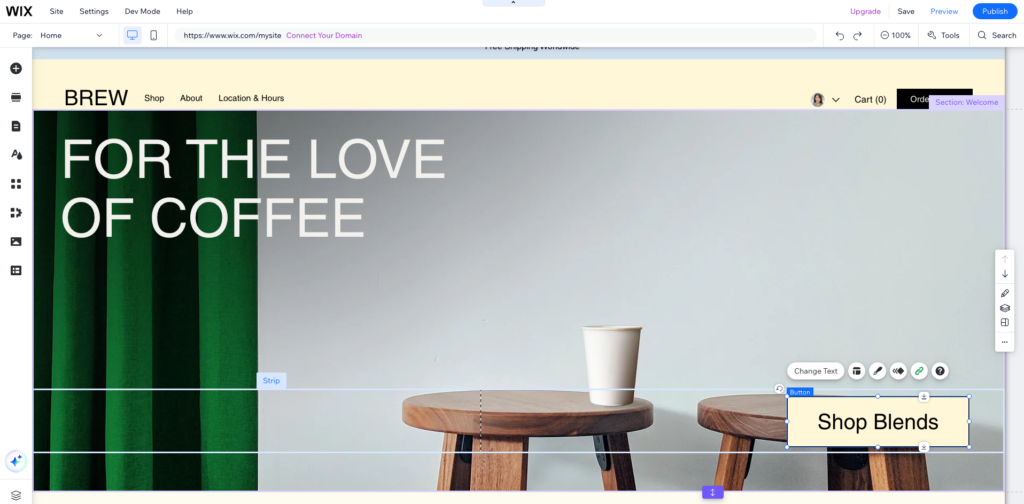
Wix feels easy in the first hour. The editor behaves like a slide tool: click something, drag it, drop it, publish. Anyone who has arranged a presentation will feel at home within minutes, and the AI builder gives you a full first draft before you have made a single design decision. The work shows up later. As pages grow, spacing drifts, sections overlap in ways you did not plan, and the phone view needs attention of its own. Wix gives you a separate mobile editor for that, which is genuinely useful, and it is also a second job. Owners who like to fiddle will enjoy it. Owners who want to publish and move on may find it becomes a weekly chore.
Squarespace feels slower in the first hour and faster every week after that. You need to learn how sections, blocks, and site-wide styles fit together, and the first time you cannot put a button exactly where you imagined it, you will feel the constraint. Then the payoff arrives. New pages match old pages without you thinking about it, the mobile view mostly takes care of itself, and you rarely open the editor to fix something that looked fine yesterday. For a team where several people edit the site, that consistency is worth a lot. Nobody can quietly wreck the homepage with one misplaced drag.

Our take: Wix wins the first afternoon, Squarespace wins the first year. If you will maintain the site yourself and you dislike design chores, Squarespace saves you the most time. If you enjoy shaping every detail, Wix will feel less restrictive.
Design and Templates: Quantity Against Curation
This is the clearest philosophical split between the two platforms. Wix gives you volume. Most guides count more than 900 templates across every industry you can name, from plumbers to yoga studios, and Wix now lists more than 2,000 on its own plans page. That volume means you will probably find a starting point close to your vision. It also means quality varies. Some templates look current and sharp. Others feel dated, and you will need an eye for which is which before you commit, because on a classic Wix site you cannot switch templates after publishing without rebuilding. You can redesign everything inside your chosen template, but the template itself is a one way door.

Squarespace gives you curation. Around 200 templates, all built on the same modern framework, all with generous white space, strong typography, and large imagery. You will not find a template for every obscure niche, but the ones you find are consistently good, and you can restyle a Squarespace site substantially without starting over. That matters more than it sounds. Businesses change their offer, their photos, and their positioning every year or two. A platform that lets the design evolve with the business saves a rebuild. For portfolios, restaurants, and personal brands, Squarespace templates still set the standard other builders are measured against. If you work with design assets regularly, our guide to Canva alternatives pairs well with either builder when you need graphics that match these templates.

Our take: Squarespace wins on out of the box polish and consistency. Wix wins on choice and on the freedom to build a layout Squarespace would never allow. Pick polish if design is your selling point. Pick freedom if you have a specific layout in mind and the patience to build it well.
Before you commit to a Wix template, build one full page in it first, including a long headline and a tall image. Templates that look great with short demo copy often fall apart with your real content, and on Wix you cannot simply swap templates later.
Pricing at a Glance: What Each Plan Actually Costs
Headline prices look close, and in some ways they are. Wix Light costs $17 a month on annual billing. Squarespace Basic costs $19. Wix Core and Squarespace Core both cost $29. The gap opens up when you look at what each plan lets you do. Wix Light cannot sell anything. Squarespace Basic can sell, but it charges a 2% fee on store sales and a 7% fee on digital products and memberships. Wix Core sells with no platform fee. Squarespace Core removes the store fee but still charges 5% on digital products and memberships. Neither platform is trying to trick you. They simply charge for different things, and the right plan depends on what you sell, not on the monthly number alone.
A simple brochure site is cheapest on Wix Light at $17 a month, or free if you can live with Wix branding and a subdomain. A small store is a closer call. At $29 a month, Wix Core and Squarespace Core cost the same and neither adds a fee to physical product sales. Squarespace Basic looks cheaper at $19, but once store sales pass roughly $500 a month, that 2% fee costs more than the $10 saving. Digital sellers should run the numbers carefully on Squarespace, because its membership and course fees stay meaningful until the Plus and Advanced plans. We go deeper into every plan, fee, and storage limit in the pricing section below.
Our take: Wix is cheaper for a simple site and for testing an idea for free. Squarespace is fairly priced for a design-led site, and its Core plan at $29 is the sweet spot for most small businesses that sell.
Ecommerce: Selling on Wix Against Selling on Squarespace
Both builders run a credible small store. Inventory, variants, discount codes, tax tools, shipping rules, and abandoned cart emails are all covered, and for a catalogue of tens or low hundreds of products, either one will do the job well. The difference is breadth against presentation. Wix has the broader commerce toolkit. It supports selling across marketplaces and social channels, dropshipping and print on demand through its app market, subscriptions, and service bookings from the same dashboard. A business with mixed revenue, part products, part services, part events, will find Wix keeps everything in one place. If your catalogue grows past a few hundred products, or selling becomes the whole business, it is worth pricing a dedicated platform before you commit. Our guide to Shopify alternatives is the right next read at that point, because it covers platforms built for volume from day one.
Squarespace commerce is cleaner and, for many brands, better looking. Product pages feel premium, checkout matches the rest of the site, and selling digital downloads, courses, and memberships is a genuine strength. The catch is the fee ladder. Basic charges 2% on store sales and 7% on digital products and memberships. Core removes the store fee but keeps 5% on digital products and memberships. Plus drops that to 1%, and Advanced removes it entirely, while card processing rates also fall from 2.9% plus 30 cents on Basic and Core to 2.7% on Plus and 2.5% on Advanced. If you sell a handful of prints, downloads, or course seats, Squarespace is more than enough and it will look better doing it. If you sell at volume, Wix Core at $29 with no platform fee is the simpler maths.
Our take: Wix wins for breadth, mixed revenue, and multichannel selling. Squarespace wins for design-led brands with modest catalogues and content or membership revenue. Neither replaces a dedicated commerce platform at serious scale.
SEO: Which Builder Gives You More Control?
The old story that Wix is bad for SEO is out of date, and it has been for a while. Both platforms handle the technical basics well in 2026: editable title tags and meta descriptions, clean URLs, automatic XML sitemaps, SSL, 301 redirects, image alt text, structured data for products, and mobile friendly output. Google does not punish a site for being built on Wix or Squarespace. It ranks pages on content, links, and user experience, and both platforms give you the tools to cover the technical side.
Where they differ is how many knobs they give you. Wix gives you more granular control: a guided SEO setup checklist, editable robots.txt, custom structured data per page, bulk SEO patterns for page types, and detailed redirect management, plus integrations with Search Console and SEMrush that help owners track what is actually ranking. Squarespace keeps SEO simpler, with fewer settings but sensible defaults, which is fine for most small sites that will compete on content, reviews, and local reputation. If you run an SEO led content strategy with dozens of pages, Wix gives you more room to work. If SEO means getting the basics right and then getting back to your business, Squarespace gives you everything you need without a settings maze.
Our take: Wix edges ahead on SEO control and tooling. In practice, your content and your backlinks will matter far more than which of these two you choose.
Blogging: Which Builder Suits Writers Better?
Squarespace has the cleaner writing experience. The editor is calm, posts support categories and tags, scheduling works as expected, and author profiles make a multi writer blog look professional. It suits writers who publish a few well designed posts a month and want each one to look like part of the brand. Wix blogging has improved a lot, and it leans more social: categories, scheduling, comments with moderation, member signups, and writer roles that let a small team publish together. It works well as a content hub attached to a business site, where the blog supports bookings and sales.
Neither builder is as flexible as WordPress for a content heavy site with hundreds of posts, custom post types, and advanced SEO plugins. If blogging is your main traffic strategy and you plan to publish at volume, that limitation matters more than any single feature here. For most small businesses, though, both blogs are good enough, and the choice comes back to the editor you enjoy opening. A blog you actually publish on beats a perfect blog you never touch.
Our take: Squarespace wins for a design led blog and a calm writing experience. Wix wins if you want your blog to double as a community hub with signups and comments.
Support: Who Helps You Faster?
Wix offers 24/7 support through its help center, live chat, and callback options, with priority care on higher tiers. Being able to ask for a phone call matters when something breaks during a launch, and it is the clearest support advantage in this comparison. Squarespace provides 24/7 email support and live chat during business hours, plus a well organized help center and community forum. Its support quality gets steady praise, but there is no phone option, so urgent problems go through chat or email. Both platforms have extensive documentation, and most owners solve everyday problems without contacting support at all. Still, if talking to a person is non negotiable for you, that alone may settle the choice.
Our take: Wix wins on support channels, thanks to callbacks. Squarespace wins on documentation quality and calm, consistent help. Neither leaves you stranded.
AI Tools: Wix AI Against Squarespace Blueprint AI
Both builders now open with AI, and both have moved past the gimmick stage. Wix AI builds a site from a single prompt and lets you flow between AI generation and drag and drop to refine any detail, so the AI draft is a starting point, not a cage. Its AI text and image tools help with headlines, section copy, and visuals as you edit. Squarespace Blueprint AI takes a more guided route: it asks about your business goals, brand, and industry, then offers recommendations and a real time preview you can adjust before committing. The result tends to look more polished straight away, which fits the Squarespace promise. Squarespace also adds AI content tools inside the editor and an AI search visibility scanner that checks how your site reads to AI answers, a useful extra as more discovery moves away from classic search results.

Neither AI builder replaces good copy and real photos. AI drafts are generic by nature, and the sites that stand out are the ones where the owner rewrote the headlines, swapped in real work, and removed the sections that did not fit. Treat AI as a fast first draft. Budget an afternoon to make it yours. On that measure, Wix AI is better if you want to reshape the draft freely afterwards. Squarespace Blueprint AI is better if you want the draft to arrive looking finished.
Our take: Wix wins for AI flexibility after generation. Squarespace wins for AI polish on arrival.
Run both free options before you pay: Wix free plan for as long as you need, and the Squarespace 14-day trial with a deadline in your calendar. Build the same homepage on both. Your hands will tell you which editor you want to live with, and that feeling matters more than any feature table.
Pricing Deep Dive: Every Plan, Explained
Prices change with promotions and region, so treat the numbers below as the US annual billing list prices we verified, and confirm the checkout price before you buy. Both platforms give a free custom domain for the first year on annual plans, and both charge card processing on top of the plan price.
Wix plans
| Plan | Annual price | Storage | Collaborators | Selling |
|---|---|---|---|---|
| Free | $0 | 500 MB | Owner only | No |
| Light | $17/mo | 2 GB | 2 | No |
| Core | $29/mo | 50 GB | 5 | Basic ecommerce |
| Business | $39/mo | 100 GB | 10 | Standard ecommerce |
| Business Elite | $159/mo | Unlimited | 100 | Advanced ecommerce |
Wix does not add its own transaction fee on store orders. You pay the payment processor, commonly 2.9% plus 30 cents per online card transaction through Wix Payments in the US. Monthly billing costs more, roughly $24 for Light, $36 for Core, $46 for Business, and $172 for Business Elite. Premium plans also carry a 14-day money-back guarantee, so an upgrade is low risk. Watch two costs that surprise buyers. First, storage: Light at 2 GB fills fast with high resolution photos, so photo heavy portfolios should start on Core. Second, apps: email marketing, bookings add-ons, and other app market tools can add real money on top of the plan, so price the apps you actually need before you choose a tier.
Squarespace plans
| Plan | Annual price | Monthly price | Store fee | Digital fee | Card rate |
|---|---|---|---|---|---|
| Basic | $19/mo | $25/mo | 2% | 7% | 2.9% + $0.30 |
| Core | $29/mo | $39/mo | 0% | 5% | 2.9% + $0.30 |
| Plus | $49/mo | $65/mo | 0% | 1% | 2.7% + $0.30 |
| Advanced | $99/mo | $139/mo | 0% | 0% | 2.5% + $0.30 |
Squarespace plans replaced the old Personal, Business, Commerce Basic, and Commerce Advanced names in 2025, which is why older guides still quote different plan names and prices for the same product. The current names are Basic, Core, Plus, and Advanced. All plans include unlimited bandwidth and storage, a free domain for the first year on annual billing, and unlimited products. Contributors are capped at 2 on Basic and unlimited on Core and above, and Core and above unlock custom CSS and JavaScript. Annual billing saves up to 36% against monthly billing. For most small businesses, Core at $29 is the plan to price first: it removes the store fee, unlocks code customization, and gives you the full business feature set without paying for advanced commerce tools you may never use.
Two year maths makes the difference concrete. A brochure site costs $408 over two years on Wix Light at $17 a month, and $456 on Squarespace Basic at $19 a month. A small store costs $696 over two years on either Core plan at $29 a month, before fees. The cheapest store that avoids platform fees is therefore a tie at Core level, while Squarespace Basic at $19 wins only if your monthly store sales stay low enough that its 2% fee costs less than $10 a month.
Who Should Pick Wix?
Pick Wix if you want a free plan to test an idea, if you need lots of built-in business features such as bookings, events, restaurant ordering, or a CRM, if you want pixel level layout control and you are comfortable adjusting the mobile view, if you plan to extend the site with apps, or if you want phone callbacks when something goes wrong. Wix also fits service businesses whose revenue mixes products, bookings, and services, because it keeps all of those in one dashboard. If you are still unsure whether your store will stay small, Wix lets you start free and grow into paid plans without changing platforms.
Who Should Pick Squarespace?
Pick Squarespace if design quality is your top priority, if you want a polished portfolio, restaurant site, or personal brand with minimal effort, if you prefer built-in features over a large app catalogue, if blogging and content are central to your site, or if you sell digital products, courses, or memberships and you are happy to price the fee ladder honestly. Squarespace also fits teams where several people edit the site, because its structured editor keeps every page consistent. If your site is your shop window and first impressions win you clients, Squarespace gives you that window faster. If the price is the sticking point, our Squarespace alternatives guide compares ten cheaper ways to get the same look.
Migration Notes: Moving To, From, and Between Builders
Moving between these platforms is a rebuild, not a transfer, and it helps to know that before you start. Neither builder lets you export a working copy of your site to another host. You can move your content, your domain, and your product data with varying amounts of effort, but the design itself has to be rebuilt. Plan for it, and budget a weekend for a small site, longer for a store.
- Template changes: on a classic Wix site, changing templates means rebuilding on a new template. On Squarespace, you can restyle substantially without starting over, because all modern templates share one system.
- Content: export blog posts and pages where the platform allows it, and keep a copy of your images at full size. Expect to reformat posts by hand.
- Store data: export products, customers, and orders as CSV files before you cancel anything, and check that variants, discounts, and tax settings carried over.
- Domain and email: unlock your domain, move it or repoint it, and set up email separately, because neither platform includes a mailbox by default on every plan.
- SEO: map every old URL to a new one with 301 redirects, and keep your title tags and meta descriptions in a spreadsheet so nothing is lost in the move.
- Timing: build the new site first, redirect second, cancel last. Never cancel the old site before the new one is live and indexed.
If you are moving from either builder to a dedicated store platform, read our Shopify alternatives guide before you rebuild, so you choose the destination once instead of migrating twice.
Final Thoughts
Wix vs Squarespace is not a contest with one right answer for everyone. It is a trade between freedom and finish. Wix gives you more tools, more templates, more apps, and a free way in, and it asks you to take responsibility for the result. Squarespace gives you fewer choices, better defaults, and a site that looks considered from the first publish, and it asks you to accept its guardrails. Both are good products in 2026, and the wrong choice will not ruin your project. The right choice will save you weekends of fixing layouts, or weekends of wishing you could move one element two inches to the left. Start with the free options, build the same homepage on both, and trust what your hands tell you. That test takes an afternoon, and it answers the question better than any comparison table can.
FAQs
Is Wix or Squarespace cheaper?
For a simple site, Wix Light at $17 a month beats Squarespace Basic at $19 a month, and Wix even has a free plan. For a store, Wix Core and Squarespace Core tie at $29 a month with no store fee on either, so the cheaper choice depends on what you sell and how much of it.
Does Wix have a free plan and does Squarespace?
Wix has a free plan with Wix branding and a subdomain, available for as long as you need it. Squarespace has no free plan, only a 14-day free trial with no card required.
Which is better for design, Wix or Squarespace?
Squarespace wins for polished design with little effort, thanks to curated templates and a structured editor. Wix wins for creative freedom, thanks to freeform editing and a much larger template library.
Can I switch templates later on Wix or Squarespace?
On Squarespace, yes, modern sites can be restyled without starting over. On a classic Wix site, no, changing templates means rebuilding on a new template, so choose carefully.
Which builder is better for ecommerce?
Wix suits broader commerce, mixed revenue, and multichannel selling. Squarespace suits design-led brands with modest catalogues and digital products, courses, or memberships. At serious volume, a dedicated commerce platform beats both.
Is Wix or Squarespace better for SEO?
Both cover the technical basics well. Wix gives you more granular SEO controls, while Squarespace gives you sensible defaults with fewer settings. Your content and links will matter more than the platform.
Which builder is better for blogging?
Squarespace offers the calmer writing experience with categories, tags, scheduling, and author profiles. Wix offers a more social blog with comments, member signups, and writer roles. Neither matches WordPress for a high volume content site.
Can I sell digital products on both builders?
Yes. Wix sells digital products with no platform fee on paid plans, plus processor fees. Squarespace charges a digital product and membership fee that falls from 7% on Basic to 5% on Core, 1% on Plus, and 0% on Advanced, so price your plan against your expected digital sales.
Pick Squarespace for polish, Wix for freedom
If your brand wins on looks and you want a site that stays tidy with little effort, choose Squarespace Core at $29 a month. If you want a free start, maximum control, and a toolkit that grows with mixed revenue, choose Wix, starting free and moving to Core at $29 when you are ready to sell. Either way, start building this week. A live site you can improve beats a perfect plan you never publish.
This kind of research, applied to your growth
If you run a SaaS business, SaaS Harvest can do this kind of digging in your market and turn it into search traffic that signs up.
