
Asana vs Monday is the comparison almost every growing team runs into sooner or later. Both tools promise to end the chaos of scattered spreadsheets, endless email threads, and status meetings that answer nothing. Both give you boards, timelines, automations, and dashboards. Both will happily take your money every month. The real question is which one matches the way your team already works, because these two tools organise work from opposite directions. Asana starts with the task. Monday starts with the board. That single difference shapes everything else: how you plan, how you automate, how you report, and how much you pay once your team grows past a handful of people.
Here is the short version, before the detail. If your work runs on deadlines, dependencies, and handoffs that must happen in a set order, pick Asana. If your work is a set of parallel items that many different people need to see at a glance, and you want to shape the tool around your process, pick Monday. If you need heavy automation on a tight budget, Asana gives you unlimited automations from its first paid plan, while Monday meters them. If you need dashboards that pull many boards into one executive view, Monday pulls ahead. We compared the official product and pricing pages of both vendors, checked each plan gate carefully, Pick Asana if your work has deadlinesand worked out what real teams of 5, 10, and 25 people actually pay. Prices are US list prices checked against vendor pricing pages.
Quick Picks: The Short Version
Short on time? Start here.
Asana
Structured task management with dependencies, timelines, and unlimited automations from the first paid plan
Price From $10.99 per user per month, billed annually
Free Personal plan for up to 2 users
Asana Starter
The sensible default for deadline driven teams that need timelines, dashboards, and rules without metering
Price $10.99 per user per month, billed annually ($13.49 monthly)
No free team plan, Personal covers 2 users
monday.com
Colourful, customisable boards and dashboards that non-technical teams adopt fast, plus a native CRM option
Price From $9 per seat per month, billed annually (Standard, with automations, is $12)
Free plan for up to 2 seats, 3 boards
Asana vs Monday at a Glance
| Feature | Asana | monday.com |
|---|---|---|
| Core building block | Tasks inside projects | Items on customisable boards |
| Free plan | Personal, up to 2 users, unlimited tasks and projects | Free, up to 2 seats, 3 boards, 3 docs |
| First paid plan | Starter, $10.99 per user per month billed annually | Basic, $9 per seat per month billed annually |
| Plan with automations and timeline | Starter, $10.99, unlimited automations | Standard, $12 per seat per month billed annually, 250 automation actions a month |
| Upper paid plan | Advanced, $24.99 per user per month billed annually | Pro, $19 per seat per month billed annually, 25,000 automation and integration actions a month |
| Portfolios and goals | Advanced, unlimited portfolios and goals | Portfolio management on Enterprise |
| Native time tracking | Advanced | Pro |
| Native CRM | No, connects to Salesforce and others | Yes, monday Sales CRM sold separately |
| Guest access | Unlimited free guests on paid plans | Guest access from Standard, with limits by plan |
| Seat minimums | Paid plans start at 2 seats | Paid plans start at 3 seats, then seat buckets |
| Free trial | Free Personal plan, trials on paid plans | 14 day free trial of Pro |
| Enterprise | Contact sales, SAML and SCIM included | Contact sales, 250,000 actions a month |
How We Compared Asana and Monday
Project management comparisons go wrong in a predictable way. They line up two price lists, tick the same feature boxes on both sides, and declare a tie. That tells you nothing, because the same feature name often hides a different plan gate, a different limit, or a different way of working. Timeline on one tool can mean a Gantt chart with dependencies. Timeline on the other can mean a date bar on a board. Automation on one tool can be unlimited. Automation on the other can be a monthly allowance that runs out on the 20th. So we compared these tools the way a buyer has to: plan by plan, limit by limit, against the vendor’s own pricing and product pages.
We checked what each plan actually includes before writing it down, and we priced three realistic team sizes instead of quoting a per seat figure in isolation. Per seat figures flatter Monday, because Monday sells seats in buckets, and they flatter Asana at the top end, because Asana Advanced costs more than Monday Pro while buying different things. We also looked at where each tool fits into a wider stack. A team that already runs its docs in one place, its sales pipeline in another, and its automations through a third tool will feel the gaps differently from a team buying its first system. That is why this guide links out to related comparisons on this site where the stack question matters, including our look at Notion alternatives for teams weighing docs against tasks, and our guide to Zapier alternatives for teams that plan to bridge gaps with automation tools.
One limit applies to this guide. Both vendors change plans, limits, and AI packaging during the year, and some details vary by account type and region. Prices here are US list prices, checked against vendor pricing pages, and they exclude tax. Before you buy, open the pricing page for the plan you intend to buy and confirm the seat count, the automation allowance, and the guest rules for your team size. A ten minute check there can save a year of paying for the wrong tier.
Asana in Focus
Best for: teams whose work has an order to it: marketing launches, product releases, operations checklists, and client delivery where step three cannot start until step two is signed off. See the official Asana site for current product details.
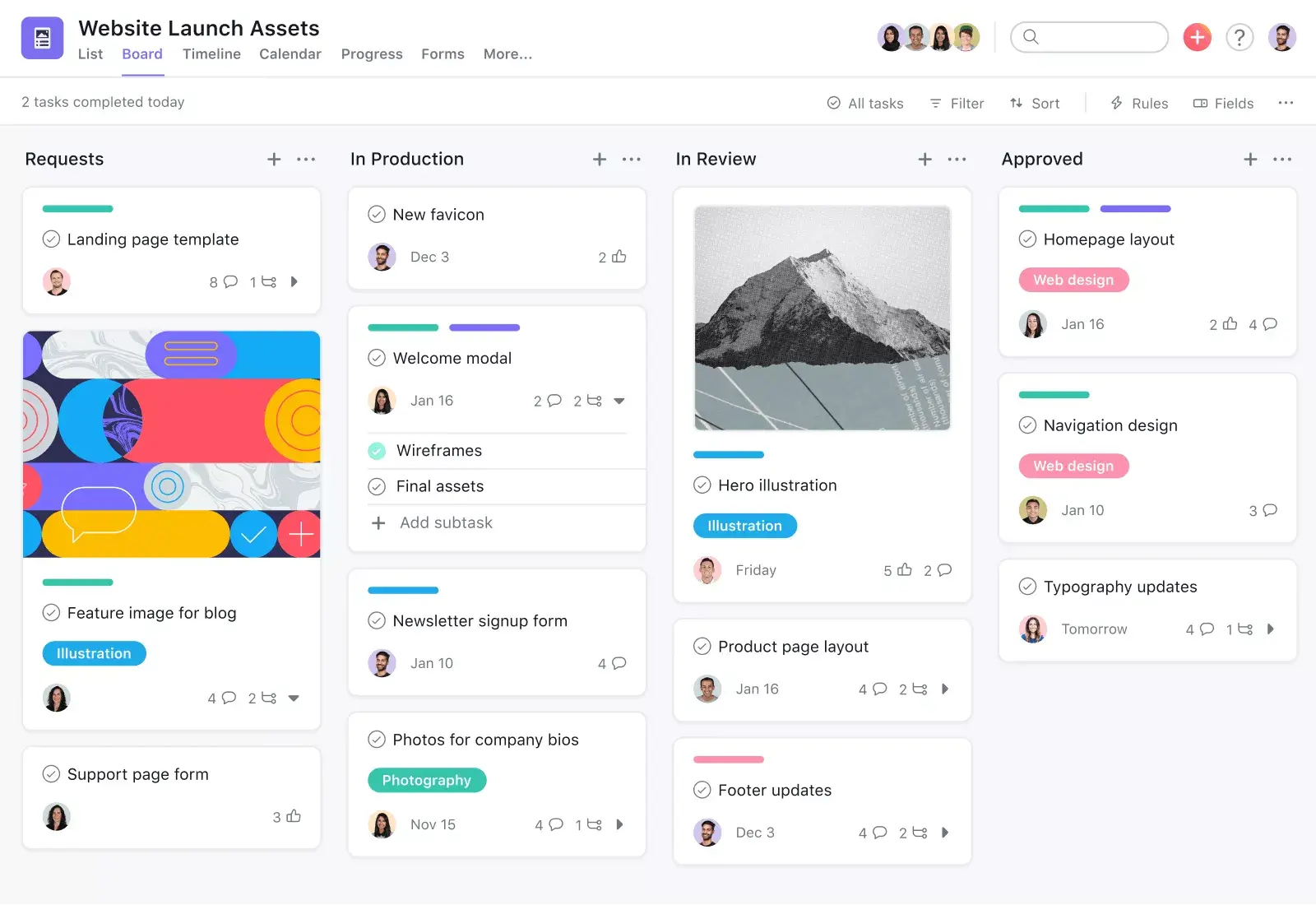
Asana organises work around tasks, and it takes that idea seriously. A task has an owner, a due date, a project, and a place in a sequence. Subtasks break it down further. Sections group tasks into stages. Dependencies say which task blocks which. When you open a project, you see the work as a list, a board, a calendar, or a timeline, but the underlying structure stays the same. That consistency is Asana’s biggest strength and its most common complaint, depending on who you ask. People who run structured projects love it, because everyone sees the same truth. People who want a freeform tracker sometimes find it rigid, because Asana keeps asking: who owns this, when is it due, and what does it depend on?
The Timeline view is where Asana earns its keep for deadline driven teams. It is a Gantt style view, available from Starter, and it shows dependencies as lines between tasks, so a slipped date shows its knock on effects instead of hiding them. Milestones mark the dates that matter. The Workflow Builder lets teams turn a repeatable process into a template with rules attached, so a new launch or a new client onboarding follows the same steps every time. Forms turn incoming requests into tasks automatically, which suits teams that take work from other departments or from clients. Reporting dashboards arrive on Starter too, so a team lead can track overdue work, workload by person, and progress by project without exporting to a spreadsheet.
Asana’s automation model is unusually generous, and it changes the value calculation. Rules are unlimited from Starter upward. A rule can reassign a task when its status changes, move it to another section, add a collaborator, set a due date, or trigger an approval. Because there is no monthly allowance to watch, teams automate freely: intake triage, handoff notifications, overdue escalations, and status hygiene all run without anyone counting actions. That matters more as a team grows. A small team might run fifty automations a month and never notice a cap. A busy operations team can run thousands, and on a metered plan that is where the bill, or the bottleneck, appears.
Advanced is where Asana becomes a portfolio tool. Portfolios gather related projects into one view, goals connect daily tasks to company objectives, and workload shows who is overcommitted across a portfolio. Approvals and proofing suit creative and compliance heavy teams: reviewers approve work or comment on files inside the task, instead of in a separate email chain. Native time tracking compares estimated effort against actual effort. The jump from Starter at $10.99 to Advanced at $24.99 more than doubles the per seat cost, so Advanced only makes sense when portfolios, goals, or proofing are daily needs, not occasional wishes. Teams that only need a timeline and dashboards should stay on Starter and spend the difference elsewhere.
Asana’s AI pitch in 2026 centres on AI Teammates and Asana Dash, plus AI Studio for building AI automations. Paid plans include AI requests, with Studio credits pooled per billing account. AI features help with drafting task descriptions, summarising long threads, and triaging intake, but both vendors now bundle AI and both meter it, so treat AI as a tiebreaker, not as the decision.
What we like about Asana
- One task can live in several projects at once, so a launch task can appear in the marketing plan, the product roadmap, and the leadership rollup without being copied three times
- Qualified nonprofits receive 50% off Starter or Advanced, which changes the maths entirely for charities and community organisations
- Each file attached to a task can be up to 100MB on the free plan, so small teams sharing briefs and mockups rarely hit a storage wall early
What could be better
- Above five users, paid seats are sold in growing blocks, so a team of six pays for ten seats and the per person cost jumps without warning
- Real budgeting needs a separate Timesheets and Budgets add-on, charged per user per month on top of the plan price
- Single sign-on through SAML and automated user provisioning through SCIM sit on Enterprise only, so mid sized teams with strict IT rules face a sales conversation
Monday in Focus
Best for: visual, cross functional teams that want to shape the tool around their process: marketing calendars, operations trackers, event plans, and sales pipelines where everyone needs to see status at a glance. See the official monday.com site for current product details.
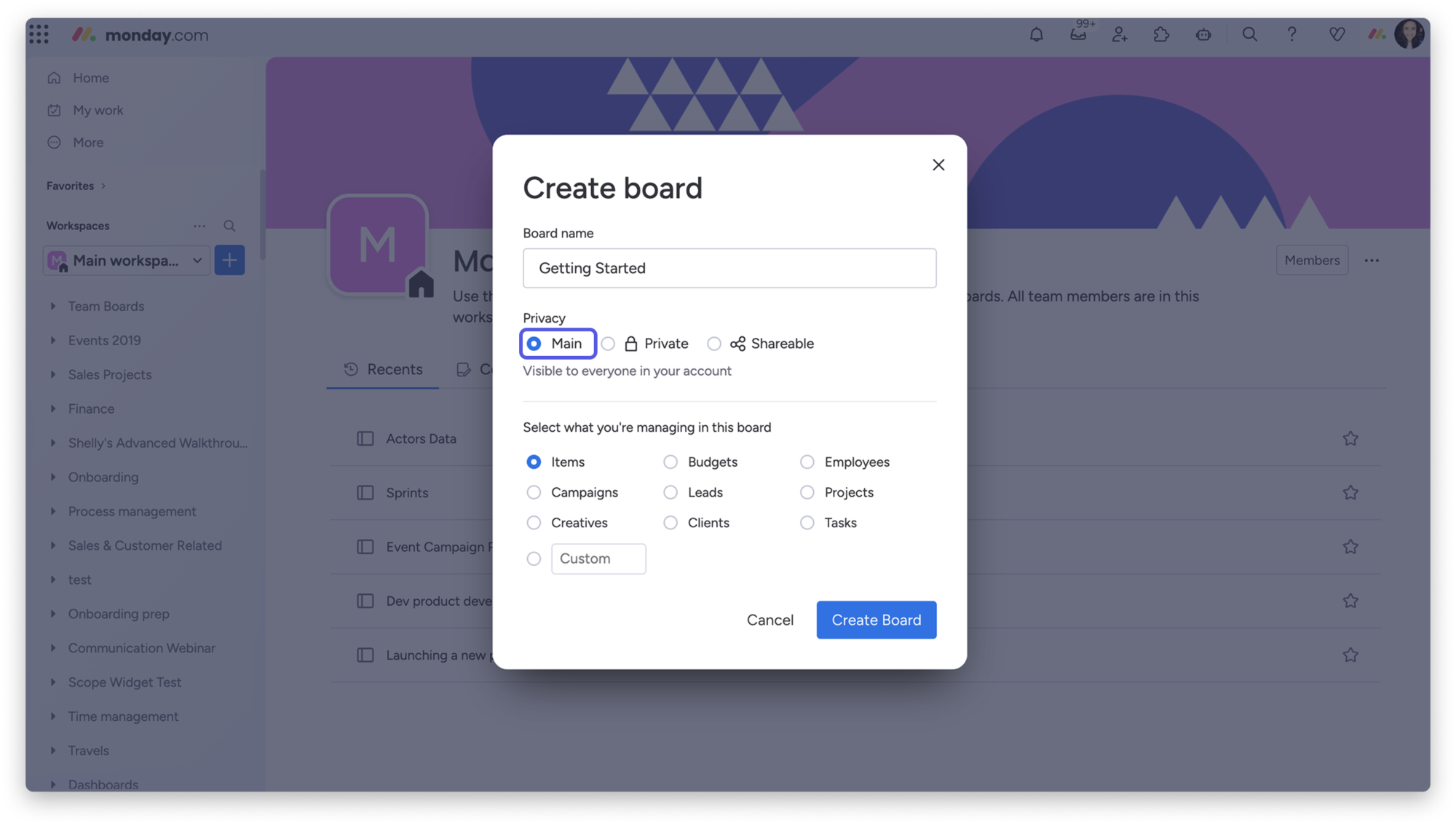
Monday organises work around boards, and a board is a table you design yourself. Groups divide the board into stages. Items are the rows. Columns are whatever you need: status, person, date, number, dropdown, file, or formula. That flexibility is the whole appeal. A content calendar, a hiring pipeline, an inventory tracker, and a campaign plan can all live on Monday, each shaped differently, without anyone learning a project methodology first. New users grasp it fast, because a board looks like a spreadsheet that finally learned some manners. Stakeholders who never open a project tool will open a Monday board, because the colour coded status columns tell the story in seconds.
Dashboards are Monday’s strongest card. A dashboard pulls widgets from several boards into one view: charts, timelines, numbers, progress bars, and workload views. A marketing lead can watch five campaign boards from one screen. An operations manager can roll up request volumes, turnaround times, and team load without building a report in another tool. The catch sits in the plan gates. Dashboard scope grows with the plan: one board per dashboard on Basic, up to five boards on Standard, and up to twenty boards on Pro. A team buying Basic for its dashboards will be disappointed, because Basic is a task tracker with a board view, not a reporting tool. Standard is the first plan where Monday starts to feel like the product in the demos.
Monday’s automation centre uses plain “when this happens, do that” recipes, and non-technical users set them up in minutes. A status change can notify an owner, move an item to another group, create a subitem, or send an email. Integrations connect boards to email, chat, calendars, and business tools, so a form submission can create an item and a deal update can move a card. The limit to watch is the monthly allowance. Standard includes 250 automation actions and 250 integration actions a month. Pro raises both to 25,000 a month. For a small team, 250 actions last a while. For a team automating every handoff across ten boards, 250 actions can run out mid month, and that is when work quietly stops moving until the allowance resets or the plan upgrades.
Monday also plays a different game from Asana outside pure project work. Monday Sales CRM runs on the same platform, so a sales team can manage deals, contacts, and pipelines without buying a separate CRM, and a won deal can hand over to a delivery board. That only helps if you want your CRM and your project tool in one place, and the CRM is priced separately from Work Management, so it is a separate paid subscription. Teams comparing a CRM purchase alongside a project tool should read our guide to the best CRM software for small business before assuming one platform does both jobs well. Monday’s work docs, whiteboards, and form views extend the same idea: one platform, many kinds of work, each shaped as a board or a doc.
AI on Monday arrives as credits, with plan allocations for newer accounts and purchasable top ups. The practical effect matches Asana: useful for summaries, drafting, and categorising items, metered in a way that heavy users need to watch.
What we like about monday.com
- A library of more than 200 ready made board templates covers launches, hiring, events, and sales, so a new team starts from a working board instead of a blank grid
- Work docs let teams write briefs and meeting notes inside the same workspace as the boards, with items that link back to live board data
- The free plan includes 500MB of storage, which is enough for a pair of freelancers sharing briefs and images while they test the tool
What could be better
- Free and Basic accounts include no guest access, so inviting a client or contractor to a board means upgrading or buying them a seat
- Dashboard reach is capped by plan, with a single board per dashboard on Basic and five boards on Standard, which limits executive reporting on lower tiers
- Accounts above 40 users move to quote based pricing, so a fast growing team loses the published per seat price exactly when budgeting matters most
Pricing Deep Dive: What a Real Team Actually Pays
Asana’s pricing is simple to read and harder to feel until the invoice arrives. Personal is free for up to 2 users, with unlimited tasks and projects, list, board, and calendar views, and 100+ free integrations. Starter costs $10.99 per user per month billed annually, or $13.49 billed monthly. Advanced costs $24.99 per user per month billed annually, or $30.49 billed monthly. Enterprise is quoted by sales. Paid plans start at 2 seats, and Asana includes unlimited free guests on paid plans, which is a genuine saving for teams that work with clients, freelancers, or agencies. A team of ten clients on guest access costs nothing extra on Asana. That alone can swing the comparison for service businesses.
Monday’s pricing looks cheaper at first glance and gets complicated in the seat count. The free plan covers up to 2 seats, 3 boards, and 3 docs. Basic costs $9 per seat per month billed annually, or $12 billed monthly, with unlimited items and free viewers, but no automations, no integrations, and no timeline view. Standard costs $12 per seat per month billed annually, or $14 billed monthly, and adds the timeline and Gantt views, guest access, 250 automation actions, and 250 integration actions a month. Pro costs $19 per seat per month billed annually, or $24 billed monthly, and raises those allowances to 25,000 actions a month, with time tracking, private boards, and chart views. Enterprise is quoted by sales, with 250,000 actions a month. Annual billing saves about 18% against monthly billing on both vendors.
| Team size, billed annually | Asana Starter | monday.com Standard | Asana Advanced | monday.com Pro |
|---|---|---|---|---|
| 5 people | $54.95 a month | $60 a month | $124.95 a month | $95 a month |
| 10 people | $109.90 a month | $120 a month | $249.90 a month | $190 a month |
| 25 people | $274.75 a month | $300 a month | $624.75 a month | $475 a month |
Read that table with two corrections in mind. First, Monday sells seats in buckets: a 3 seat minimum, then blocks of 5, 10, 15, and so on. A team of 7 pays for 10 seats on Monday, which turns a $120 Standard bill into $120 for ten seats covering seven people, or an effective $17.14 per person. A team of 12 pays for 15 seats. Asana’s seat increments work differently, with single seats up to 5 users and larger blocks above that, so a team of 6 pays for 10 seats on Asana too. Either way, round your headcount up to the next bucket before you compare, and get the exact seat count in writing from the vendor. Second, the fair pairing is Starter against Standard, and Advanced against Pro, because those are the plans where both tools offer timelines and automations. Comparing Asana Starter at $10.99 with Monday Basic at $9 is a category error: Basic has no automations at all.
The headline lesson is plain. At the practical team tier, Asana is slightly cheaper and gives unlimited automations. At the upper tier, Monday Pro is about 24% cheaper than Asana Advanced, but the plans buy different things. Advanced buys portfolios, goals, workload, approvals, and proofing. Pro buys higher automation limits, time tracking, and private boards. A team that needs portfolios should not buy Pro to save money, because Pro does not include them. A team that needs 25,000 automation actions should not buy Advanced to save money, because Advanced buys portfolio depth instead. Price the plan that includes your must have features, then compare. Anything else is comparing two different products and calling it a saving.
Before you pay for a year, run a two week trial with one real project, one real deadline, and one real handoff. Count how many automations fire, how many guests you invite, and how many boards your dashboard needs. Those three numbers pick the plan for you, faster than any feature checklist.
Task and Project Views: Lists, Boards, Timelines, Calendars
Both tools offer list, board, timeline, and calendar views, and both look complete on a feature page. The difference is what each view is built on. Asana’s list view is a task list with sections, assignees, due dates, and custom fields, and it stays readable when a project holds hundreds of tasks. Its board view groups those same tasks by stage. Its timeline view draws dependencies, milestones, and critical path dates. Switching views never changes the underlying work. A task edited in the calendar is the same task on the timeline. That discipline suits teams that manage work as a sequence, where the order of tasks is the plan.
Monday’s views start from the board, and the board is more flexible than a task list. Columns can hold status, people, dates, numbers, files, locations, ratings, and formulas, so a board can track a hiring pipeline, a budget, or a content calendar without pretending to be a project. Timeline and Gantt views arrive on Standard, calendar views come with the platform, and workload views arrive on Pro. The flexibility has a cost. A board with thirty columns and five hundred items gets hard to read, and teams that build boards without a template often end up with a colourful spreadsheet that nobody maintains. Monday rewards teams that design their boards deliberately and punishes teams that add columns whenever someone asks for one.
For sprint style work, neither tool is a Jira replacement, and buyers should be honest about that. Asana handles sprints through sections, custom fields, and timeline views, and its Jira integration suits teams that track engineering work in Jira while coordinating the wider programme in Asana. Monday handles sprints through board groups, status columns, and dashboards, and its monday dev product is the closer fit for software teams. If your team lives in agile ceremonies, backlog grooming, and story points, compare both against a dedicated agile tool before committing. If your team runs marketing, operations, and cross functional projects, either tool covers the views you need, and the choice comes back to structure against flexibility.
Automations and Integrations: Unlimited Rules Against Metered Recipes
Automation is where the price gap turns into a workflow gap. Asana’s rules run on triggers and conditions inside a project: when a task moves to a section, when a custom field changes, when a due date approaches, when an approval is requested. Actions can reassign, comment, move, set dates, add subtasks, or start an approval. Because rules are unlimited from Starter, teams build them for every repeatable handoff: intake triage, review routing, overdue nudges, and completion notifications. The Workflow Builder packages rules into templates, so a new project inherits the automation instead of starting from zero.
Monday’s automation centre is easier for a first time user. Recipes read like sentences: when a status changes to Done, notify the manager and move the item to the Completed group. The builder is visual, the recipes are plain language, and a non-technical operations lead can build a useful automation in five minutes. Integrations follow the same pattern, connecting boards to Gmail, Slack, Teams, Outlook, HubSpot, Salesforce, and Mailchimp, among others. The constraint is the allowance. Standard gives 250 automation actions and 250 integration actions a month. A team running daily status automations across several boards can burn through 250 actions in a week. Pro’s 25,000 actions remove that worry for most teams, but Pro costs $19 per seat, and the jump from Standard to Pro is the real automation price on Monday.
Both tools connect to Zapier and Make, and that matters when a needed integration is missing. A Zap can create Asana tasks from form submissions, sync Monday items to a CRM, or push completed work into a reporting sheet. Teams that already pay for an automation platform can bridge gaps on either tool, but they should count that subscription in the total cost. Our guide to Zapier alternatives covers cheaper ways to build those bridges. As a rule, if you need more than a handful of cross tool automations every day, Asana’s unlimited rules plus a modest Zapier or Make plan beats Monday Standard plus constant allowance anxiety. If your automations are simple status recipes inside one workspace, Monday’s builder gets you there faster.
Reporting and Dashboards: Portfolio Views Against Board Rollups
Reporting separates the two tools more cleanly than task views do. Asana reports from the task layer upward. Dashboards on Starter show overdue tasks, tasks by assignee, tasks by project, and custom field breakdowns. Advanced adds portfolios, which roll many projects into one status view, and goals, which show progress against objectives. A programme manager running twenty projects sees each project’s health, its milestones, and its risks in one portfolio. Workload views show who is overcommitted across the portfolio, which is the report that prevents burnout before it happens.
Monday reports from the board layer upward. Dashboards combine widgets from several boards, so a leadership view can show campaign progress, budget spend, hiring status, and support volume side by side. Chart widgets, number widgets, battery widgets, and timeline widgets make the dashboard feel like a live briefing document. The limit, again, is the plan gate. A Standard dashboard covers up to five boards. A team with twelve active boards needs Pro for a twenty board dashboard, or it splits reporting across several dashboards and loses the single view. Monday’s dashboards are prettier and more flexible than Asana’s. Asana’s portfolios are deeper for programme management. Pick the reporting style your leadership actually reads every Monday morning.
Exports and integrations fill the gaps on both sides. Asana connects to Salesforce, Tableau, and Power BI on Advanced, which suits teams that report in a business intelligence tool. Monday exports boards to Excel and connects through its own widgets and integrations. Buy on the daily workflow, then check that the reporting tier you need sits on the plan you can afford. That check prevents the most common regret here: a dashboard demo on a plan the team never buys.
Collaboration: Comments, Docs, Guests, and Mobile
Day to day collaboration looks similar on both tools until guests enter the picture. Both offer task and item comments, file attachments, mentions, and notifications. Asana keeps discussion inside the task, with comments, status updates, and messages that stay attached to the work. Monday keeps discussion on the item, with updates, info boxes, and board discussions that suit teams who comment in context. Both send plenty of notifications out of the box, and both reward ten minutes spent tuning notification settings on day one. Notification overload is a setup problem, not a product flaw, on either tool.
Docs show a real difference in philosophy. Asana treats docs as notes inside projects: meeting notes, briefs, and project overviews that sit next to the tasks they describe. Teams that write long documents usually keep them in a dedicated docs tool and link them into Asana, which is why our comparison of Notion alternatives matters for Asana buyers. Monday’s work docs live in the same workspace as the boards, with tables that connect to live board data, so a brief can show a project’s status without a manual update. Neither docs tool replaces a full knowledge base, but Monday’s docs feel more native to the platform, while Asana’s docs feel like a useful side room.
Guests decide the collaboration winner for service businesses. Asana includes unlimited free guests on paid plans, so clients, contractors, and partners can comment on and follow their projects without a seat. Monday includes guest access from Standard, with plan limits, and no guests on Free or Basic. An agency with twenty clients will feel that difference every month. A purely internal team will not care at all. Mobile apps on both tools cover the essentials: viewing work, updating status, commenting, and approving. Building automations, dashboards, and portfolios still belongs on a desktop, on either tool.
Security and Admin: What IT Will Ask About
Security rarely decides this comparison for a small team, and it often decides it for a company above fifty people. Both vendors publish trust and compliance documentation, hold recognised certifications, and offer enterprise tiers with advanced controls. Asana’s Enterprise adds SAML single sign-on, SCIM user provisioning, universal resource management, capacity planning, service accounts, view only licences, and guest invitation controls. Enterprise+ adds data residency, audit logs, SIEM integrations, and managed workspaces. Monday’s Enterprise adds advanced security and governance controls, 250,000 automation and integration actions a month, portfolio and resource management, and support with a 99.9% uptime service level.
For most buyers, the practical security questions are simpler than the certification list. Who can see a private board or project? Who can invite guests? Who can export data? Asana answers those questions at team and project level, with comment only, edit, and admin permissions. Monday answers them at board level, with main, private, and shareable boards, plus column and item restrictions on higher plans. The right question for IT is which model matches the company’s existing access policy, because retrofitting permissions after a hundred boards exist is painful on either tool.
Data residency, audit logs, and compliance integrations matter most for regulated industries and public sector buyers. If your security questionnaire demands them, skip the self serve tiers entirely and talk to both vendors’ sales teams before trialling. A trial on Starter or Standard will not show you the enterprise controls, and a purchase made without that conversation can stall at procurement. For everyone else, the standard security on both paid plans is solid, and the decision should stay on workflow, price, and reporting.
Migration and Switching: Moving Without Losing the Work
Switching between Asana and Monday is doable, and it is never one click. Both tools import from spreadsheets and CSV files, and both offer importers for common tools. A realistic migration runs in five stages. First, export each project or board and audit what you actually use: active tasks, templates, custom fields, automations, and dashboards. Second, map the structure: Asana sections become Monday groups, Asana custom fields become Monday columns, Asana subtasks become Monday subitems, and the reverse when moving the other way. Third, import one pilot project and check dates, owners, dependencies, and attachments before touching the rest. Fourth, rebuild automations by hand, because Asana rules and Monday recipes do not translate one to one. Fifth, freeze edits in the old tool on cutover day, so nobody updates both systems and creates two versions of the truth.
Expect three things to break, and plan for them. Dependencies need checking by hand, because a timeline that looked right in Asana can lose its logic in a flat board import. Dashboards need rebuilding, because a portfolio view and a board dashboard are different reports. Automations need rethinking, because a rule that fired freely on Asana may count against an allowance on Monday Standard. Budget a week for a small team and a month for a large one, and keep the old tool read only for a quarter, so historical work stays searchable.
Teams that must run both tools for a while, after a merger or an acquisition, can sync selected work through Zapier or Make. That works for a handful of shared projects. It does not work as a permanent architecture, because two way sync across hundreds of tasks creates conflicts, duplicates, and silent failures. Pick a system of record, sync only what the other side must see, and set a date to consolidate. Running both indefinitely costs two subscriptions and one confused team.
Who Should Pick Asana?
Pick Asana if your work has deadlines that depend on each other, if handoffs must happen in order, and if accountability matters more than visual flair. Marketing teams running launches, product teams shipping releases, operations teams running repeatable processes, and agencies managing client delivery all fit this shape. You get timelines with dependencies from Starter, unlimited automations from Starter, dashboards from Starter, and portfolios and goals on Advanced. You also get unlimited free guests, which keeps client collaboration cheap. If your team already uses a separate docs tool and a separate CRM, Asana slots into that stack cleanly, connecting to Salesforce, Slack, Google Workspace, and Microsoft 365.
Asana fits less well when the work is a freeform tracker instead of a project. A team managing inventory, a hiring pipeline, or a content calendar with no dependencies may find Asana’s task structure heavier than it needs, and should compare Asana alternatives before committing. A team that wants its CRM inside the same platform will miss a native CRM, and should weigh Monday’s Sales CRM or a dedicated CRM from our guide to the best CRM software for small business. A solo user or a pair should also think twice: the free Personal plan covers two users, but a team of three pays from the third seat, and Advanced doubles the bill for portfolio features a small team may not use yet.
Who Should Pick Monday?
Pick Monday if your team thinks in boards, if stakeholders need to grasp status in seconds, and if you want to shape the tool around your process instead of learning a methodology. Marketing teams running content calendars, operations teams tracking requests, event teams juggling vendors, and sales teams running pipelines all fit this shape. You get colourful, customisable boards, dashboards that roll many boards into one view, an automation builder that non-technical users learn fast, and a native CRM option on the same platform. If your team includes people who resist project tools, Monday is the easier sell, because a board looks familiar from day one.
Monday fits less well when automation volume is high and budgets are tight. Standard’s 250 automation actions a month run out fast on a busy team, and Pro at $19 per seat is the honest price for heavy automation. Monday also fits less well for programme managers who need portfolios and goals as a core view, because portfolio management sits on Enterprise. A team with many external collaborators should check guest limits carefully, since guests are restricted on lower plans. And a team above 40 users should get a quote early, because published per seat pricing stops applying at that size.
Using Both, or Switching Later
Some organisations run both tools, deliberately, for different jobs. A product organisation might run Asana for programme delivery, with dependencies and portfolios, while a marketing team runs Monday for campaign boards and content calendars. That split works when each team owns its tool and the handoff between them is a simple status update. It fails when the same project lives in both tools, because updates drift apart and nobody knows which version is current. If you run both, name one system of record per project, sync only the handoff, and review the double subscription every quarter.
Switching later is always possible, and the cost is measured in weeks, not in licence fees. Export cleanly, rebuild automations and dashboards by hand, and pilot with one team before migrating the company. The harder cost is habit: a team that learned to think in Asana tasks will take a month to think in Monday boards, and the reverse is just as true. That is why the trial matters more than the feature list. Give both tools the same real project for two weeks, with the same deadline and the same handoffs, and watch which one your team opens without being asked. Adoption is the feature that decides whether any of the rest matters.
Final Thoughts
Asana vs Monday comes down to a choice between structure and flexibility, and most teams already know which one they need. Asana suits teams whose work has an order, a deadline, and an owner, and it rewards them with unlimited automations, strong timelines, and portfolio depth at a fair price. Monday suits teams whose work is visual, parallel, and cross functional, and it rewards them with boards anyone can read, dashboards that roll up the whole operation, and a platform that stretches from projects to CRM. Neither tool is a bad buy. The bad buy is the tool that fights the way your team already works, bought because a demo looked good or a per seat price looked low.
Our recommendation, after comparing plans, limits, and real team costs, is this. Start with Asana if your work is deadline driven and automation heavy, because Starter gives you timelines, dashboards, and unlimited rules for $10.99 per user per month. Start with Monday if your work is visual and cross functional, and buy Standard at $12 per seat per month, not Basic, because Basic lacks the automations and timeline that make Monday worth buying. Trial both with one real project, count your automations, guests, and dashboard boards, and let those three numbers pick the plan. Whichever you choose, set it up properly in week one: clean boards or projects, tuned notifications, and one dashboard your leadership actually reads. A well set up tool on either platform beats a powerful tool that nobody opens.
FAQs
Is Asana better than Monday for project management?
It depends on the project. Asana is stronger for deadline driven projects with dependencies, timelines, and handoffs in a set order, because its task structure, Timeline view, and unlimited rules suit that work. Monday is stronger for visual, parallel work such as content calendars and operations trackers, because its customisable boards and dashboards suit many items at a glance. For most structured teams, Asana is the safer default. For most visual, cross functional teams, Monday is the easier adoption.
Which is cheaper, Asana or Monday?
At the practical team tier, Asana Starter at $10.99 per user per month billed annually is slightly cheaper than Monday Standard at $12 per seat per month billed annually, and Asana includes unlimited automations where Monday Standard caps them at 250 actions a month. At the upper tier, Monday Pro at $19 is cheaper than Asana Advanced at $24.99, but the plans buy different things: Advanced adds portfolios and goals, while Pro raises automation limits. Always round your headcount up to the next seat bucket before comparing totals.
Do Asana and Monday have free plans?
Yes, both offer free plans for up to 2 users. Asana Personal includes unlimited tasks and projects with list, board, and calendar views. Monday Free includes 3 boards, 3 docs, and 8 column types. Neither free plan suits a real team, because the third person triggers a paid plan on both tools. Monday also offers a 14 day free trial of its Pro plan.
Does Monday have automations on its cheapest paid plan?
No. Monday Basic at $9 per seat per month includes no automations and no integrations, and no timeline view. Automations start on Standard at $12 per seat per month, with 250 automation actions and 250 integration actions a month. Teams that need automation from day one should treat Standard as Monday’s real entry price, and compare it against Asana Starter at $10.99, which includes unlimited automations.
Does Asana have a CRM?
No, Asana does not include a native CRM. It connects to Salesforce and other CRM tools, and teams usually run their sales pipeline in a dedicated CRM alongside Asana. Monday offers monday Sales CRM on the same platform, priced separately from Work Management. If a combined project tool and CRM matters to you, compare Monday’s CRM pricing and features against a dedicated CRM before deciding.
Can I migrate from Asana to Monday, or from Monday to Asana?
Yes, both tools import from spreadsheets and CSV files, and both offer importers for common tools. There is no one click migration, because automations and dashboards do not transfer automatically. Plan to map sections to groups, custom fields to columns, and subtasks to subitems, import one pilot project first, rebuild automations by hand, and freeze edits in the old tool on cutover day. Budget a week for a small team and longer for a large one.
Which tool is easier for non-technical teams?
Monday, in most cases. Its boards look like a familiar spreadsheet, its status columns show progress at a glance, and its automation recipes read like plain sentences. Asana is also approachable for basic task tracking, but its structure of projects, sections, tasks, subtasks, and rules takes longer for a new user to grasp. If adoption by non-technical stakeholders is the main risk, Monday’s visual style is a genuine advantage.
Which should a small business pick, Asana or Monday?
A small business running deadline driven work with regular handoffs should start with Asana Starter, for timelines, dashboards, and unlimited automations at $10.99 per user per month. A small business running visual trackers, content calendars, or a sales pipeline should start with Monday Standard at $12 per seat per month, and skip Basic, because Basic lacks automations and timelines. Either way, trial both with one real project for two weeks and count automations, guests, and dashboard boards before committing to a year.
Asana for structured, deadline driven teams; Monday for visual, cross functional teams
If your work runs on deadlines, dependencies, and handoffs in a set order, choose Asana Starter at $10.99 per user per month, with unlimited automations, timelines, and dashboards from day one. If your work is visual and parallel, and your team needs boards and dashboards it can shape without training, choose Monday Standard at $12 per seat per month, and skip Basic. Buy Advanced only for portfolios and goals, and buy Pro for heavy automation volume. Trial both on one real project, and let automations, guests, and dashboard boards pick the plan.
This kind of research, applied to your growth
If you run a SaaS business, SaaS Harvest can do this kind of digging in your market and turn it into search traffic that signs up.
