

Asana alternatives are the first thing most teams search for when Asana starts feeling expensive, heavy, or just wrong for the way they work, and that search usually starts with a very practical question: what do we actually get for the money? Asana is a good tool. It is clean, it is reliable, and millions of teams run on it. But its Starter plan now costs $10.99 per user per month billed annually, and the plan most growing teams need, Advanced, costs $24.99. At ten people that is $109.90 a month before you add anything else, and $249.90 if you need portfolios, goals, and resource management. For a small team that bill stings, and for a team that only needs boards and deadlines it feels like paying for a gym membership when you only use the treadmill. My direct opinion is that most teams leaving Asana should land on monday.com, because it keeps the structure Asana users like and adds the flexibility Asana holds back. But the honest answer depends on your team, and this guide covers ten tools so you can find the one that fits your work, your budget, and your patience for setup. Which of these sounds more like you: a team that wants a prettier Asana, a team that wants something simpler, or a team that wants to pay less and still get the job done?
In this guide, we checked the vendor pricing pages for every price in this article and worked out what a typical month actually costs for a ten-person team on each one, based on vendor pricing pages, user reviews and demo videos. You will find a side-by-side table, a pricing deep dive, a worked monthly cost example, a migration section, and clear guidance on who should pick each tool. Every price here is a US list price checked against the vendor pricing page on 7 November 2026, and where a price depends on your choices we say so plainly and tell you to check the live page before you pay.
One thing to know before you start comparing: there is no single best Asana alternative, only a best one for your kind of work. A software team that runs sprints needs something very different from a marketing agency that bills clients by the hour, and a solo freelancer needs something different again. The ten tools below cover that whole range, from a free board you can set up in ten minutes to an enterprise platform that plans capacity across departments. Read the Quick Picks for the short answer, then read the section for the tool that catches your eye.
Quick Picks: The Short Version
monday.com
Best for most teams leaving Asana, with flexible boards, strong dashboards, and the closest feel to Asana with more room to shape it.
Price Free plan for up to 2 seats. Standard from $12 per user per month billed annually.
Free plan available, plus a 14-day free trial of the Pro plan.
Trello
Best free option for small teams and simple projects, with the easiest boards to learn and the fastest setup of any tool here.
Price Free for up to 10 collaborators per workspace. Standard from $5 per user per month billed annually.
Free plan available, no credit card required.
ClickUp
Best value for teams that want the most features per dollar, with docs, chat, dashboards, and automations in one workspace.
Price Free Forever plan at $0. Core from $9 per user per month billed annually.
Free Forever plan available, no credit card required.
Asana Alternatives at a Glance
| Tool | Best for | Free plan | Paid from (per user/month, annual) | Standout strength |
|---|---|---|---|---|
| monday.com | Most teams leaving Asana | Yes | $9 Basic, $12 Standard | Flexible boards and dashboards |
| ClickUp | Most features per dollar | Yes | $9 Core | Docs, chat, and dashboards in one place |
| Notion | Docs plus tasks | Yes | $10 Plus | One workspace for notes and projects |
| Trello | Simple boards, smallest teams | Yes | $5 Standard | Fastest to learn, fastest to set up |
| Jira | Software and agile teams | Yes | $8.48 Standard | Sprints, backlogs, and dev workflows |
| Wrike | Complex enterprise work | Yes | $10 Team | Gantt charts and resource planning |
| Teamwork | Client work and agencies | Yes | $9.99 Basics | Time tracking, budgets, and invoicing |
| Basecamp | Simple flat-priced teamwork | Yes | $29 per month flat (Freelancer) | One price, no per-user fees |
| Smartsheet | Spreadsheet-style planning | No, 30-day trial | $9 Pro | Grid views with real reporting |
| Motion | AI scheduling and time blocking | No | $19 Pro AI per seat | Calendar that plans your day for you |
Prices are US list prices checked against vendor pricing pages. Basecamp charges a flat monthly price per account, not per user. Check the live figures on each vendor pricing page before you commit, because vendors change prices and limits.
How We Compared These Asana Alternatives
We compared these tools as a working team would use them, from the first hour to the twelfth month. Setup speed mattered, and so did the quiet costs that appear later: a plan limit that arrives mid-project, a feature that only exists on the tier above the one you bought, and a view your team needs that turns out to be an add-on. A tool that looks cheap on day one can become expensive by month six, and a simple-looking tool can become slow once your projects grow past a dozen.
Our criteria were simple and practical. First, how quickly can a non-technical person set up a project and invite the team? Second, what does a real month cost for ten people, counting the plan a team would actually buy? Third, how good are the views: boards, lists, timelines, calendars, and Gantt charts? Fourth, how much busywork can automations and AI take away? Fifth, how well does the tool fit the kind of work you do: client work, software sprints, content, or general projects? A good project tool should fit your work, and it should not force your work to fit it.
We checked the vendor pricing pages for every price in this article. Prices are US list prices checked against vendor pricing pages. Where a price depends on your choices, for example your seat count or your billing cycle, we give you the annual billing figure and note the monthly figure beside it, so you can adjust the maths for your own team. If a figure was uncertain, we left it out or told you to check the live page. That matters in project software, because a per-user price that looks small becomes a real bill when you multiply it by ten people and twelve months. If Asana still feels close but you want to see a head-to-head first, our Asana vs Monday comparison covers the same kind of trade-off for the two most popular options.
Why Teams Look Beyond Asana
Asana earned its place. It is one of the cleanest project tools ever built, and teams that run simple projects with clear deadlines often love it for years. The problems start when a team grows, or when its work gets more complicated than a list of tasks with due dates. The free Personal plan covers only one or two people, so a real team pays from the start. The Starter plan at $10.99 per user per month billed annually covers timelines, dashboards, and forms, which is fair. But the features growing teams ask for first, portfolios, goals, resource management, approvals, and time tracking, all sit on Advanced at $24.99 per user per month. That is more than double the Starter price, and it is the jump that sends most teams shopping.
Price is only half the story. Asana is deliberately opinionated about how work should look, and that opinion does not suit every team. Agencies that bill by the hour want time tracking and invoicing built in. Software teams that run sprints want backlogs and story points as first-class citizens. Teams that live in documents want their notes and their tasks in the same place. And teams that plan their day by the calendar want a tool that schedules work for them. Asana does some of these things through integrations, but an integration is a workaround, and workarounds are where tools quietly break. A native feature you use every day beats an integration you have to maintain.
The ten tools below each solve a different version of this problem. Some are cheaper. Some are simpler. Some are more powerful in one specific area. None of them is Asana with a different logo, and that is the point. The right alternative is the one that matches the work you actually do, at a price you can defend in a budget meeting, with a learning curve your team will survive. Start with the Quick Picks, then read the two or three sections that match your team, and use the worked cost example near the end to see what each one really costs at ten people.
1. monday.com: Best Overall Asana Alternative
monday.com is the closest thing to a straight Asana replacement on this list, and that is why it leads it. The board is the heart of the tool, just like Asana, with tasks as rows, columns for status, owner, dates, and priorities, and colour everywhere so a board reads at a glance. The difference is how much you can shape it. Columns can be almost anything: a dropdown, a number, a formula, a file, a timeline, a person. A marketing team can build a campaign board, an ops team can build a hiring pipeline, and a product team can build a launch tracker, all in the same workspace, without any of them feeling like they are using the wrong tool. Asana keeps its structure tighter, and some teams like that. Teams that want to bend the tool to their process will prefer monday.com.
Dashboards are where monday.com pulls ahead of Asana for managers. You can pull numbers from several boards into one dashboard, chart them, and see workload, budget, and progress in one place. The dashboard builder is visual and forgiving, and it is the kind of thing a team lead can set up in an afternoon and then rely on every Monday morning. Asana has reporting dashboards too, but they sit on the Starter plan and feel thinner, and the portfolio view that ties projects together sits on Advanced at $24.99 per user per month. On monday.com, dashboards and the views that feed them are part of the everyday experience from Standard upward, which is where most teams land.
Automations and AI are built into the daily flow. You can set a rule that moves a task, notifies an owner, or changes a status when something happens, and the rule builder reads like plain English, so a non-technical manager can build one without help. The newer AI side adds agents that triage tickets, screen candidates, and draft updates, plus a Sidekick assistant that answers questions about your boards. None of this replaces good process, but it takes the repetitive clicks out of a week. If your team spends its Fridays updating statuses and chasing owners, monday.com automations pay for themselves quickly.
Pricing is the part to read carefully. The free plan is small and suits a solo user trying the tool. Paid work management plans start at $9 per user per month for Basic on annual billing, $12 for Standard, and $19 for Pro, with Enterprise priced on request. Standard is the honest starting point for a team, because Basic leaves out automations and integrations, which are the reason most teams pick monday.com at all. Monthly billing costs more: $12, $14, and $24 for the same three tiers. For a deeper head-to-head on the two tools, read our Asana vs Monday comparison before you decide.

What we like about monday.com
- AI credits come with every paid plan: 1,000 a month on Basic, 2,000 on Standard, and 3,000 on Pro.
- Docs, Whiteboard, and Forms live inside the same workspace, so notes and intake stay next to the work.
- Unlimited free viewers on paid plans mean stakeholders can look without taking a paid seat.
What could be better
- Paid plans need a minimum of 3 seats, so a one or two person team still pays for three.
- Guest access starts on Standard, so Basic keeps outside collaborators out.
- Annual billing is charged as one upfront payment, which is a bigger single hit to the budget.
2. ClickUp: Best Value Asana Alternative
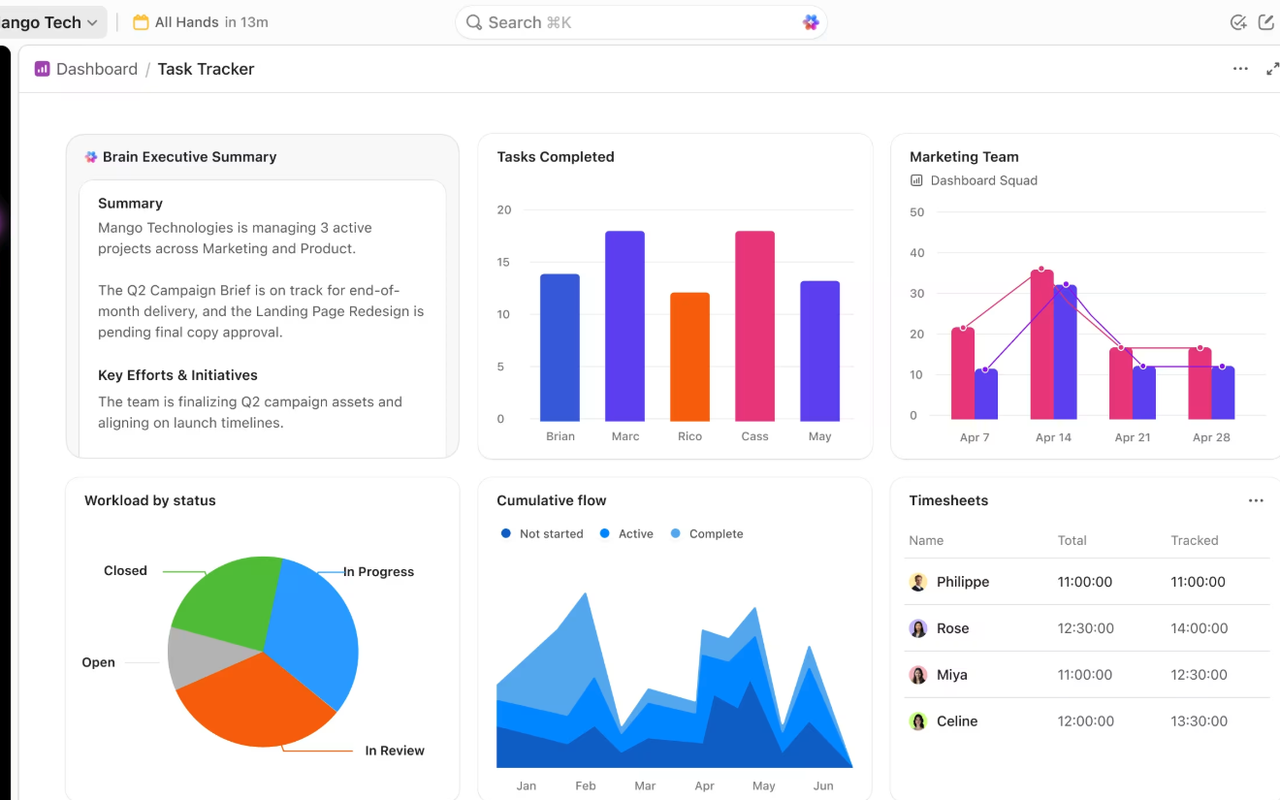
ClickUp tries to be everything in one workspace, and more than most tools that make that promise, it gets close. Tasks, docs, chat, dashboards, goals, and time tracking all live under one roof, which means a team can stop paying for three or four separate tools and stop losing work between them. A task can hold a doc, a doc can hold tasks, and a chat thread can turn into a task with one click. That sounds like a small thing until you have lived with it for a month and realised how much of your week used to be copying context from one app to another. Asana is calmer and more focused, and some teams will always prefer that. ClickUp is for teams that want one place for all of it.
Views are the other reason ClickUp wins on value. List, board, calendar, Gantt, timeline, workload, mind map, and table views all come from the same data, and switching between them takes one click. A manager can look at the workload view on Monday, a developer can look at the board on Tuesday, and nobody has to rebuild anything. Asana has solid views too, but timeline and Gantt sit on the paid Starter plan, and the deeper reporting sits higher. On ClickUp, the view that shows you who is overloaded is available early, and that is the view that prevents burnout in a busy quarter.
The free plan deserves a real mention, because it is the most generous free plan on this list. You get unlimited tasks and subtasks, docs, kanban boards, calendar view, sprint management, and time tracking without paying anything, which means a small team can run real work on ClickUp for months before it needs to pay. The catch, and there is always one, is that ClickUp packs so much in that new users can feel lost for the first week. The interface has more buttons, more menus, and more settings than Asana, and a team that wants a tool to disappear into the background may find ClickUp loud. Give it two weeks and a short team training session, and most teams settle in.
Pricing is simple to read. The Free Forever plan costs $0. Core costs $9 per user per month billed annually, with a regular price of $12 shown struck through on the pricing page. Business costs $17 per user per month billed annually, with a regular price of $25. Enterprise is custom priced, and the MAX plan, which bundles the full AI engine with enterprise controls, costs $100 per user per month billed annually. For a ten-person team, Core costs $90 a month, which is less than Asana Starter at $109.90, and it covers far more ground.
What we like about ClickUp
- Free plan includes 60 MB of storage.
- Core includes 1,000 automations a month, so routine work starts running itself early.
- Support runs 24/7 even on the free plan, which is rare at this price.
What could be better
- Paid plans add guest seats in fixed bundles, so inviting many outside collaborators gets fiddly.
- Business is needed for advanced dashboards, timesheets, and private views.
- The MAX plan is a steep jump from Business, so the full AI engine is a big budget step.
3. Notion: Best Asana Alternative for Docs Plus Tasks
Notion is the odd one out on this list, and that is exactly why it belongs here. It is not a project manager first. It is a workspace where documents, wikis, databases, and tasks live together, and a team that writes a lot will feel at home in minutes. A project page can hold the brief, the meeting notes, the task database, and the launch checklist in one place, and every task is a page you can open, comment on, and link to from anywhere. Asana keeps tasks and docs in separate worlds, with integrations bridging the gap. Notion removes the gap entirely, and for content teams, product teams, and startups that document everything, that is a real advantage.
Databases are the engine underneath it all. A task database can show as a board, a calendar, a timeline, a gallery, or a table, and each view can filter and sort differently, so the same project looks like a sprint board to developers and a content calendar to marketers. You can link databases together, so a task can pull in its project, its owner, and its deadline from other pages without copying anything. The learning curve is real: a team that opens Notion for the first time will spend a week building before it feels natural, and a team that wants a ready-made project tool out of the box may find that week annoying. But once the setup is done, Notion bends further than any other tool here.
AI is now woven through Notion in a way that suits writing-heavy teams. The workspace AI can draft, summarise, and search across your pages, and the newer agent features can triage feedback, resolve tickets, and automate reporting. For a team that already keeps its knowledge in Notion, that AI has context no other tool can match, because it reads the same pages your team reads. The trade-off is that the full AI set is not on every plan, and the price of the plan that carries it is double the entry plan, so check which tier you actually need before you budget.
Pricing is clean. The Free plan costs $0 and suits one person or a team trying the tool. Plus costs $10 per member per month billed annually, or $12 billed monthly. Business costs $20 per member per month billed annually, or $24 billed monthly. Enterprise is custom priced. For a ten-person team, Plus costs $100 a month, which undercuts Asana Starter, and Business costs $200 a month. Guests are free, so only members count toward the bill. If Notion feels close but you want to see what else exists in its category, our guide to Notion alternatives is a useful next read.

What we like about Notion
- Free plan keeps 7 days of page history, and Plus extends it to 30 days with 5 GB file uploads.
- Students and educators get Plus free with a school email address.
- Guests are free of charge, so clients and contractors can view pages without a paid seat.
What could be better
- Full Notion AI, with Agent, AI Meeting Notes, and Enterprise Search, needs the Business tier.
- Custom Agents cost extra credits at $10 per 1,000 Notion credits.
- Free workspaces with two or more members hit a block limit and must upgrade to keep adding content.
4. Trello: Best Free Asana Alternative
Trello is the simplest tool on this list, and for many teams that is the whole point. A board is a set of lists, a list holds cards, and a card holds the work: a description, a checklist, a due date, an owner, and a few comments. There is almost nothing to learn. A new team member can open a Trello board and understand it in five minutes, which is something you cannot say about most of the tools here. Asana is not hard to learn, but it has more concepts: projects, sections, portfolios, goals, and rules. Trello strips all of that away and leaves the board, and for a small team running straightforward projects, the board is enough.
Butler, the built-in automation, is the quiet strength of Trello. You can set rules that move cards, assign members, add due dates, and post comments when something changes, all without writing code. The rule builder is simple, and the automations run on every board, including free ones, which means even a team paying nothing gets real automation. Power-Ups add the rest: custom fields, and integrations with Slack, Google Drive, and hundreds of other apps. A Power-Up is a small add-on, and most teams need only a handful, but they are the reason Trello can stretch from a personal to-do board to a team content calendar without changing tools.
The trade-off is depth. Trello has no native time tracking, no workload view, no goals, and no real reporting, and a team that outgrows boards will feel those gaps within a year. The mobile and desktop apps are solid, and the quick capture inbox, which gathers to-dos from email, Slack, and Teams into one place, is genuinely useful for busy people. But if your projects have dependencies, budgets, and cross-team reporting, Trello will start to feel small. That is fine. Trello is honest about what it is: a fast, friendly board, not a platform. Use it for what it is good at, and move on when your work outgrows it.
Pricing is the cheapest on this list. The Free plan costs $0 and covers a small team getting organised. Standard costs $5 per user per month billed annually, or $6 billed monthly. Premium costs $10 per user per month billed annually, or $12.50 billed monthly. Enterprise costs $17.50 per user per month billed annually. For a ten-person team, Standard costs $50 a month, which is less than half of Asana Starter, and Premium costs $100 a month, which still undercuts Asana Starter while adding admin controls and extra features.

What we like about Trello
- Free plan covers up to 10 collaborators per workspace, which is enough for a real small team.
- Standard adds unlimited boards and card mirroring, so one card can live on several boards at once.
- Premium adds calendar, timeline, map, and dashboard views on top of the board.
What could be better
- Free workspaces are limited to 10 boards, so a team with many projects hits the ceiling fast.
- Enterprise is priced well above Premium, which is dear for what is still a simple board tool.
- Atlassian Guard single sign-on costs $4 per user per month extra, on top of the plan price.
5. Jira: Best Asana Alternative for Software Teams
Jira is the tool Asana users move to when their work is software, and the reason is simple: Jira was built for agile development from the start, and it shows in every screen. Backlogs, sprints, story points, epics, and burndown charts are first-class citizens, not features bolted on later. A developer can pick up a ticket, see its history, its linked code, and its place in the sprint, and move it through a workflow that matches how the team actually ships. Asana can run a sprint, and many teams do, but its sprint support feels like a general project tool doing a software job. Jira feels like it was designed by people who ship code.
Plans, the timeline view, is where Jira earns its keep for larger teams. You can see several teams, several projects, and their dependencies on one timeline, and spot the collision before it happens. Cross-project planning is the feature that makes Jira worth its learning curve for engineering managers, because it answers the question Asana struggles with: who is doing what, when, and what happens if this slips by two weeks. The automation rules help too: a rule can assign a ticket, move it, or notify a channel when a condition is met, and the rules run across projects, so a team can standardise its workflow instead of relying on everyone remembering the process.
The cost of all this power is complexity. Jira has more settings, more admin screens, and more concepts than Asana, and a team without a Jira admin will spend its first month learning the tool instead of using it. Non-technical teams often bounce off Jira for exactly this reason: the interface is dense, the terminology is software-specific, and a simple project can feel buried under process. But for a software team, that density is the product. The same screens that confuse a marketing team are the screens a scrum master lives in. If your team writes code, Jira is the serious answer on this list.
Pricing is fair for what you get. The Free plan costs $0 and covers a small team getting started. Standard costs $8.48 per user per month, and Premium costs $15.56 per user per month. Enterprise is custom priced. For a ten-person team, Standard costs $950 a year on annual billing ($79.17 a month equivalent), or $97 a month on monthly billing, which undercuts Asana Starter, and Premium costs $1,950 a year on annual billing ($162.50 a month equivalent), or $196 a month on monthly billing. The AI features, built around the Rovo assistant, come with every paid plan. If software is your world, our guide to Jira alternatives is worth a read too, because it covers the tools teams pick when even Jira feels heavy.

What we like about Jira
- Free plan covers 10 users with 2 GB of storage, enough for a small dev team to start.
- Standard includes 400 automation steps per user per month, so routine triage runs itself.
- Premium adds a 99.9% uptime SLA and unlimited storage for teams that cannot go down.
What could be better
- Rovo AI credits are capped at 25 per user a month on Standard, so heavy AI use needs a higher tier.
- Setup and admin need a Jira admin, not a casual user, and small teams often lack one.
- Enterprise pricing is only shown for annual billing, so monthly buyers must talk to sales.
6. Wrike: Best Asana Alternative for Complex Work
Wrike is the enterprise answer on this list, and it is built for teams whose projects have phases, dependencies, budgets, and resource plans that all need to stay in sync. The Gantt chart is the star: you can see a whole project as a timeline, drag a phase, and watch the dependent tasks move with it, which is the kind of planning Asana does on its higher tiers and Wrike does from its Team plan upward. Request forms let other teams submit work with the right details attached, so intake stops being a Slack message and a prayer. Proofing lets reviewers annotate files inside Wrike, which creative teams love, because feedback stops living in email threads.
Resource management is where Wrike earns its price for larger organisations. You can see who is overloaded, who has capacity, and what happens to the plan if a key person takes two weeks off, and you can rebalance before the deadline slips. That view is the difference between a tool that tracks tasks and a tool that manages work, and it is the reason agencies and enterprise teams pick Wrike over lighter tools. The dashboards and reports go deep too, with real-time visibility across projects, which matters when a director asks for a status update and you need an answer in five minutes, not five hours.
The trade-off is that Wrike is a serious tool with a serious learning curve. The interface is dense, the settings run deep, and a team that wants a quick board will find Wrike heavy. The AI features are growing fast, with AI agents and automation actions on the higher tiers, but they are part of a platform that expects an admin to own it. Small teams should think twice before picking Wrike: it is built for organisations with dozens of people and projects, and a ten-person team may find it more tool than it needs. But if your work is complex, regulated, or spread across departments, Wrike is the tool that keeps up.
Pricing starts with a Free plan at $0 for essential task management. Team costs $10 per user per month, and Business costs $25 per user per month. Pinnacle and Apex, the top tiers, are priced on request. For a ten-person team, Team costs $100 a month, which undercuts Asana Starter, and Business costs $250 a month, which is in line with Asana Advanced but covers more enterprise ground. Check the live figures on the Wrike pricing page before you commit, because the higher tiers are quoted, not published.

What we like about Wrike
- Team plan covers 2 to 15 users, which fits a small department without enterprise pricing.
- Business adds resource management and covers 5 to 200 users for growing organisations.
- Wrike is sold in seat groups of 5 up to 30 users, so adding a few people is simple.
What could be better
- Pinnacle and Apex pricing needs a sales call, so bigger teams cannot budget without talking to Wrike.
- Business and above are annual billing only, with no monthly option.
- Whiteboard costs $15 per user per month extra, on top of the plan price.
7. Teamwork: Best Asana Alternative for Client Work
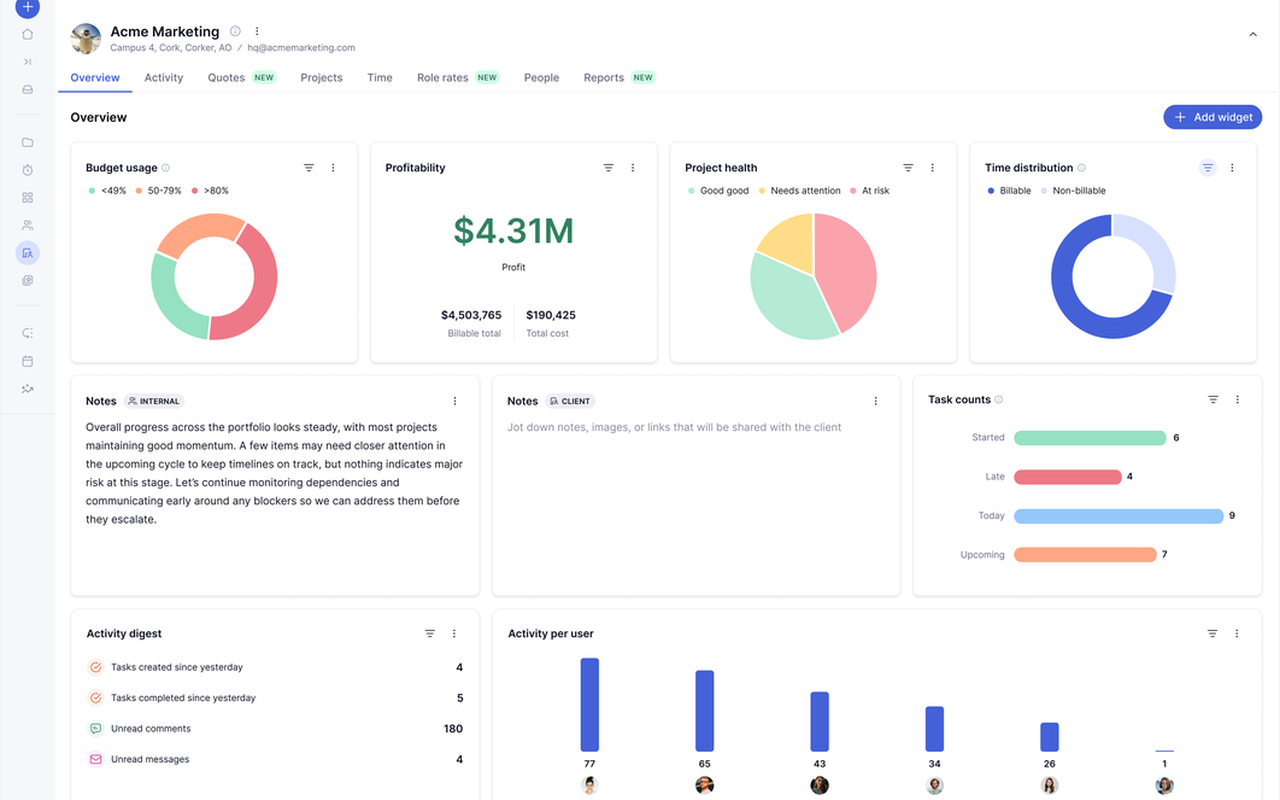
Teamwork is the only tool on this list built specifically for client work, and if you run an agency, a consultancy, or any team that bills clients, that focus changes everything. Projects are organised by client, time is tracked against tasks, budgets are watched in real time, and invoices can be built from logged hours without leaving the tool. Asana can do some of this through integrations with time tracking apps, but the data lives in two places and the reconciliation is manual. In Teamwork, the time, the budget, and the task are the same record, and a project manager can see at a glance whether a project is making money or eating it.
The client-facing side is thoughtful too. You can share a project view with a client, let them comment and approve work, and keep the internal discussion separate, which is the difference between a tool that serves clients and a tool that merely tolerates them. Workload planning shows who is overbooked across all client projects, so a manager can shift work before someone burns out, and the reporting shows profitability by client, by project, and by team member. For an agency, those reports are not a nice extra. They are how you decide which clients to keep and which rates to raise.
AI is now part of the package, with assistants that summarise projects, plan resources, and forecast profitability, and the pricing page notes that AI is included in all paid plans for an introductory period. The interface is clean and calm, closer to Asana than to ClickUp, and a team moving from Asana will find the learning curve gentle. The weakness is that Teamwork is less flexible outside client work: a product team or a software team will find its templates and language geared toward agencies, and it will feel like wearing someone else’s shoes. But if your work is client work, those shoes fit.
Pricing starts with a Free plan at $0 for a small team trying the tool. Basics costs $9.99 per user per month billed annually, and Accelerate costs $24.99 per user per month billed annually. Scale and Enterprise are custom priced. For a ten-person team, Basics costs $99.90 a month, which undercuts Asana Starter, and Accelerate costs $249.90 a month. Both paid plans include a 14-day free trial, and the pricing page notes that annual billing carries a discount against monthly billing.
What we like about Teamwork
- Free plan covers 5 users and 5 projects, enough for a small agency to test real client work.
- Accelerate includes 20,000 automations a month, so routine client admin runs itself.
- One-click import from Asana, Wrike, monday.com, Basecamp, ClickUp, and Trello makes switching fast.
What could be better
- The Basics tier lacks workload planning and invoicing, so growing agencies must step up to Accelerate.
- Scale pricing is custom, so a growing agency cannot budget it without talking to sales.
- Client seats and permissions get complex on bigger accounts, and an admin needs to own them.
8. Basecamp: Best Simple Asana Alternative With Flat Pricing
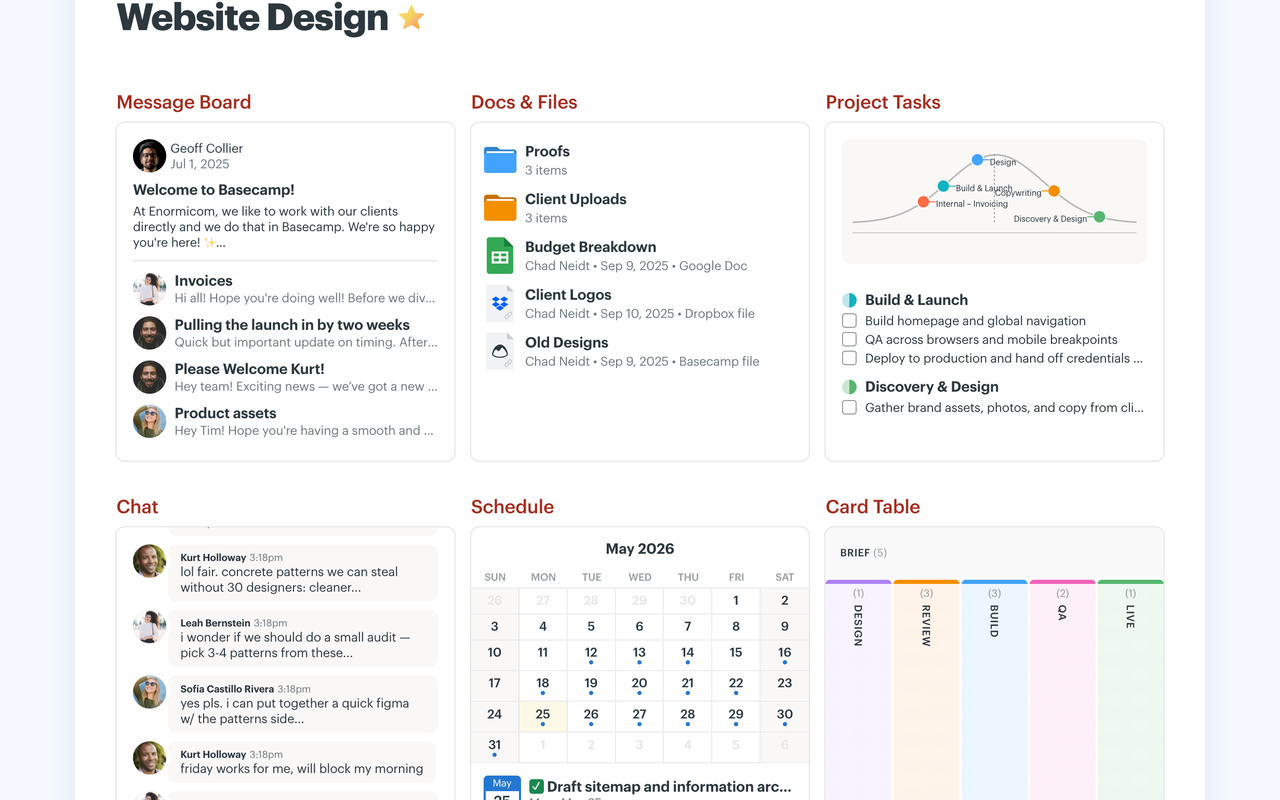
Basecamp is the most opinionated tool on this list, and its fans love it for exactly that reason. Instead of a blank board you shape yourself, Basecamp gives you six tools in every project: a message board, to-dos, a card table, chat, a schedule, and docs and files. That is the whole product. There is no Gantt chart, no custom workflow engine, and no automation builder, and Basecamp is proud of that. The argument is that most teams do not need those things, and that the tools they do need should be simple, obvious, and in the same place. After a decade of project tools getting more complex, Basecamp’s simplicity feels like a deep breath.
The communication tools are the real product. Message boards replace long email threads, group chat replaces scattered Slack channels, and automatic check-ins ask the team simple questions on a schedule, like what did you work on today, and collect the answers in one place. A manager can read the check-ins over coffee and know where every project stands, without a status meeting. To-dos are simple, with owners and due dates, and the card table gives you a kanban view when you need one. Hill Charts, Basecamp’s way of showing progress as a hill you climb, give a project a sense of shape that a percentage bar never does. For a small team that talks a lot and plans a little, this is a better fit than Asana.
The pricing is the other reason teams pick Basecamp, and it is unlike anything else here. There are no per-user fees. You pay a flat monthly price for the account, and you add as many people as the package allows. That makes budgeting simple: the price does not grow every time you hire someone, and inviting a client or a contractor does not add to the bill. The trade-off is that Basecamp has no free tier worth using for a real team, and a team that needs dependencies, time tracking, or deep reporting will outgrow it. But for a small business that wants one calm place for its projects, Basecamp is hard to beat.
Pricing is flat and simple. The Free plan costs $0. Freelancer costs $29 per month, Pro costs $79 per month, Pro Plus costs $99 per month, and Pro Unlimited costs $199 per month billed annually. For a ten-person team, Pro at $79 a month covers everyone, which is less than Asana Starter at $109.90, and the price stays $79 whether the team is five people or ten. No credit card is needed to try it, and cancellation is self-serve with no retention call.
What we like about Basecamp
- Free plan covers 1 project and 3 users, so a solo user can try the real product.
- Pro Unlimited covers unlimited users and unlimited projects for one flat monthly price.
- Nonprofits get 10% off, and K-12 schools and universities use Basecamp free for class work.
What could be better
- No per-user pricing means a solo user pays the same flat price as a team of five on Freelancer.
- Freelancer caps at 3 projects and has no time tracking, so growing teams must upgrade early.
- No Gantt chart or dependencies for deadline-driven work that needs a timeline.
9. Smartsheet: Best Asana Alternative for Spreadsheet Lovers
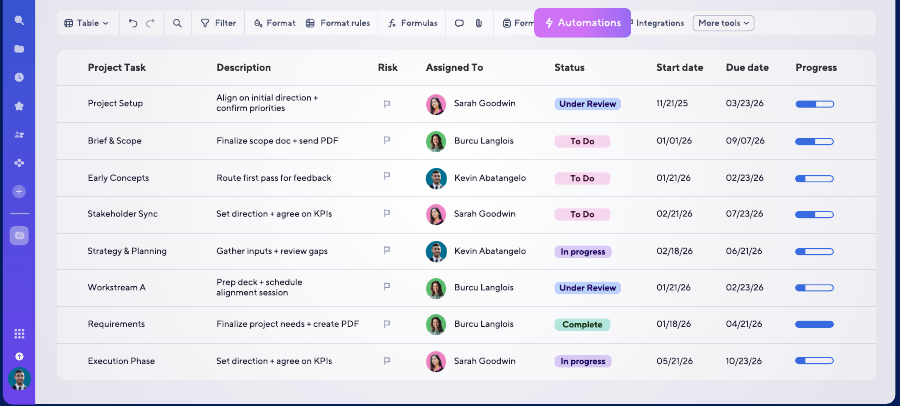
Smartsheet looks like a spreadsheet, and that is its superpower for a certain kind of team. If your team lives in Excel or Google Sheets, Smartsheet feels familiar from the first minute: rows, columns, formulas, and filters, with the power of a project tool underneath. A row can be a task with an owner, a due date, a status, and attachments, and the same sheet can show as a grid, a card view, a calendar, or a Gantt chart. Asana hides the spreadsheet behind boards and lists, and for some teams that is cleaner. For a team that thinks in rows and columns, Smartsheet meets them where they are.
Reporting is where Smartsheet earns its keep. Dashboards pull data from many sheets into one view, and reports can filter across projects to show, for example, every overdue task owned by one department, or every project over budget this quarter. That cross-project reporting is stronger than Asana’s, and it is the reason operations teams, finance teams, and construction and healthcare teams pick Smartsheet. Automations handle the routine work: approval requests, reminders, and status changes run on rules, and the forms feature turns intake into a sheet row automatically, so a request from another department lands in the right place with the right fields filled in.
The weakness is the interface. Smartsheet is powerful, but it is not pretty, and a team that cares about design will find it plain next to Asana or monday.com. The learning curve is gentle for spreadsheet users and steeper for everyone else, because the mental model is a sheet, not a board, and some concepts, like sheet permissions and cross-sheet formulas, take time to learn. AI features are growing, with formula help and summaries, but Smartsheet is not an AI-first tool, and teams that want a smart assistant will find more of that elsewhere. If your work is data-heavy, process-driven, and reported upward, Smartsheet is the serious answer.
Pricing starts with a free trial, and there is no free plan. Pro costs $9 per member per month billed annually, or $12 billed monthly. Business costs $19 per member per month billed annually, or $24 billed monthly. Enterprise is custom priced. For a ten-person team, Pro costs $90 a month, which undercuts Asana Starter, and Business costs $190 a month. Check the live figures on the Smartsheet pricing page before you commit, because the plan limits change with team size.
What we like about Smartsheet
- Pro covers 1 to 10 members with unlimited contributors, so viewers never take a paid seat.
- Business starts at 3 members with unlimited guests and contributors for wider teams.
- 30-day free trial needs no credit card, so a team can test real work before paying.
What could be better
- The entry Pro tier lacks the resource views and advanced controls larger teams need.
- Enterprise pricing is custom, so bigger organisations must talk to sales to budget it.
- The interface still feels like a spreadsheet, which some teams dislike next to prettier tools.
10. Motion: Best Asana Alternative for AI Scheduling
Motion is the most different tool on this list, because it starts from the calendar, not the project. You add your tasks, your meetings, and your priorities, and Motion builds your day for you: it schedules each task into the calendar, moves things around when a meeting runs long, and tells you what to work on next. Asana tells you what is due. Motion tells you when to do it. For a busy person whose day is a fight between meetings and deep work, that difference is the whole product, and it is why Motion has a loyal following among founders, executives, and small teams that run on their calendars.
The AI is the engine, and it is more hands-on than the AI in the other tools here. Motion watches your calendar, your deadlines, and your priorities, and it re-plans your day when reality changes, which it does every day. A task that slips gets rescheduled automatically, a meeting that moves frees a block for focused work, and the day plan updates without you touching it. Projects and booking links sit alongside the calendar, so a team can plan work and let clients book time in the same tool. The project features are lighter than a full project manager: there are no portfolios, no workload views, and no deep reporting, and a team that needs those things will find Motion thin. But for personal productivity and small-team scheduling, Motion is in a class of its own.
The price is the honest catch. Motion is the most expensive tool on this list for a team, because it charges per seat and its entry plan costs more than most tools’ mid-tier plans. A solo user or a small team that lives by the calendar will find the price easy to justify, because the time it saves is visible every day. A ten-person team that wants a project manager will find it hard to justify, because the same money buys a full project platform elsewhere. Motion is a scheduling tool that does projects, not a project tool that does scheduling, and the right buyer is the person who feels that distinction in their own week.
Pricing has two tiers. Pro AI costs $19 per seat per month, and Business AI costs $29 per seat per month, both on annual billing, which the pricing page notes saves 33% against monthly billing. Business AI adds advanced dashboards and reports, timeline and Gantt charts, permissions, central billing, and priority support. For a ten-person team, Pro AI costs $190 a month, which is more than Asana Starter, and Business AI costs $290 a month. Check the live figures on the Motion pricing page before you commit, because the AI credit allowances sit on top of the seat price.
What we like about Motion
- Pro AI includes 7,500 AI credits per seat per month for the AI features that plan your day.
- Business AI raises that to 15,000 credits per seat per month for heavier AI use.
- Extra credits cost 25 cents per 100 on Pro AI and 19 cents per 100 on Business AI, so top-ups are cheap.
What could be better
- Per-seat pricing adds up fast, so a growing team pays far more than on a flat-priced tool like Basecamp.
- There is no free plan, so every seat is paid from day one.
- Business AI is the only tier with time tracking and capacity planning, so those sit behind the higher price.
Pricing: What You Actually Pay
Pricing is where this comparison is decided for most buyers, so it deserves a careful read. The headline price is never the whole story. A tool that costs $5 per user looks cheap until you learn that the feature you need sits on the $10 tier, and a tool that costs $19 per user looks dear until you learn that it replaces two other subscriptions. The table below gives the entry paid price for each tool, and the paragraphs after it explain the catches. Prices are US list prices checked against vendor pricing pages.
Start with the cheapest honest options. Trello Standard at $5 per user per month billed annually is the lowest per-user price here, and it covers a small team well. ClickUp Core at $9, Smartsheet Pro at $9, Teamwork Basics at $9.99, and Notion Plus at $10 all sit in the same band, and each one covers a different kind of team. Jira Standard at $8.48 and Wrike Team at $10 sit in that band too. monday.com Standard at $12 is the realistic entry price there, because Basic at $9 leaves out automations and integrations. Basecamp Pro at $79 a month flat breaks the per-user pattern entirely, and Motion Pro AI at $19 per seat is the dearest entry price on the list.
Three pricing traps deserve attention. First, the free plan is a trial in disguise on some tools and a real workspace on others. ClickUp and Trello give you a free plan you can run a team on, while Smartsheet and Motion give you a trial and then ask you to pay. Second, the feature you need is often one tier above the entry price. Time tracking, workload views, advanced dashboards, and single sign-on all tend to sit on the second or third tier, so read the plan comparison table before you budget, not after you buy. Third, monthly billing costs more everywhere: monday.com Basic rises from $9 to $12, Notion Plus from $10 to $12, Trello Standard from $5 to $6, and Smartsheet Pro from $9 to $12. Annual billing saves real money, but it asks you to pay a year upfront, so only commit annually once the team has used the tool for a month and still likes it.
Before you pick a plan, count your seats honestly, including the part-timers and the clients you invite in. A per-user price that looks small becomes a real bill at ten seats, and a flat-priced tool like Basecamp starts looking very good once your team passes eight people.
One final pricing warning applies to every tool here. Vendors change prices, and the figure on the pricing page today may not be the figure next quarter. Asana itself moved its prices this year, and the tools on this list will do the same. Check the live figures on each vendor pricing page before you commit, and treat any price in this article as a snapshot from 7 November 2026, not a promise. If your workflows also span many apps and you plan to automate across them, our guide to Zapier alternatives is a useful companion read, because the automation tool you pick shapes which project tool fits best.
A Worked 10-Person Team Monthly Cost Comparison
Take a ten-person team and put it on the plan each tool would actually sell it. Not the cheapest plan on the page, and not the enterprise tier, but the plan a real team of ten buys in its first year. The table below shows the monthly cost on annual billing for each tool, using the entry plan that fits a working team. Basecamp is flat priced, so its figure does not grow with seats, and Asana Starter is included as the baseline you are leaving.
| Tool | Plan used | Monthly cost for 10 people (annual billing) | Yearly cost |
|---|---|---|---|
| Trello | Standard | $50 | $600 |
| Basecamp | Pro, flat price | $79 | $948 |
| Jira | Standard | $79.17 | $950 |
| ClickUp | Core | $90 | $1,080 |
| Smartsheet | Pro | $90 | $1,080 |
| Teamwork | Basics | $99.90 | $1,198.80 |
| Notion | Plus | $100 | $1,200 |
| Wrike | Team | $100 | $1,200 |
| Asana | Starter (baseline) | $109.90 | $1,318.80 |
| monday.com | Standard | $120 | $1,440 |
| Motion | Pro AI | $190 | $2,280 |
The spread is wider than most teams expect. Trello at $50 a month costs less than half of Asana Starter, and Basecamp at $79 flat costs less too, while staying the same price if the team grows to twelve or fifteen people. ClickUp, Smartsheet, Teamwork, Notion, and Wrike all land between $90 and $100 a month, which is a saving of $10 to $20 a month against Asana Starter, or $120 to $240 a year. monday.com Standard at $120 a month actually costs more than Asana Starter, and Motion Pro AI at $190 costs far more, so neither of those two wins on price. They win on fit, which is the point of this whole comparison.
The yearly column is the one to show your manager. Over twelve months, Trello costs $600, Basecamp costs $948, and the middle group costs $1,080 to $1,200, against $1,318.80 for Asana Starter. But remember what the entry plan leaves out. A team that needs time tracking, workload views, or advanced reporting will step up a tier on most of these tools, and the second tier is where the real comparison happens. Trello Premium at $100 a month, ClickUp Business at $170, Notion Business at $200, and monday.com Pro at $190 are all dearer than Asana Starter, and Asana Advanced at $249.90 is dearer still. Run the same simple maths for your own team, with the tier you actually need, before you decide. Price is a reason to switch, but it should never be the only reason.
Migration From Asana: How to Switch Without Losing Work
Switching project tools sounds harder than it is, and the fear of losing work keeps more teams on Asana than the price ever does. The honest answer is that migration takes an afternoon of planning and a week of running both tools side by side, and it is worth doing properly. Start by listing every live project in Asana, with its owner, its due date, and its status, and decide which projects move and which ones are finished and can be archived. Most teams find that a third of their Asana projects are done, and archiving them before the move saves real time.
Export comes next. Asana lets you export projects as CSV files, and most of the tools on this list can import a CSV or offer a one-click importer that pulls projects, tasks, owners, and due dates across directly. Run the import on one small project first, check that the tasks, dates, and owners landed correctly, and fix the mapping before you import the rest. Comments and attachments are the parts that move least cleanly, so save the important attachments separately and copy the key decisions into the new tool by hand. It is boring work, and it is the work that prevents a lost file three months later.
Run both tools in parallel for one to two weeks. Let the team do new work in the new tool while Asana stays open for reference, and set a clear cut-off date after which Asana is read-only. Tell the team when the switch happens, show them where their projects live now, and give them one short training session on the new tool instead of a long manual nobody reads. The teams that struggle with migration are usually the teams that skipped the parallel week, or the teams that moved everything, including dead projects, and then could not find anything. Move less, test more, and set a date. That is the whole method.
How to Choose the Right Asana Alternative
Choose by the work, not by the feature list. A feature list will tell you that every tool on this page has boards, lists, and calendars, and that is true and useless. What matters is which tool makes your most common day easier. If your most common day is a software sprint, pick Jira. If it is client work with billable hours, pick Teamwork. If it is content with docs and deadlines, pick Notion. If it is a small team that needs a board today, pick Trello. If it is a growing team that wants Asana with more room to shape it, pick monday.com. Start with the work, and the tool follows.
Then check three practical things before you pay. First, the free plan or the trial: use it for two real weeks with a real project, not a demo, and see whether the team still likes it on day fourteen. Second, the tier you actually need: open the pricing page, find the feature you cannot live without, and note which tier carries it, because that tier is your real price. Third, the exit: check that you can export your data, because a tool that locks your work in is a tool you will regret. If your workflows span many apps and you plan to automate across them, pair your pick with an automation tool, and our guide to Zapier alternatives covers the options worth knowing.
Finally, involve the team in the choice. A project tool is only as good as the people who update it, and a tool the team resents is a tool with stale tasks and missed deadlines. Let two or three people try the top two contenders for a week, then ask them which one they would keep. Their answer is worth more than any review, including this one.
Who Should Pick Each Asana Alternative
Pick monday.com if you want the closest Asana replacement with more flexibility, and you are willing to pay $12 per user per month for Standard. It fits marketing teams, operations teams, and growing companies that want dashboards and automations without enterprise complexity. Pick ClickUp if you want the most features per dollar and you are happy to spend a week learning a bigger tool. It fits startups and small businesses that want docs, chat, and dashboards in one place and want to stop paying for separate tools.
Pick Notion if your team lives in documents and wants tasks in the same place as notes, wikis, and plans. It fits content teams, product teams, and startups that document everything. Pick Trello if your team is small, your projects are simple, and you want a board running today with almost no learning curve. It fits freelancers, small teams, and personal projects, and it is the cheapest honest option here. Pick Jira if your team writes software and runs sprints, because its backlogs, story points, and dev integrations are built for that work and nothing else here matches them.
Pick Wrike if your work is complex, spread across departments, and needs Gantt charts, resource planning, and real reporting. It fits enterprise teams and large agencies that have an admin to own the tool. Pick Teamwork if your work is client work and you bill by the hour, because its time tracking, budgets, and invoicing are built for agencies. Pick Basecamp if you want one calm place for projects and one flat price that never grows with headcount. It fits small businesses that talk a lot and plan a little.
Pick Smartsheet if your team thinks in spreadsheets and reports upward with dashboards and cross-project reports. It fits operations, finance, and process-driven teams. Pick Motion if your day is ruled by the calendar and you want a tool that plans your time for you. It fits founders, executives, and small teams that live by their schedules and are willing to pay for it.
When Asana Is Still the Right Call
Leaving Asana is not right for every team, and this guide would be dishonest if it pretended otherwise. Asana is still the cleanest general project tool on the market, and for a team that runs straightforward projects with clear owners and deadlines, it is hard to beat. The interface is calmer than ClickUp, simpler than Jira, and more focused than Notion, and a team that values that calm will miss it elsewhere. The AI features are strong too, with AI teammates, AI Studio, and meeting summaries built into the paid plans, and the integration list covers more than 100 apps on the free plan alone.
Asana is also the right call when your team already runs on it and the pain is small. If the complaint is one missing feature, check whether an integration or a workflow change fixes it before you move ten people to a new tool. Migration costs time, training, and goodwill, and a team that moves for a small saving often finds the new tool has its own gaps. Asana Starter at $10.99 per user per month is fairly priced for what it covers, and its unlimited free guests mean clients and contractors can collaborate without adding to the bill, which is a genuine advantage over per-user tools that charge for every seat.
The moment to leave is when the pain is structural, not cosmetic. If your team needs portfolios, goals, and resource management and balks at $24.99 per user per month for Advanced, or if your work is client billing, software sprints, or document-heavy planning that Asana handles through workarounds, then the tools above are worth the move. Stay when Asana fits and the bill is fair. Leave when the work has outgrown the tool, not when a review told you to.
Final Thoughts
Asana alternatives are not hard to find, and the ten tools above cover every kind of team that outgrows Asana or outprices it. The short answer is monday.com for most teams, Trello for the smallest and simplest, and ClickUp for the best value, and any of those three is a safe choice. The longer answer is that the right tool depends on your work: Jira for software, Teamwork for client work, Notion for docs, Wrike for complex enterprise work, Basecamp for flat-priced calm, Smartsheet for spreadsheet teams, and Motion for calendar-driven days.
Our recommendation is practical. Shortlist two tools from this guide, use each one for two real weeks with a real project, and let the team vote. Check the tier that carries the feature you need, run the ten-person maths from the table above, and confirm the price on the live pricing page before you pay. Then migrate properly: archive the dead projects, test the import on one project, run both tools in parallel for a week, and set a cut-off date. A project tool is a home for your team’s work, and the right one is the one your team actually opens every morning.
FAQs
What is the best Asana alternative in 2026?
monday.com is the best overall Asana alternative for most teams, because it keeps Asana’s board structure, adds flexible columns, dashboards, and automations, and costs $12 per user per month on Standard billed annually. Trello is the best free option, ClickUp is the best value, and Jira is the best pick for software teams. The right answer depends on your work, so read the section that matches your team before you decide.
Is there a free alternative to Asana?
Yes. Trello, ClickUp, Notion, monday.com, Jira, Wrike, Teamwork, and Basecamp all have free plans. Trello and ClickUp have the most generous free plans for a small team, with Trello covering up to 10 collaborators per workspace and ClickUp offering unlimited tasks and docs at $0. Smartsheet and Motion have no free plan, only a trial, so they are not free alternatives in the same sense.
Which Asana alternative is cheapest for a 10-person team?
Trello Standard is the cheapest at $50 a month for ten people on annual billing, followed by Basecamp Pro at $79 a month flat, and Jira Standard at $79.17 a month. ClickUp Core and Smartsheet Pro both cost $90 a month. Asana Starter costs $109.90 a month for the same ten people, so most of the tools on this list save money at this team size.
Can I migrate my projects from Asana to another tool?
Yes. Asana lets you export projects as CSV files, and most of the tools on this list can import a CSV or offer a one-click importer. Test the import on one small project first, check that tasks, dates, and owners landed correctly, and save important attachments separately, because comments and attachments move least cleanly. Run both tools in parallel for one to two weeks before you set a cut-off date.
Is monday.com better than Asana?
It depends on what you value. monday.com is more flexible, with custom columns, stronger dashboards, and automations that a non-technical manager can build, and Standard at $12 per user per month costs more than Asana Starter at $10.99. Asana is cleaner, calmer, and simpler to learn, and its free plan covers one or two people. Teams that want to shape the tool to their process usually prefer monday.com. Teams that want a calm, opinionated tool usually stay with Asana.
Is ClickUp better than Asana?
ClickUp gives you more for the money: docs, chat, dashboards, goals, and time tracking in one workspace, with Core at $9 per user per month billed annually against Asana Starter at $10.99. The trade-off is complexity. ClickUp packs so much in that new users can feel lost for the first week, while Asana is simpler and calmer from day one. Pick ClickUp if you want one tool for everything and you will invest a week in learning it. Pick Asana if you want the simplest tool that does the job.
Which Asana alternative is best for agencies?
Teamwork is the best Asana alternative for agencies, because it is built for client work: projects organised by client, time tracking against tasks, budgets watched in real time, and invoices built from logged hours. Basics costs $9.99 per user per month billed annually, and Accelerate at $24.99 adds workload planning and invoicing. Wrike is the other strong agency pick, with Gantt charts and resource planning for larger agency teams.
Does Asana have a free plan?
Yes. Asana Personal is free forever for one or two people, with unlimited tasks and projects, list, board, and calendar views, and more than 100 free integrations. A team of three or more needs a paid plan, with Starter at $10.99 per user per month billed annually and Advanced at $24.99. The free plan is a genuine free tier, not a trial, but it is too small for a working team.
Pick monday.com for most teams, Trello for the smallest, ClickUp for the best value
Most teams leaving Asana should start with monday.com, because it keeps the structure they know and adds the flexibility Asana holds back, at $12 per user per month on Standard. Small teams that want a free board today should pick Trello, and teams that want the most features per dollar should pick ClickUp. Software teams should pick Jira, agencies should pick Teamwork, and everyone else should match the tool to the work, then test it for two real weeks before paying.
This kind of research, applied to your growth
If you run a SaaS business, SaaS Harvest can do this kind of digging in your market and turn it into search traffic that signs up.
